
DDDyer - Minecraft Skins & Skin History
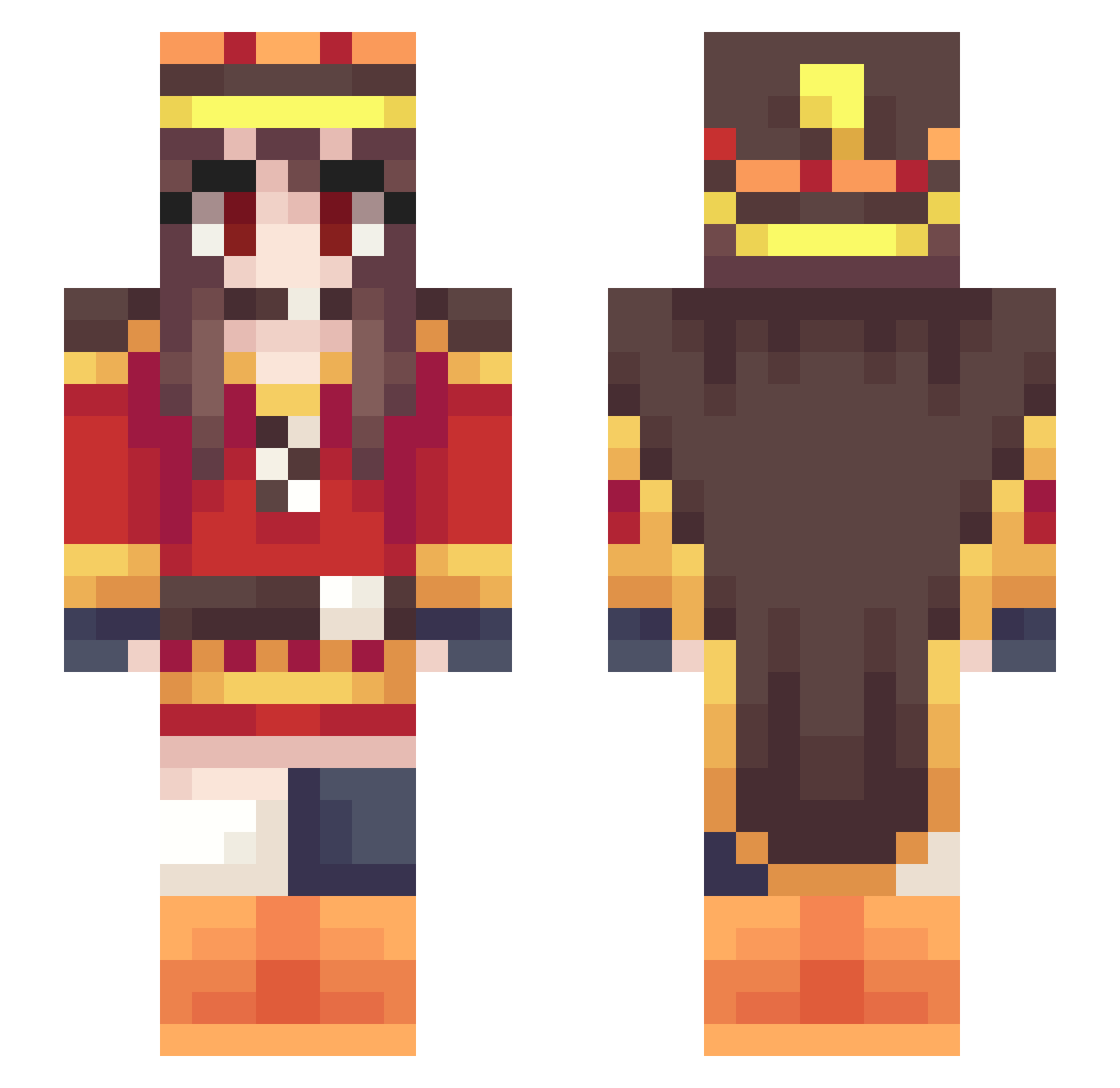
Current Minecraft skin of the player DDDyer, loaded from the official Mojang API. Rotate the 3D model with your mouse or finger, then download the skin as a PNG file and use it in Minecraft: Bedrock Edition or Java Edition for free. When DDDyer changes their skin, this page updates automatically and the old skin stays in the history below.
Other players with this skin (302)
DDDyer was the 248th player we have seen with this skin, first spotted on 07.10.2026. The same skin was seen on these players. Open a nickname to see their current skin and skin history.
 Nskype AnTe1ku420 Huan_Lon kj3t1lth0mass3n quasart tapazo Fuuuu22 bino_80 jumema qec cbanse92 SmarmyBridge72 Pech8 charghost saike_x ShirosakiHana O_MAKI_O Umizia Rickk007 Charninja1 Just_AwfuI BoBosenpa BBLinker Livi_hime noenemigos ITaZuRa115 JlemcnJleep benson0402_ Alexxudaking N0Gam3N0Lif3 Maleficent1257 XiaoMie1013 Nyarlaxx GeNoMu10 Minion0528 Bug0w0 greenboy135 Regularomo applewon kyon0428 UtahaSlave chuyisama YoruDeg danyboi00 Bubb1e_ hiruandon Releasinq efinkjp bastoune14 LiaNeptune WRidA4 Blinkypk Sierra0139 Zhenphis chu_0425 Parunation JeongHwan586 IntenseOldMan SSZ373 NoTicNova
More Royalty Minecraft skins
How to install the DDDyer skin
- Press the Download button above to save the skin as a PNG file.
- Minecraft: Bedrock Edition (PE): open the Dressing Room from the main menu (or tap your character → Edit Character), go to Classic Skins → Owned, press the + (new skin) button, choose the downloaded PNG and pick the Slim (Alex) model. Works on PC and mobile; consoles cannot import custom skins.
- Minecraft: Java Edition: open the Minecraft Launcher, go to the Skins tab, click New Skin, load the PNG, pick the Slim (Alex) model and press Save & Use. You can also upload it at minecraft.net → Profile → Change Skin.
The skin does not show up after import - what should I do?
Restart Minecraft and open the Dressing Room again - imported skins sometimes appear only after a restart. Also make sure you selected the imported skin and picked the Slim (Alex) model.
Which model should I choose, Classic or Slim?
This skin is designed for the Slim (Alex) model. If you pick the wrong model, the arms of the skin will look stretched or squeezed.
Is the skin of DDDyer free to download?
Yes. Press Download, save the PNG file and use it in Minecraft: Bedrock Edition or Java Edition - no payment or registration needed. The skin also works on multiplayer servers and Realms.
More skins
Looking for more? Go back to all Minecraft skins and check the top skins of the week, month and all time, or find any player's skin by nickname.