
DARK_N3 - Minecraft Skins & Skin History
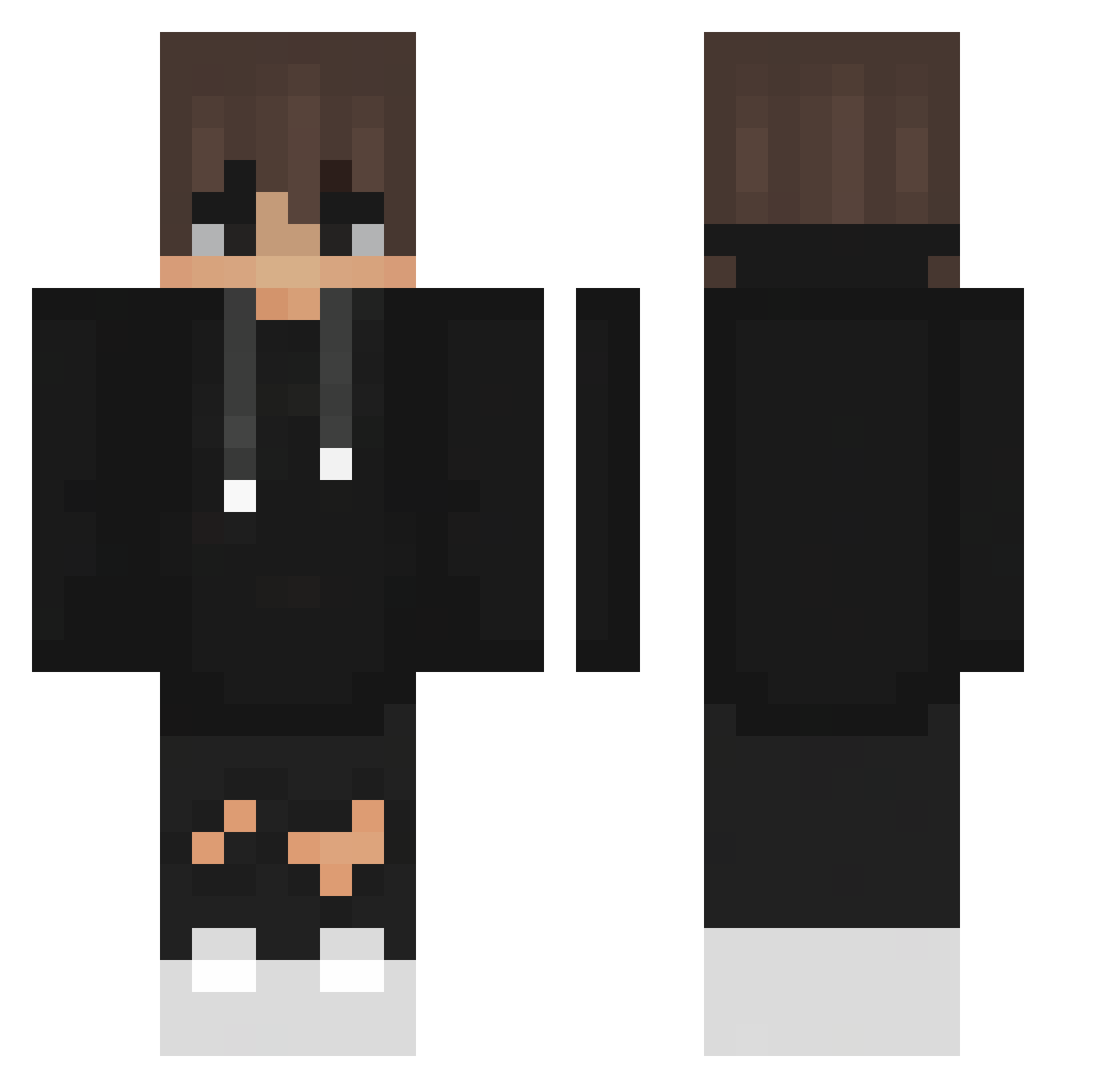
Current Minecraft skin of the player DARK_N3, loaded from the official Mojang API. Rotate the 3D model with your mouse or finger, then download the skin as a PNG file and use it in Minecraft: Bedrock Edition or Java Edition for free. When DARK_N3 changes their skin, this page updates automatically and the old skin stays in the history below.
Other players with this skin (356)
DARK_N3 was the 300th player we have seen with this skin, first spotted on 11.10.2026. The same skin was seen on these players. Open a nickname to see their current skin and skin history.
 tonyhawksdaddy amnsaa Fredward17 _poet_blackcat_ teribendu MrCharlezzz Ege_A_0 Daini0 R9LogiK momo970330 Edumon zwazk Kokaszek rinye11 LukaTheAnonymous Nersi_to_szaman user3180 Dave19890 Rubenfuen Chrinzo Shadow_Playz56 Braeex Dailieska RedLowing Specki_HD R_MIKI TxmsBank Quenni1102 FunnyGamez PaulGains rafaelrovira mathren56 ItsDark_OG friday2613 Lil_Trouble10 GwenKatten 3011Manuel ZzezI ShogunOnPC Hacker_Change pkpluto Farbecca2007 Edorfile CaptianDragon JksJustinSavage SchweizerMessser spakiliti Totti0712 Riccimetschman verce18 OwOMikey Myxhics PepinosAmigos Chicken_in_Chair Maximiliaan2001 kaaazuuu1212 Aborehab xXlimon4ickXx P_alstn _itzSchlegel_PvP
How to install the DARK_N3 skin
- Press the Download button above to save the skin as a PNG file.
- Minecraft: Bedrock Edition (PE): open the Dressing Room from the main menu (or tap your character → Edit Character), go to Classic Skins → Owned, press the + (new skin) button, choose the downloaded PNG and pick the Classic (Steve) model. Works on PC and mobile; consoles cannot import custom skins.
- Minecraft: Java Edition: open the Minecraft Launcher, go to the Skins tab, click New Skin, load the PNG, pick the Classic (Steve) model and press Save & Use. You can also upload it at minecraft.net → Profile → Change Skin.
The skin does not show up after import - what should I do?
Restart Minecraft and open the Dressing Room again - imported skins sometimes appear only after a restart. Also make sure you selected the imported skin and picked the Classic (Steve) model.
Which model should I choose, Classic or Slim?
This skin is designed for the Classic (Steve) model. If you pick the wrong model, the arms of the skin will look stretched or squeezed.
Is the skin of DARK_N3 free to download?
Yes. Press Download, save the PNG file and use it in Minecraft: Bedrock Edition or Java Edition - no payment or registration needed. The skin also works on multiplayer servers and Realms.
More skins
Looking for more? Go back to all Minecraft skins and check the top skins of the week, month and all time, or find any player's skin by nickname.