
D0mc1a - Minecraft Skins & Skin History
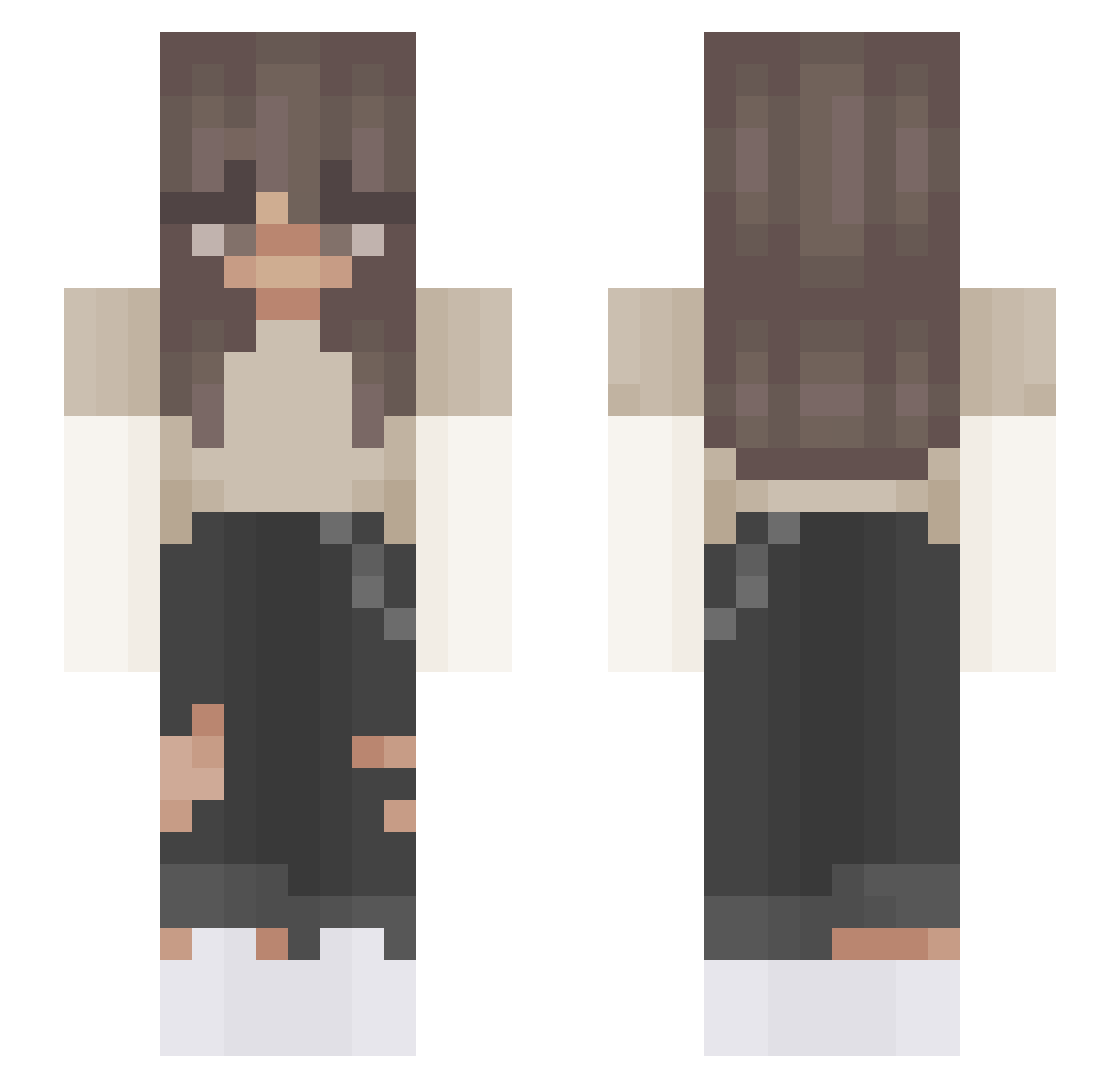
Current Minecraft skin of the player D0mc1a, loaded from the official Mojang API. Rotate the 3D model with your mouse or finger, then download the skin as a PNG file and use it in Minecraft: Bedrock Edition or Java Edition for free. When D0mc1a changes their skin, this page updates automatically and the old skin stays in the history below.
Other players with this skin (408)
D0mc1a was the 285th player we have seen with this skin, first spotted on 08.10.2026. The same skin was seen on these players. Open a nickname to see their current skin and skin history.
 swoogus lindzior2 ALLYKAT770212 Celsius_Genius DashLovesToby _Tuvi_ Yukitsuky Aethyx_ Azrey_hah Tosixx LaGubboDaDollar kthmimi vyuroi Zan_XxX Alyssa478 HotSpots8 squibb06 Liamdb2009 WeiTaNaiyo FluffyKoala4975 Merlynnieee UF000 DaryVGS rafaqamagatinhos Axshtr ethanncivil Miguelito_2003 lari_s mmaru_ sakusaa caloof NoraKittyy qy96 BeniYK Leleplayer mondy_schmondy natavs OneMysticSoup Mayol2007 _Gracy Ly_pro11 vxzuzkaa mutates 28min 09o_o10_ vikatoriya Nikola_420 9a8s reeck0 hachin11 Rosejackson007 NOGA2012 nicolebaptista Avelloxy TrashLIlpoop14 ILostMyKids_ xobethyyy FizekZZZ Zuziax45 CarinaAna
More Grunge Minecraft skins
How to install the D0mc1a skin
- Press the Download button above to save the skin as a PNG file.
- Minecraft: Bedrock Edition (PE): open the Dressing Room from the main menu (or tap your character → Edit Character), go to Classic Skins → Owned, press the + (new skin) button, choose the downloaded PNG and pick the Slim (Alex) model. Works on PC and mobile; consoles cannot import custom skins.
- Minecraft: Java Edition: open the Minecraft Launcher, go to the Skins tab, click New Skin, load the PNG, pick the Slim (Alex) model and press Save & Use. You can also upload it at minecraft.net → Profile → Change Skin.
The skin does not show up after import - what should I do?
Restart Minecraft and open the Dressing Room again - imported skins sometimes appear only after a restart. Also make sure you selected the imported skin and picked the Slim (Alex) model.
Which model should I choose, Classic or Slim?
This skin is designed for the Slim (Alex) model. If you pick the wrong model, the arms of the skin will look stretched or squeezed.
Is the skin of D0mc1a free to download?
Yes. Press Download, save the PNG file and use it in Minecraft: Bedrock Edition or Java Edition - no payment or registration needed. The skin also works on multiplayer servers and Realms.
More skins
Looking for more? Go back to all Minecraft skins and check the top skins of the week, month and all time, or find any player's skin by nickname.