
CultureCreater - Minecraft Skins & Skin History
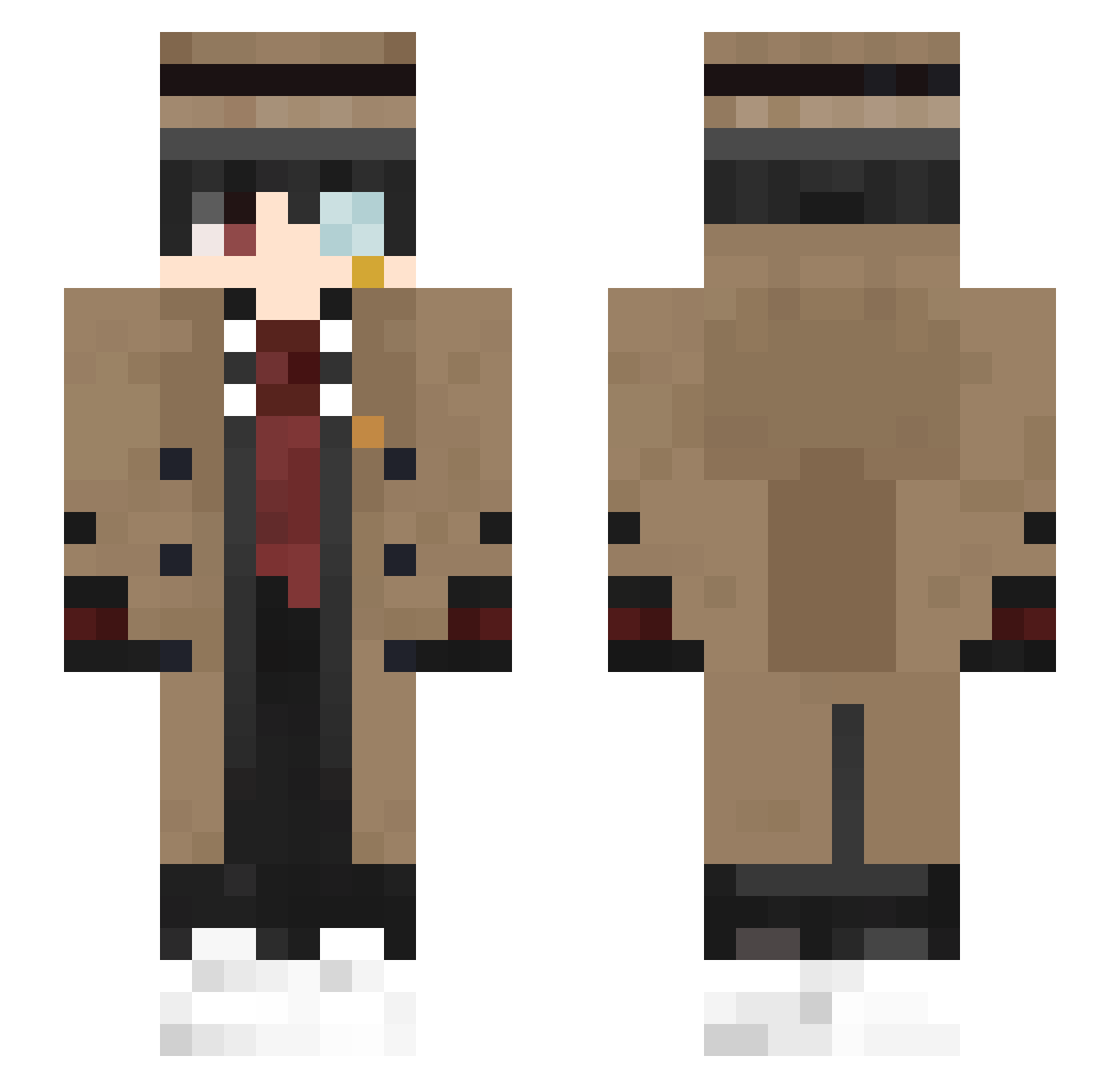
Current Minecraft skin of the player CultureCreater, loaded from the official Mojang API. Rotate the 3D model with your mouse or finger, then download the skin as a PNG file and use it in Minecraft: Bedrock Edition or Java Edition for free. When CultureCreater changes their skin, this page updates automatically and the old skin stays in the history below.
Other players with this skin (363)
CultureCreater was the 238th player we have seen with this skin, first spotted on 30.09.2026. The same skin was seen on these players. Open a nickname to see their current skin and skin history.
 EsatSenpai CapraGenoveffa Z4fir0 Jabloo27 SisterKisser2009 Livelystreet4 __JustJay 0ChrisO SRSD413 Reynauld_1 Kevynho peach6704 KHALID_21 Akida4 gui_gua Ian_twin xinvxy youwen1214 xaropinho_ MRk4banos bieshen KnoP4ka Da_Xinhhh yxy1479 Kurtis59730 _2669 Jax_Young MxrlenS Flenzyy GLASSFIVER DrugDreBoiE akiralulw _falling_leaves_ dhnyel CarbonluPoaca NAETON WAW_Nerd PassiveSauce979 shung123 cirota GHSsenior Ryuzakii1 MoshiurIsHere Fezore paluty13511 FTSCZJ Feltic zaksauskas StubbedToe11 Cafettu Nightels DortHit_76badad0 dworkop_elo Rutakata YUBO666 TheRandomHoboMan ChiefAlchemist _Ronaldo7 Oxxynn _Xx_ZaK_xX_
More Yugi Amane Minecraft skins
How to install the CultureCreater skin
- Press the Download button above to save the skin as a PNG file.
- Minecraft: Bedrock Edition (PE): open the Dressing Room from the main menu (or tap your character → Edit Character), go to Classic Skins → Owned, press the + (new skin) button, choose the downloaded PNG and pick the Slim (Alex) model. Works on PC and mobile; consoles cannot import custom skins.
- Minecraft: Java Edition: open the Minecraft Launcher, go to the Skins tab, click New Skin, load the PNG, pick the Slim (Alex) model and press Save & Use. You can also upload it at minecraft.net → Profile → Change Skin.
The skin does not show up after import - what should I do?
Restart Minecraft and open the Dressing Room again - imported skins sometimes appear only after a restart. Also make sure you selected the imported skin and picked the Slim (Alex) model.
Which model should I choose, Classic or Slim?
This skin is designed for the Slim (Alex) model. If you pick the wrong model, the arms of the skin will look stretched or squeezed.
Is the skin of CultureCreater free to download?
Yes. Press Download, save the PNG file and use it in Minecraft: Bedrock Edition or Java Edition - no payment or registration needed. The skin also works on multiplayer servers and Realms.
More skins
Looking for more? Go back to all Minecraft skins and check the top skins of the week, month and all time, or find any player's skin by nickname.