
Crispyfat - Minecraft Skins & Skin History
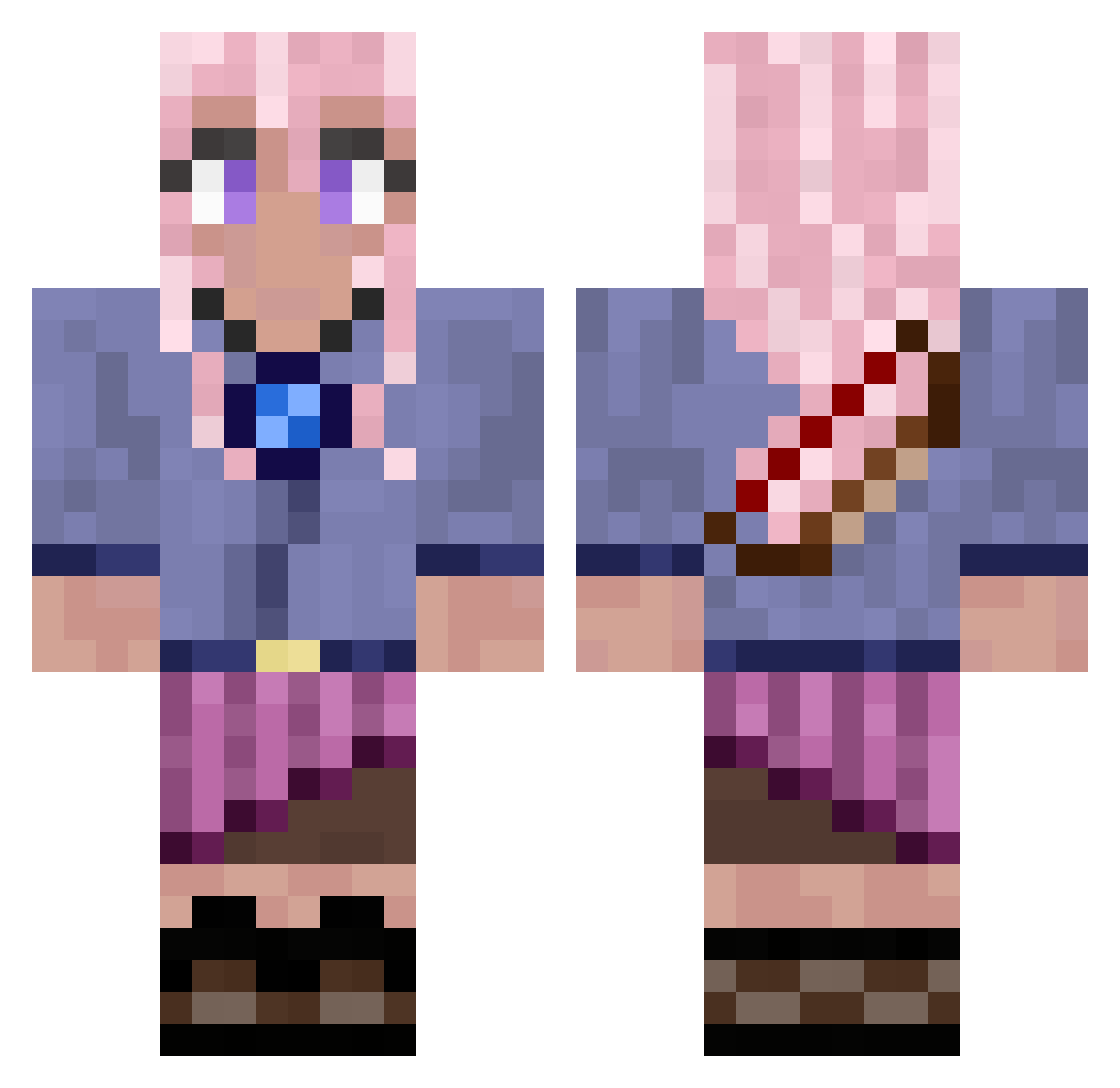
Current Minecraft skin of the player Crispyfat, loaded from the official Mojang API. Rotate the 3D model with your mouse or finger, then download the skin as a PNG file and use it in Minecraft: Bedrock Edition or Java Edition for free. When Crispyfat changes their skin, this page updates automatically and the old skin stays in the history below.
Other players with this skin (942)
Crispyfat was the 870th player we have seen with this skin, first spotted on 10.11.2026. The same skin was seen on these players. Open a nickname to see their current skin and skin history.
 josephkills123 Vinz98 JInx216 KevinShen137 axlets alicea0201 Bermfam9932 DunJa86 chibiwabbit Goncerp Pineapplebrain3 Foozelie __Brooklyn___ giabee710 lihuanhuan505 SoulSoul_z Melspy09 Aleyna0806 chzhffpt GetIQ moxieeeeee kayla12347 Endr_0 solituded Auttymay21 Rainne Iwas2 THGAngelCake Lethar_209 NoemieW koharustar JsaezF Ella_good Chiiime msy1221 BrawlDragon NikkiF kerri96 deanfieldgal SuperCrazy198 Yunu_Hong Franshy15 Cristian9898 soapymacaroni HansKraft halberdman7 JulieNintendo VelkyPipik anniiiiika erdbeeralex Lukiewill2 lilostich12 SammmJ mathias102025 MeowSan666 Mariposa119 Tulle_05 RosiePoise halabeans minitahisterica
More Kyoko Kirigiri Minecraft skins
See all 73 Kyoko Kirigiri skins
How to install the Crispyfat skin
- Press the Download button above to save the skin as a PNG file.
- Minecraft: Bedrock Edition (PE): open the Dressing Room from the main menu (or tap your character → Edit Character), go to Classic Skins → Owned, press the + (new skin) button, choose the downloaded PNG and pick the Classic (Steve) model. Works on PC and mobile; consoles cannot import custom skins.
- Minecraft: Java Edition: open the Minecraft Launcher, go to the Skins tab, click New Skin, load the PNG, pick the Classic (Steve) model and press Save & Use. You can also upload it at minecraft.net → Profile → Change Skin.
The skin does not show up after import - what should I do?
Restart Minecraft and open the Dressing Room again - imported skins sometimes appear only after a restart. Also make sure you selected the imported skin and picked the Classic (Steve) model.
Which model should I choose, Classic or Slim?
This skin is designed for the Classic (Steve) model. If you pick the wrong model, the arms of the skin will look stretched or squeezed.
Is the skin of Crispyfat free to download?
Yes. Press Download, save the PNG file and use it in Minecraft: Bedrock Edition or Java Edition - no payment or registration needed. The skin also works on multiplayer servers and Realms.
More skins
Looking for more? Go back to all Minecraft skins and check the top skins of the week, month and all time, or find any player's skin by nickname.