
CraHorFy - Minecraft Skins & Skin History
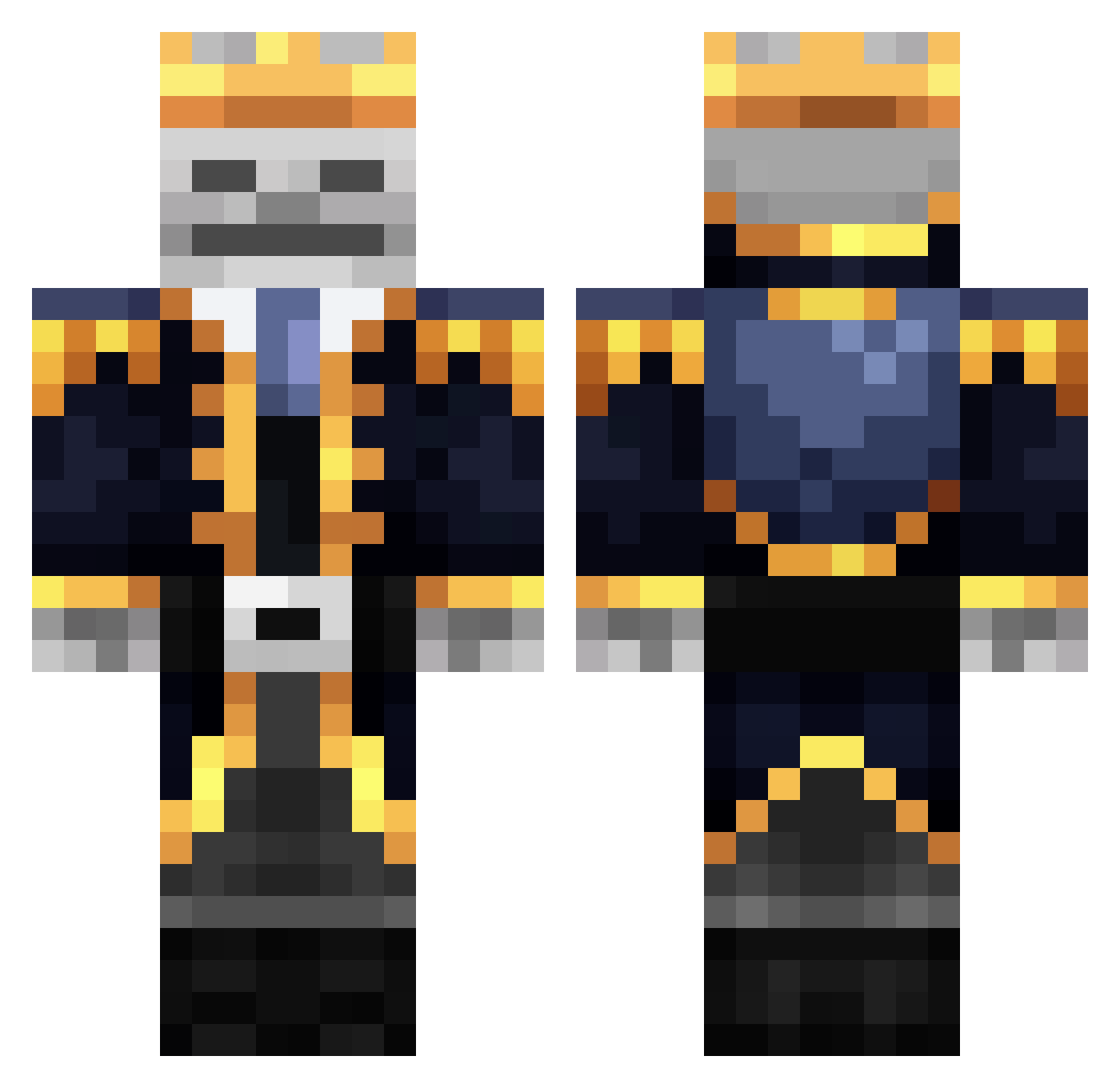
Current Minecraft skin of the player CraHorFy, loaded from the official Mojang API. Rotate the 3D model with your mouse or finger, then download the skin as a PNG file and use it in Minecraft: Bedrock Edition or Java Edition for free. When CraHorFy changes their skin, this page updates automatically and the old skin stays in the history below.
Other players with this skin (343)
CraHorFy was the 127th player we have seen with this skin, first spotted on 24.08.2026. The same skin was seen on these players. Open a nickname to see their current skin and skin history.
 ManoLord chucknugget20 CAR_6769NDHEHS noctumist Lemongra Beratt4734 Godskin7 luizhtrentin laVacheQuiRit02 elzp12 Norteno1542 jason013579 tijmen_010 Indexis01 MahatmaGhandu tallcode11 Sanji66 Sungjun1459 muel12 Bryonson ImagineManRaucht puppypals333 KRABii CoffeeBoi24 Randall_RB lortografe PotatoKing71 captain_m0nkey1 Yelol TheKnightsLights Yasuosu Zartyns huanxuan3 Tortoragola Saturndown3 Skelakinesis CCL4C xStrqfeMC Mr_Niceguy628 SkeleBhaiya 7FLIGHTS PekaMax33 MrAhmedmo
 Tricolorlime fuquki 69sivertsen69 Godjones GacanHopsin _Mindless_ OPSIDIANAS 2ndBestGenji sie123 VoidConstruct en1m1nstrandhold Not_a_murderer1 Schlumpfnase02 Skelet0n_King kaio5o1 DerSeaEagle TigerzGaming
More Skeleton King Minecraft skins
See all 26 Skeleton King skins
How to install the CraHorFy skin
- Press the Download button above to save the skin as a PNG file.
- Minecraft: Bedrock Edition (PE): open the Dressing Room from the main menu (or tap your character → Edit Character), go to Classic Skins → Owned, press the + (new skin) button, choose the downloaded PNG and pick the Classic (Steve) model. Works on PC and mobile; consoles cannot import custom skins.
- Minecraft: Java Edition: open the Minecraft Launcher, go to the Skins tab, click New Skin, load the PNG, pick the Classic (Steve) model and press Save & Use. You can also upload it at minecraft.net → Profile → Change Skin.
The skin does not show up after import - what should I do?
Restart Minecraft and open the Dressing Room again - imported skins sometimes appear only after a restart. Also make sure you selected the imported skin and picked the Classic (Steve) model.
Which model should I choose, Classic or Slim?
This skin is designed for the Classic (Steve) model. If you pick the wrong model, the arms of the skin will look stretched or squeezed.
Is the skin of CraHorFy free to download?
Yes. Press Download, save the PNG file and use it in Minecraft: Bedrock Edition or Java Edition - no payment or registration needed. The skin also works on multiplayer servers and Realms.
More skins
Looking for more? Go back to all Minecraft skins and check the top skins of the week, month and all time, or find any player's skin by nickname.