
ClutchPro14 - Minecraft Skins & Skin History
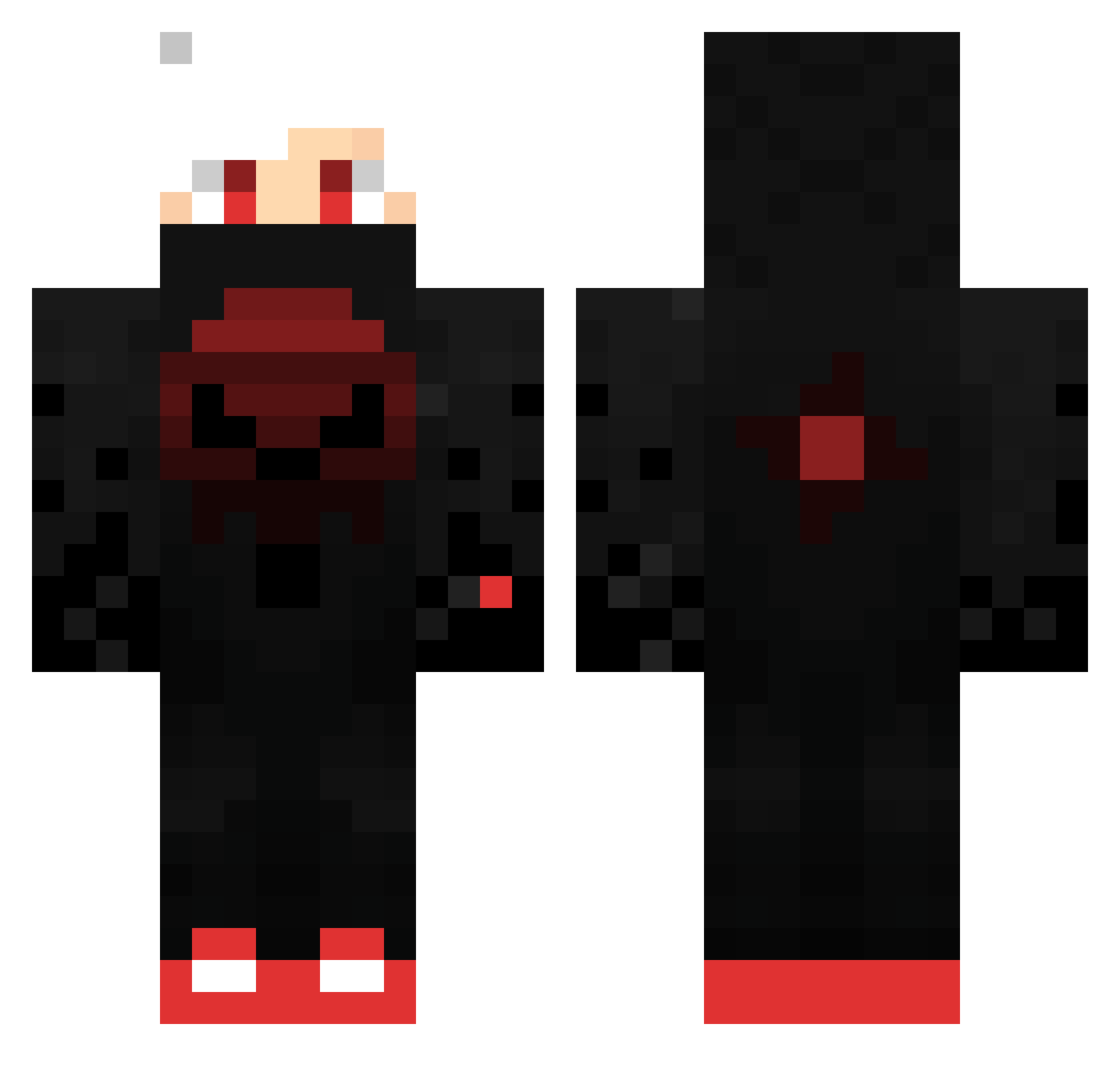
Current Minecraft skin of the player ClutchPro14, loaded from the official Mojang API. Rotate the 3D model with your mouse or finger, then download the skin as a PNG file and use it in Minecraft: Bedrock Edition or Java Edition for free. When ClutchPro14 changes their skin, this page updates automatically and the old skin stays in the history below.
Other players with this skin (424)
ClutchPro14 was the 265th player we have seen with this skin, first spotted on 01.10.2026. The same skin was seen on these players. Open a nickname to see their current skin and skin history.
 N4LP Psanc l00troomba gongangingan Dr3amer grithenking AlperisGod Nemesis_5225 LockyJay2013 1GC43Y AnilWilsan rob_drydek_ Jyyde Blood_Moon_ nonnoob FizzardTheWizard LeonTrin Bashallah _The_Name_ jsr_02 FireGhost55 AkiraEND japa08210 xX_GUNS4HIRE_Xx GrinderMatei Semedy_ JulleFN E_DVIN1 luc202299 al3jqndr0 Brady0913 synx_x zeNx20 Leykii Deadreamer fafie Victor0072 Triviun Yukito1209 MikastunGaming Deathmagician red_dragon012 Moritschi X_DarkFiree EdwardFranklin daboiofdoi Aaron_Ultima _Hyxe ISmashU KING_Cha0S Gusgthy Vougan_F Bestieboy2000 TakiHana GabrielLima1237 Jugadorprojaja TheAngryDoom Gusta2237 K41DO1991 Adler4125
More Skull Minecraft skins
How to install the ClutchPro14 skin
- Press the Download button above to save the skin as a PNG file.
- Minecraft: Bedrock Edition (PE): open the Dressing Room from the main menu (or tap your character → Edit Character), go to Classic Skins → Owned, press the + (new skin) button, choose the downloaded PNG and pick the Classic (Steve) model. Works on PC and mobile; consoles cannot import custom skins.
- Minecraft: Java Edition: open the Minecraft Launcher, go to the Skins tab, click New Skin, load the PNG, pick the Classic (Steve) model and press Save & Use. You can also upload it at minecraft.net → Profile → Change Skin.
The skin does not show up after import - what should I do?
Restart Minecraft and open the Dressing Room again - imported skins sometimes appear only after a restart. Also make sure you selected the imported skin and picked the Classic (Steve) model.
Which model should I choose, Classic or Slim?
This skin is designed for the Classic (Steve) model. If you pick the wrong model, the arms of the skin will look stretched or squeezed.
Is the skin of ClutchPro14 free to download?
Yes. Press Download, save the PNG file and use it in Minecraft: Bedrock Edition or Java Edition - no payment or registration needed. The skin also works on multiplayer servers and Realms.
More skins
Looking for more? Go back to all Minecraft skins and check the top skins of the week, month and all time, or find any player's skin by nickname.