
Cletus_Throbert - Minecraft Skins & Skin History
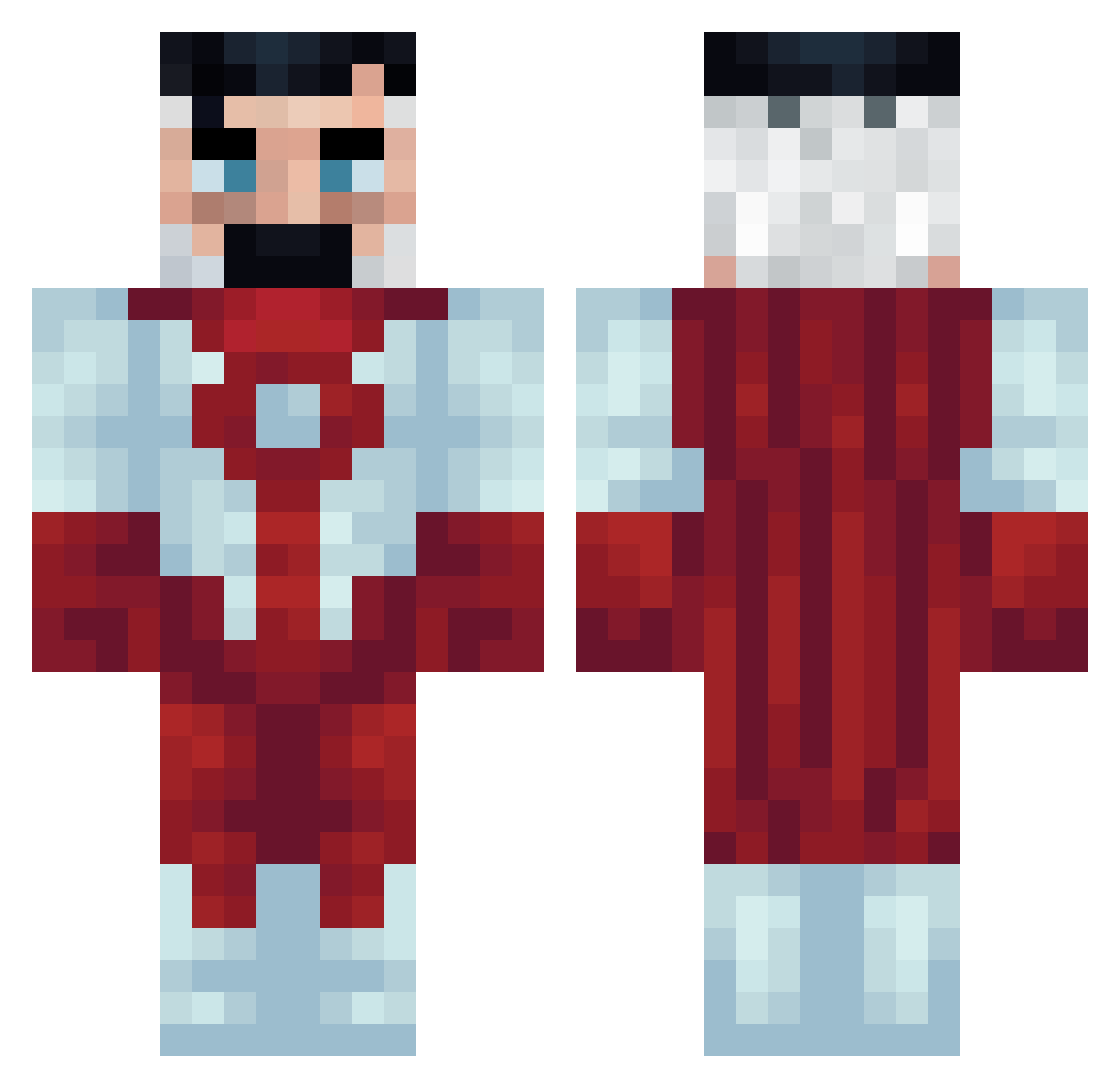
Current Minecraft skin of the player Cletus_Throbert, loaded from the official Mojang API. Rotate the 3D model with your mouse or finger, then download the skin as a PNG file and use it in Minecraft: Bedrock Edition or Java Edition for free. When Cletus_Throbert changes their skin, this page updates automatically and the old skin stays in the history below.
Other players with this skin (58)
Cletus_Throbert was the 10th player we have seen with this skin, first spotted on 10.08.2026. The same skin was seen on these players. Open a nickname to see their current skin and skin history.
 MrShadow3424
 Slushieboy1000 7amoel OfzSmoker onlypapi Iactuallydocuss
 odenaa machinelike KubMonster Tacoman3902 fernandomec
 Sauuceyy7 Angel_of_Death88 genekk_ _Rain_Man_ YvngBlack LinhxXLDU0205 BenconQ Denkix Ya_Boi_Teez KingJJV hotheadjared El_Yayo_912 Floyyd_ InNormally Puutchou mhmdj3788 zertra numotesdelarue Kualam julasse LeZvai Luciano00010 bineybiney ahmeed9 Davik09 not_Ruperto PolSevi Juri2020 Yerick1323 _PumpkinGua_ Naiknet KsiadzMateusz_ NDOC itzmndezz segy_n1 Wortarblock MrAtillius Kjell_7 ScareMold116281 TheKidKy kapek1234xd Gogzhy TakingSoul Lexo1301 ShoutingRuby061 CastroEZ kingclark06
More Omni-Man Minecraft skins
How to install the Cletus_Throbert skin
- Press the Download button above to save the skin as a PNG file.
- Minecraft: Bedrock Edition (PE): open the Dressing Room from the main menu (or tap your character → Edit Character), go to Classic Skins → Owned, press the + (new skin) button, choose the downloaded PNG and pick the Classic (Steve) model. Works on PC and mobile; consoles cannot import custom skins.
- Minecraft: Java Edition: open the Minecraft Launcher, go to the Skins tab, click New Skin, load the PNG, pick the Classic (Steve) model and press Save & Use. You can also upload it at minecraft.net → Profile → Change Skin.
The skin does not show up after import - what should I do?
Restart Minecraft and open the Dressing Room again - imported skins sometimes appear only after a restart. Also make sure you selected the imported skin and picked the Classic (Steve) model.
Which model should I choose, Classic or Slim?
This skin is designed for the Classic (Steve) model. If you pick the wrong model, the arms of the skin will look stretched or squeezed.
Is the skin of Cletus_Throbert free to download?
Yes. Press Download, save the PNG file and use it in Minecraft: Bedrock Edition or Java Edition - no payment or registration needed. The skin also works on multiplayer servers and Realms.
More skins
Looking for more? Go back to all Minecraft skins and check the top skins of the week, month and all time, or find any player's skin by nickname.