
ChrisLOL10 - Minecraft Skins & Skin History
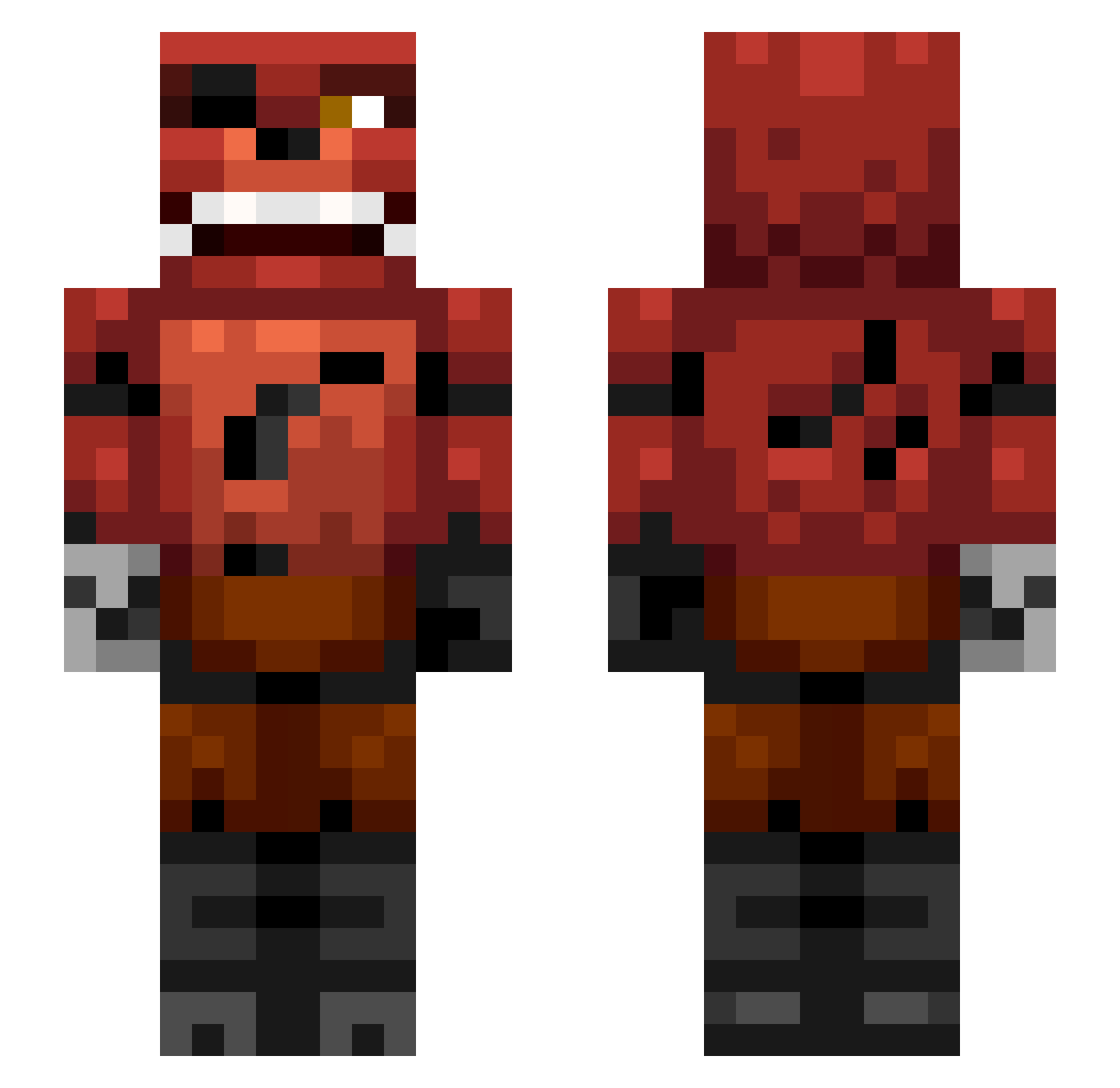
Current Minecraft skin of the player ChrisLOL10, loaded from the official Mojang API. Rotate the 3D model with your mouse or finger, then download the skin as a PNG file and use it in Minecraft: Bedrock Edition or Java Edition for free. When ChrisLOL10 changes their skin, this page updates automatically and the old skin stays in the history below.
Other players with this skin (337)
ChrisLOL10 was the 204th player we have seen with this skin, first spotted on 29.09.2026. The same skin was seen on these players. Open a nickname to see their current skin and skin history.
 bosen1 math484i StoneBoat37196 Robindevos iChopNinja DylanRobinson1 yackxxl PrinceXavierBP DARKBLAD3S wolfhound100 Jerry1221 B3N_R acgamer99 koolalfie Dabeastkilla mod_player19 bman6067 Like__Connor Annoyedcandy buzzkiller13 Huszii Charmander002006 FenrisAmarok Jono35 death_gamer_4040 Levinatore roo1801minecraft Natascha1996 blaketg AlertFox theblockheadeats Connor06x _SlyiR Miajas DxLight OldAusgedenkt NightWolffe blackmomba22 turner2000 christianrose snoBRO181 cmhg bhurrr JacksonTDM RamosDevil Gibbyson1023 Brassdog Bailiff Sam06D jonte82006 Lostprophet1412 quintenboy116 boerenbond strahinjad shazam1611 terrafirma_87 luckyberi Miller10000000 Slenderman496 madamspazz
More Foxy Minecraft skins
How to install the ChrisLOL10 skin
- Press the Download button above to save the skin as a PNG file.
- Minecraft: Bedrock Edition (PE): open the Dressing Room from the main menu (or tap your character → Edit Character), go to Classic Skins → Owned, press the + (new skin) button, choose the downloaded PNG and pick the Slim (Alex) model. Works on PC and mobile; consoles cannot import custom skins.
- Minecraft: Java Edition: open the Minecraft Launcher, go to the Skins tab, click New Skin, load the PNG, pick the Slim (Alex) model and press Save & Use. You can also upload it at minecraft.net → Profile → Change Skin.
The skin does not show up after import - what should I do?
Restart Minecraft and open the Dressing Room again - imported skins sometimes appear only after a restart. Also make sure you selected the imported skin and picked the Slim (Alex) model.
Which model should I choose, Classic or Slim?
This skin is designed for the Slim (Alex) model. If you pick the wrong model, the arms of the skin will look stretched or squeezed.
Is the skin of ChrisLOL10 free to download?
Yes. Press Download, save the PNG file and use it in Minecraft: Bedrock Edition or Java Edition - no payment or registration needed. The skin also works on multiplayer servers and Realms.
More skins
Looking for more? Go back to all Minecraft skins and check the top skins of the week, month and all time, or find any player's skin by nickname.