
Chelonioidea_ - Minecraft Skins & Skin History
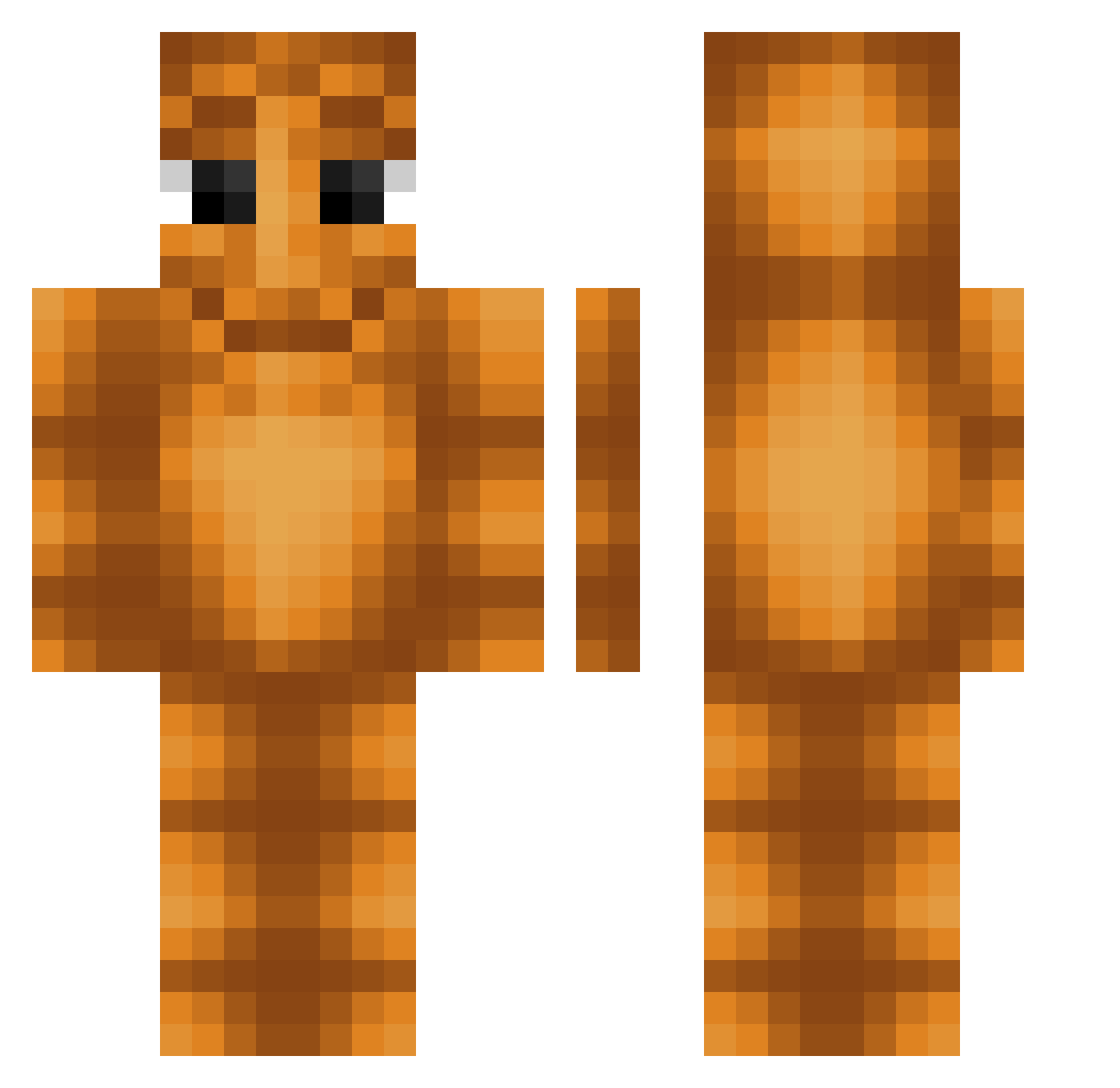
Current Minecraft skin of the player Chelonioidea_, loaded from the official Mojang API. Rotate the 3D model with your mouse or finger, then download the skin as a PNG file and use it in Minecraft: Bedrock Edition or Java Edition for free. When Chelonioidea_ changes their skin, this page updates automatically and the old skin stays in the history below.
Other players with this skin (70)
Chelonioidea_ was the 28th player we have seen with this skin, first spotted on 28.08.2026. The same skin was seen on these players. Open a nickname to see their current skin and skin history.
 NP64 RandomTung
 nosaboM_ Zruxr BarniThePug Cuajada237 nogdog17
 dr1pkid undawater ythz_zFwZe_11_08 ohmKtp MasloToNieJa prodmercuryy Breadman_44 nicholasfv Mawaoshi Sirjaskari FirstStike 67TRIPLETGLOVER xuwn Wonk_360 d2apixel
 golopo28 Unbones MASTERBERKE530 ELzerit00 Samparky12 Dimmzyz Kebabsas RazCo_ chugg41 Luanxc j1284
 elpepe69__ 6ng MaLvOnS Jur1x_ Fiercedata23 YTFelixGamer416 JaviBy_2007 SrTavalo TATUTIGOT neithereza Nexhill
 Davi95 Codrin20024 Victor070621 1337lizbona Moistys
 TungTungKremuwka Fromache_ Hx6np StrangerZ_ MikeTheMistake Sneak_Toggled cxhs ArabeSamuel pasiuXd LNNY9292 Wylon
How to install the Chelonioidea_ skin
- Press the Download button above to save the skin as a PNG file.
- Minecraft: Bedrock Edition (PE): open the Dressing Room from the main menu (or tap your character → Edit Character), go to Classic Skins → Owned, press the + (new skin) button, choose the downloaded PNG and pick the Classic (Steve) model. Works on PC and mobile; consoles cannot import custom skins.
- Minecraft: Java Edition: open the Minecraft Launcher, go to the Skins tab, click New Skin, load the PNG, pick the Classic (Steve) model and press Save & Use. You can also upload it at minecraft.net → Profile → Change Skin.
The skin does not show up after import - what should I do?
Restart Minecraft and open the Dressing Room again - imported skins sometimes appear only after a restart. Also make sure you selected the imported skin and picked the Classic (Steve) model.
Which model should I choose, Classic or Slim?
This skin is designed for the Classic (Steve) model. If you pick the wrong model, the arms of the skin will look stretched or squeezed.
Is the skin of Chelonioidea_ free to download?
Yes. Press Download, save the PNG file and use it in Minecraft: Bedrock Edition or Java Edition - no payment or registration needed. The skin also works on multiplayer servers and Realms.
More skins
Looking for more? Go back to all Minecraft skins and check the top skins of the week, month and all time, or find any player's skin by nickname.