
CHOJUANxD - Minecraft Skins & Skin History
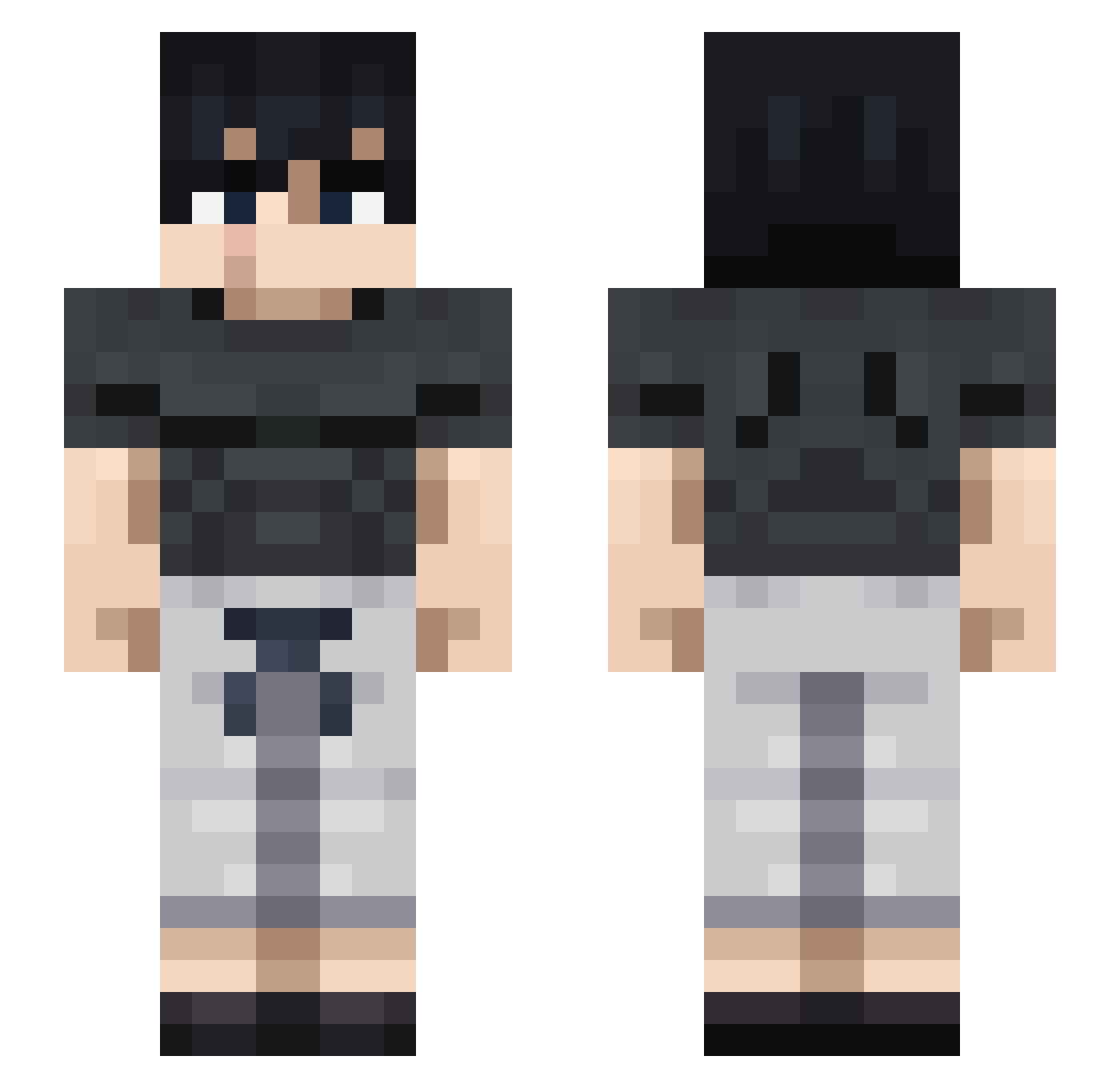
Current Minecraft skin of the player CHOJUANxD, loaded from the official Mojang API. Rotate the 3D model with your mouse or finger, then download the skin as a PNG file and use it in Minecraft: Bedrock Edition or Java Edition for free. When CHOJUANxD changes their skin, this page updates automatically and the old skin stays in the history below.
Other players with this skin (712)
CHOJUANxD was the 558th player we have seen with this skin, first spotted on 03.10.2026. The same skin was seen on these players. Open a nickname to see their current skin and skin history.
 nutmegbb RitalinRider vitorsz_ crowcrow2 OktanGG Ayaan21 Manjiro_Cauz Adamiseven Uuuho0 manerious Jona1059 Kaneomac NotZhenToji NumboDaDumbo LSheepy ActivEP7 LeoTsuma Ale53120 hon1e SladeParks Erni2711 LelouchYourPapa juliancesare SaMuxSA Shigogean Leluam Estebanpoche umauma5533_ J2sonic Bogdain YouCanT_ ValkGotAsh Salpique2003 azogued Zonwi XainFTW Wdosic cooper208 klausi0207 M1s0_Soup FARES_1CR7 PalosDeSalmon Herr_Killer VivaS21 Korz12 andaytwan pepomat2007 Brais2002GR Smoke08 KioHos ORik1_ Hexset CaptainDuke01 TheeHyllus kings_advice alvaroogr22 BELCOOL LordMarkS Awesomegerman N1TS0
More Casual Minecraft skins
How to install the CHOJUANxD skin
- Press the Download button above to save the skin as a PNG file.
- Minecraft: Bedrock Edition (PE): open the Dressing Room from the main menu (or tap your character → Edit Character), go to Classic Skins → Owned, press the + (new skin) button, choose the downloaded PNG and pick the Slim (Alex) model. Works on PC and mobile; consoles cannot import custom skins.
- Minecraft: Java Edition: open the Minecraft Launcher, go to the Skins tab, click New Skin, load the PNG, pick the Slim (Alex) model and press Save & Use. You can also upload it at minecraft.net → Profile → Change Skin.
The skin does not show up after import - what should I do?
Restart Minecraft and open the Dressing Room again - imported skins sometimes appear only after a restart. Also make sure you selected the imported skin and picked the Slim (Alex) model.
Which model should I choose, Classic or Slim?
This skin is designed for the Slim (Alex) model. If you pick the wrong model, the arms of the skin will look stretched or squeezed.
Is the skin of CHOJUANxD free to download?
Yes. Press Download, save the PNG file and use it in Minecraft: Bedrock Edition or Java Edition - no payment or registration needed. The skin also works on multiplayer servers and Realms.
More skins
Looking for more? Go back to all Minecraft skins and check the top skins of the week, month and all time, or find any player's skin by nickname.