
C0okieTh3Go4t - Minecraft Skins & Skin History
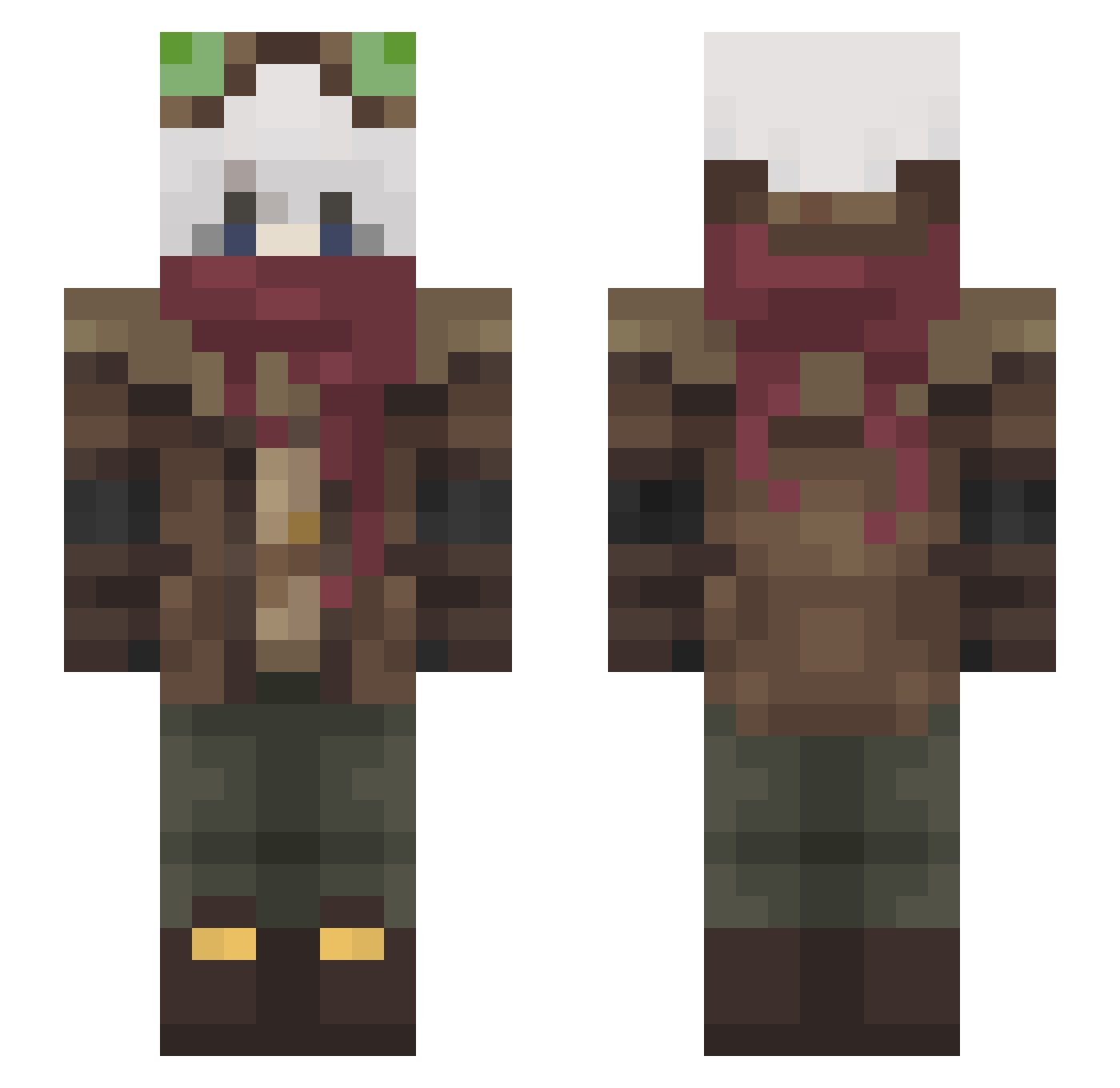
Current Minecraft skin of the player C0okieTh3Go4t, loaded from the official Mojang API. Rotate the 3D model with your mouse or finger, then download the skin as a PNG file and use it in Minecraft: Bedrock Edition or Java Edition for free. When C0okieTh3Go4t changes their skin, this page updates automatically and the old skin stays in the history below.
Other players with this skin (465)
C0okieTh3Go4t was the 353rd player we have seen with this skin, first spotted on 12.10.2026. The same skin was seen on these players. Open a nickname to see their current skin and skin history.
 CiberDemon _Kaiory_ Hiroto_11 Ghostly_Viper Mocolax MirageDreaming AndrianoTurner SrMoneda RamenWombat WastedSeb_ kanafu_31 Ghostie_14 kandygirl432 TexN1cSk KN0B0LD RoKoGod_ Mr_Froggies TheGrandR Killua12Azxrel TheSlhn0 BurningParidise Ferna339 Alfredo_JH zOrzHD Kartoffelcompany Admiral_Ginkgo Homiros AsiMuzikant Guizola0_0 futurepixels_ CPTCody122 Regulus_Leoni BAIMON_00 Erdmur Qrowm21 Shiba_Yashiro JohnN147 CrownPlayerSD Archon728 Pinpoint404 Skyline_OG Lafondra ShatteringSpree VeCrazy Erafy Boorne UlrosGreaseMastr Varummung whiteline39 Venextos00 Crow__Man Fabbsan mottyan1107 BooZe0 mgs6945 MapTuness ItsSirMega_ DevilsKnightmare BRobinB RED_PHANT0M
More Pilot Minecraft skins
How to install the C0okieTh3Go4t skin
- Press the Download button above to save the skin as a PNG file.
- Minecraft: Bedrock Edition (PE): open the Dressing Room from the main menu (or tap your character → Edit Character), go to Classic Skins → Owned, press the + (new skin) button, choose the downloaded PNG and pick the Slim (Alex) model. Works on PC and mobile; consoles cannot import custom skins.
- Minecraft: Java Edition: open the Minecraft Launcher, go to the Skins tab, click New Skin, load the PNG, pick the Slim (Alex) model and press Save & Use. You can also upload it at minecraft.net → Profile → Change Skin.
The skin does not show up after import - what should I do?
Restart Minecraft and open the Dressing Room again - imported skins sometimes appear only after a restart. Also make sure you selected the imported skin and picked the Slim (Alex) model.
Which model should I choose, Classic or Slim?
This skin is designed for the Slim (Alex) model. If you pick the wrong model, the arms of the skin will look stretched or squeezed.
Is the skin of C0okieTh3Go4t free to download?
Yes. Press Download, save the PNG file and use it in Minecraft: Bedrock Edition or Java Edition - no payment or registration needed. The skin also works on multiplayer servers and Realms.
More skins
Looking for more? Go back to all Minecraft skins and check the top skins of the week, month and all time, or find any player's skin by nickname.