
Bunteas - Minecraft Skins & Skin History
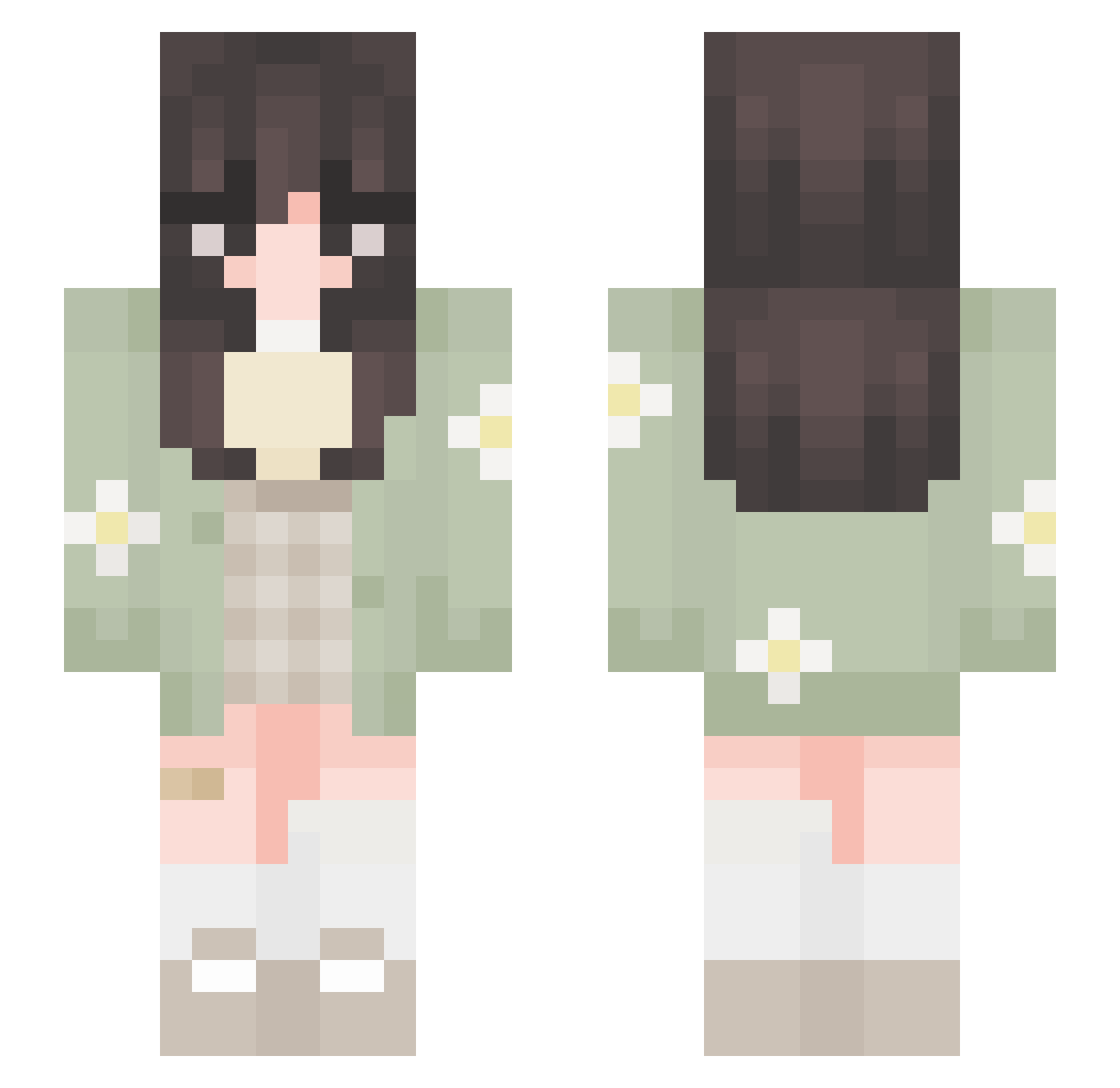
Current Minecraft skin of the player Bunteas, loaded from the official Mojang API. Rotate the 3D model with your mouse or finger, then download the skin as a PNG file and use it in Minecraft: Bedrock Edition or Java Edition for free. When Bunteas changes their skin, this page updates automatically and the old skin stays in the history below.
Other players with this skin (651)
Bunteas was the 603rd player we have seen with this skin, first spotted on 25.10.2026. The same skin was seen on these players. Open a nickname to see their current skin and skin history.
 biddyb1tch oromisa kuromiorbit eatingbananas08 lulubtgg LadyFreeland Ilikepuppys191 whl1224 fayloties kay1a1089 1Almond_Milk1 im_missa ellieeeeeeee hjkith LuminousLen Mette97 teaspun halloooitme hotaruu_bi liqaxox xiaomo_x Rubichibi maraguu Maariina Jujulapatate Lydia_Mercury AstraeusTrex Miamaus16 SesameSoy MissSofifi Clairbear_ spideyliam9 Erissela blveth_nqzz mxyb babelee zefcutie AnnaHi3 marycr14 Nixandnax Smol_Cynical LaureenNeerual JediGirl3 coolpotato sasakisan kira77301 _6_Bunnie_6_ soupidoopi nomadcali xxDiamxx JustCherry teexsoh Nikacat48 uhtrish FairyNarwhal DaGuppie TheBinchiest RubyGorge RosalineTM Cattiestar6
More Daisy Minecraft skins
How to install the Bunteas skin
- Press the Download button above to save the skin as a PNG file.
- Minecraft: Bedrock Edition (PE): open the Dressing Room from the main menu (or tap your character → Edit Character), go to Classic Skins → Owned, press the + (new skin) button, choose the downloaded PNG and pick the Slim (Alex) model. Works on PC and mobile; consoles cannot import custom skins.
- Minecraft: Java Edition: open the Minecraft Launcher, go to the Skins tab, click New Skin, load the PNG, pick the Slim (Alex) model and press Save & Use. You can also upload it at minecraft.net → Profile → Change Skin.
The skin does not show up after import - what should I do?
Restart Minecraft and open the Dressing Room again - imported skins sometimes appear only after a restart. Also make sure you selected the imported skin and picked the Slim (Alex) model.
Which model should I choose, Classic or Slim?
This skin is designed for the Slim (Alex) model. If you pick the wrong model, the arms of the skin will look stretched or squeezed.
Is the skin of Bunteas free to download?
Yes. Press Download, save the PNG file and use it in Minecraft: Bedrock Edition or Java Edition - no payment or registration needed. The skin also works on multiplayer servers and Realms.
More skins
Looking for more? Go back to all Minecraft skins and check the top skins of the week, month and all time, or find any player's skin by nickname.