
Bouncing247 - Minecraft Skins & Skin History
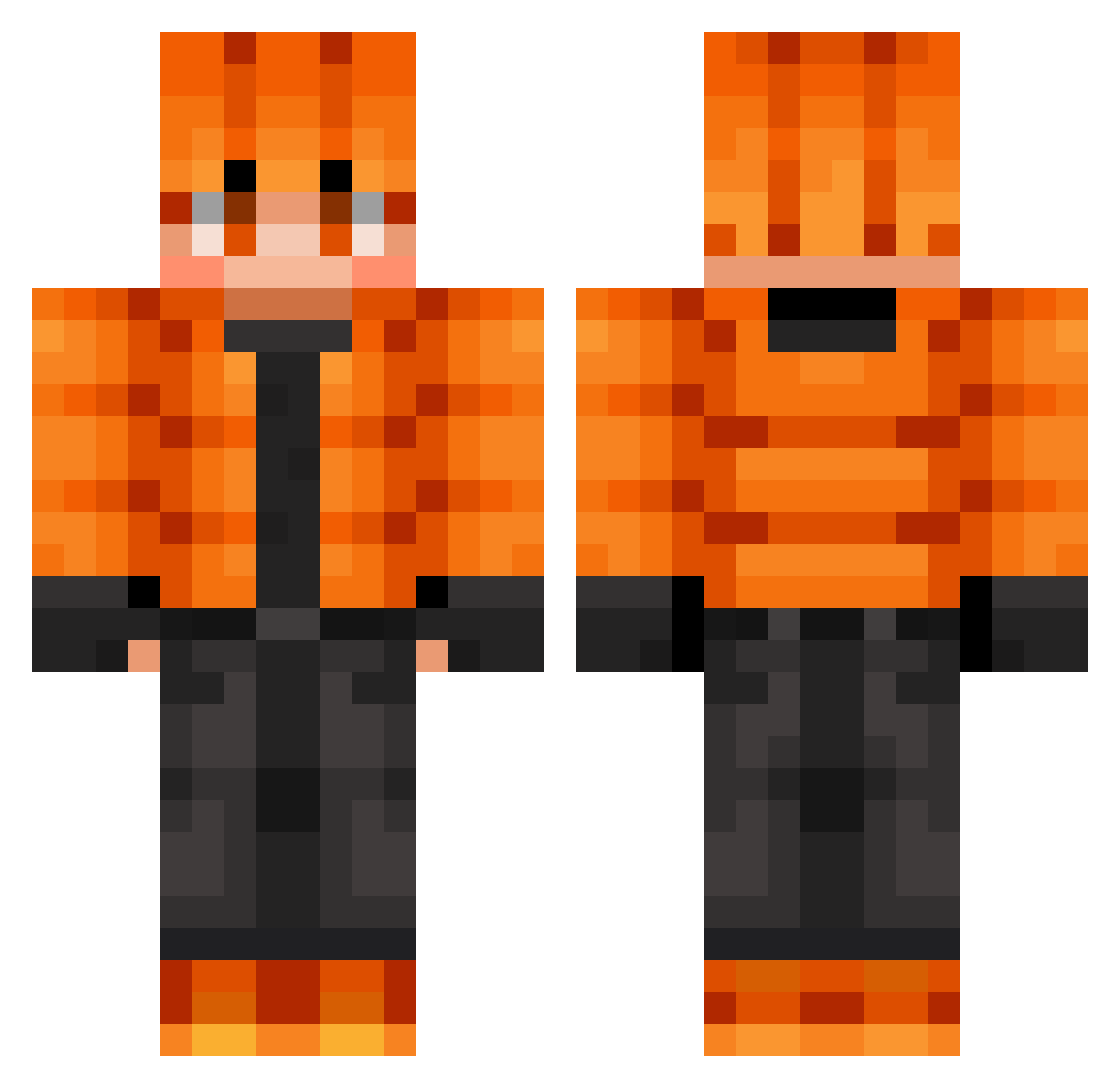
Current Minecraft skin of the player Bouncing247, loaded from the official Mojang API. Rotate the 3D model with your mouse or finger, then download the skin as a PNG file and use it in Minecraft: Bedrock Edition or Java Edition for free. When Bouncing247 changes their skin, this page updates automatically and the old skin stays in the history below.
Other players with this skin (643)
Bouncing247 was the 96th player we have seen with this skin, first spotted on 07.08.2026. The same skin was seen on these players. Open a nickname to see their current skin and skin history.
 SwinXD
 MaruchanDArroz EdCas333 Xandred98 Yulia_Blue 56558 SleepingDG maargielas NotKeon Boubouchaton Akkarin5 K1rmYzaS
 TheMegaBear BRE_Vincent
 8i3r uwucifer666 haru_1705 Achtag23 didz01 kingleo8100
 LeFreisinger lilolme321 Snoddas_123 BigBot9359 Adamdanielx1 Kitkai1000
 GaRnEkGoTuJe SUPERSONICRACRS
 Yomiaba Zxc777QQ
 Zero7231 Nightstarya Highspookycat11 danger5454 TopGunMoose1
 yvia_l
 KingFerrett67 Nebula5123 FIRE_WORK_15 dustycrust657 MartimTeixeira zeroeffort369 Brixinator21 Conzobhoy SpideTTV Gameforlifenoah sharkyboy202 IsBacK95
 MisterNobody67
 ArasAtlas Wanheda1775 BakhaKi
 icecnguyen mongey22 SarahEliza Benio95 THREELITTLEBEARS Hugobzthewarrior Nate123541 nemoping
How to install the Bouncing247 skin
- Press the Download button above to save the skin as a PNG file.
- Minecraft: Bedrock Edition (PE): open the Dressing Room from the main menu (or tap your character → Edit Character), go to Classic Skins → Owned, press the + (new skin) button, choose the downloaded PNG and pick the Classic (Steve) model. Works on PC and mobile; consoles cannot import custom skins.
- Minecraft: Java Edition: open the Minecraft Launcher, go to the Skins tab, click New Skin, load the PNG, pick the Classic (Steve) model and press Save & Use. You can also upload it at minecraft.net → Profile → Change Skin.
The skin does not show up after import - what should I do?
Restart Minecraft and open the Dressing Room again - imported skins sometimes appear only after a restart. Also make sure you selected the imported skin and picked the Classic (Steve) model.
Which model should I choose, Classic or Slim?
This skin is designed for the Classic (Steve) model. If you pick the wrong model, the arms of the skin will look stretched or squeezed.
Is the skin of Bouncing247 free to download?
Yes. Press Download, save the PNG file and use it in Minecraft: Bedrock Edition or Java Edition - no payment or registration needed. The skin also works on multiplayer servers and Realms.
More skins
Looking for more? Go back to all Minecraft skins and check the top skins of the week, month and all time, or find any player's skin by nickname.