
Botnyi - Minecraft Skins & Skin History
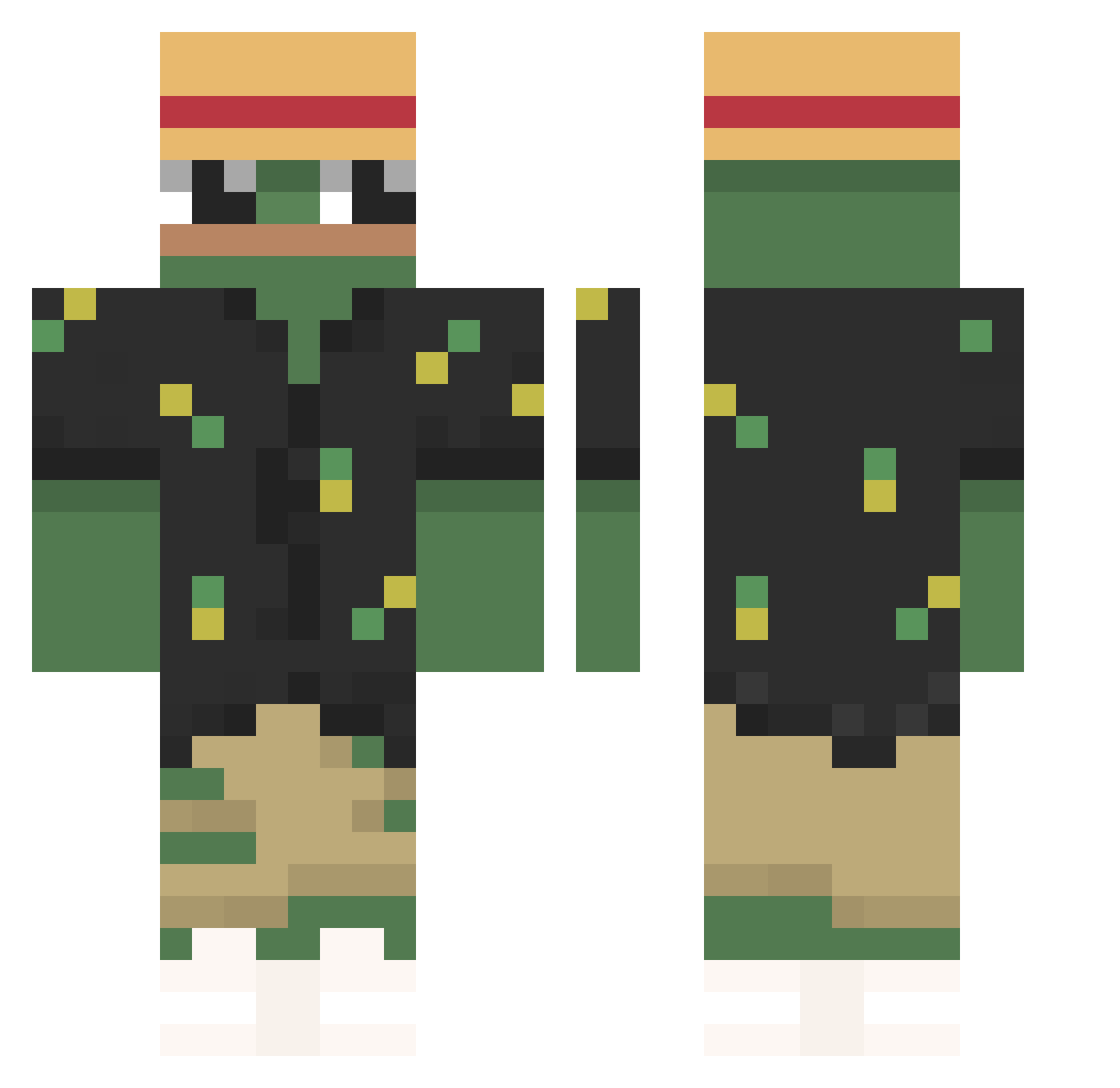
Current Minecraft skin of the player Botnyi, loaded from the official Mojang API. Rotate the 3D model with your mouse or finger, then download the skin as a PNG file and use it in Minecraft: Bedrock Edition or Java Edition for free. When Botnyi changes their skin, this page updates automatically and the old skin stays in the history below.
Other players with this skin (183)
Botnyi was the 169th player we have seen with this skin, first spotted on 25.10.2026. The same skin was seen on these players. Open a nickname to see their current skin and skin history.
 mifboy Christhoper_ sheluvmusic lLichh cameroonioo PolishPiglet Mcchicky4 Trist4n2005 Fr0ggy__ muszynianka123 Bebe18roma DidasPTyt relashed CarIsLost XtroXtro Pajaroman05 _JJK_ Og_SneakY AzazinoLendario Seeve_ AmnesiaXDD Pallopri PLANAXIS_MC KCWink Sittam_Night Poland_Gaming HighValue pooshingP Eldryyn EzAxEu n0kt_ telmo1133 Cucccumber Caramelooo Lauty7 Kacer3k Chaupa 3procenta NAKAMUZ Qpumpkin INDEX888 Yaa_Nan Tarrandos AverageLeopard HongMoSaMa _tab1 Riouxs03 SUPERNO_VA stoken2003 ghostie_777 1Onemoretime Jciam3 AcxrHD LevraiSam03 Mirxku_ tolga23 SeikatsuNoHana mellie192 LanceHardwood IamBloodyImpact
More Pepe Minecraft skins
How to install the Botnyi skin
- Press the Download button above to save the skin as a PNG file.
- Minecraft: Bedrock Edition (PE): open the Dressing Room from the main menu (or tap your character → Edit Character), go to Classic Skins → Owned, press the + (new skin) button, choose the downloaded PNG and pick the Classic (Steve) model. Works on PC and mobile; consoles cannot import custom skins.
- Minecraft: Java Edition: open the Minecraft Launcher, go to the Skins tab, click New Skin, load the PNG, pick the Classic (Steve) model and press Save & Use. You can also upload it at minecraft.net → Profile → Change Skin.
The skin does not show up after import - what should I do?
Restart Minecraft and open the Dressing Room again - imported skins sometimes appear only after a restart. Also make sure you selected the imported skin and picked the Classic (Steve) model.
Which model should I choose, Classic or Slim?
This skin is designed for the Classic (Steve) model. If you pick the wrong model, the arms of the skin will look stretched or squeezed.
Is the skin of Botnyi free to download?
Yes. Press Download, save the PNG file and use it in Minecraft: Bedrock Edition or Java Edition - no payment or registration needed. The skin also works on multiplayer servers and Realms.
More skins
Looking for more? Go back to all Minecraft skins and check the top skins of the week, month and all time, or find any player's skin by nickname.