
Boof_Raptor - Minecraft Skins & Skin History
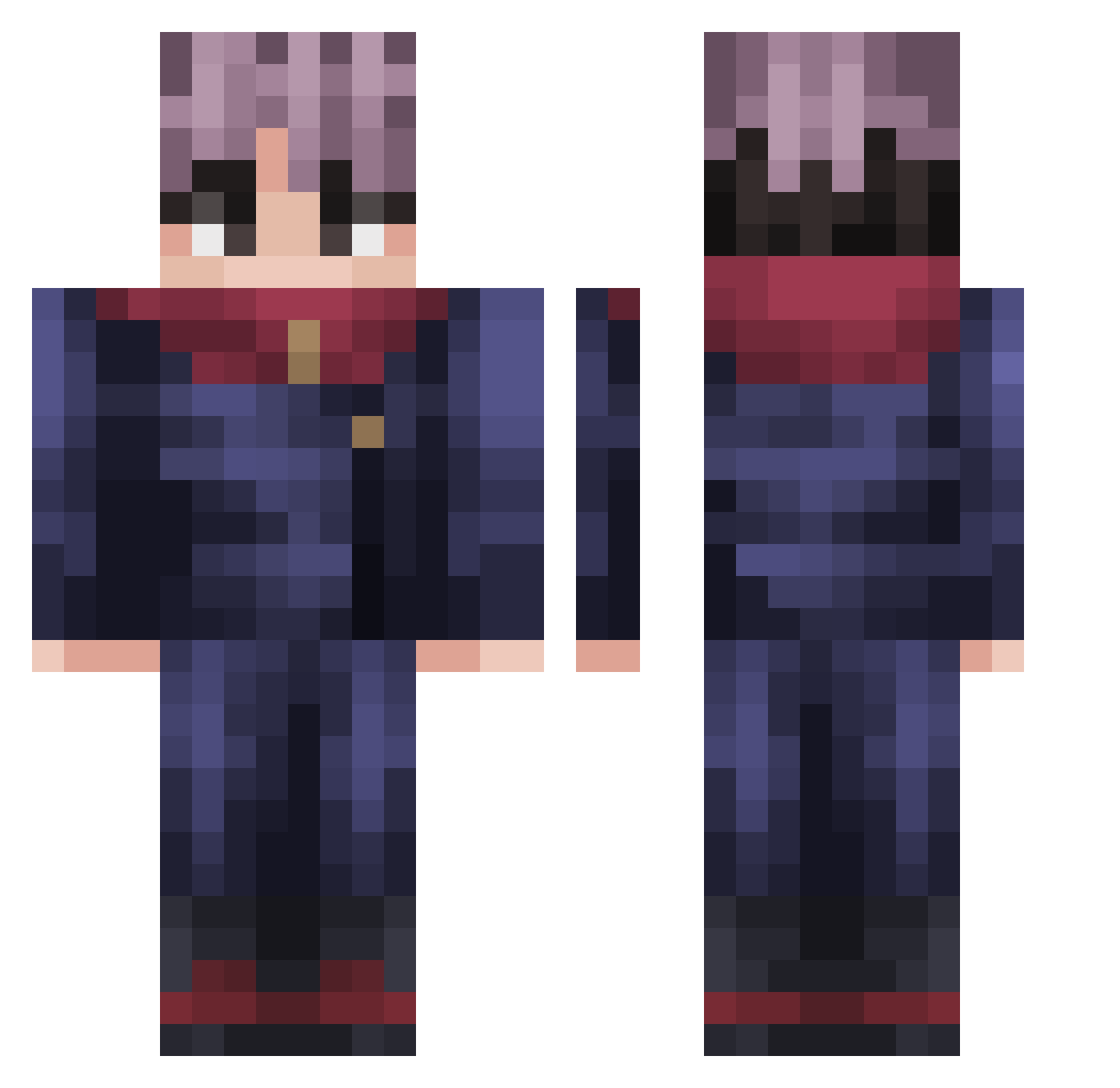
Current Minecraft skin of the player Boof_Raptor, loaded from the official Mojang API. Rotate the 3D model with your mouse or finger, then download the skin as a PNG file and use it in Minecraft: Bedrock Edition or Java Edition for free. When Boof_Raptor changes their skin, this page updates automatically and the old skin stays in the history below.
Other players with this skin (227)
Boof_Raptor was the 78th player we have seen with this skin, first spotted on 05.09.2026. The same skin was seen on these players. Open a nickname to see their current skin and skin history.
 Breadonthemic laidi4n MrCrazyyy HeroKeftes GoranSqtt Bl4ck000 rldms JustMark42 AdeventeeH AstroFade25 Chicken316 DerMinoschest ElFary Drago43 Zeickh Daswerty WAZOXW JovicaMC Guaraviton KrySoXx kdh9006 dalpeang wuero300 LeLaitDeMaman MysticGamer78 Xcfe ILikeHanimeXD MauroElCrack16 Mamaweb0 muhiu OgDraco69 Scribb Noodlees_ Nhaxyoungboi Franciows Myrostik Hizxt Electrezzz Ke1ito ElliShan_ 0nemuno0 bkdbrwni chippuuu MatecitoPeroncho CashManDubs Azkarotz hsgch ItsRage96 Natas137 _Let_Me_Be_ Maoxett taiyou0731 DinosaurKarma NanoDanJM Seu_MadrugaXBR SnoZen eroza93
 dasu1122 DenkusFerreira Kerllonmtss
More Yuji Itadori Minecraft skins
See all 225 Yuji Itadori skins
How to install the Boof_Raptor skin
- Press the Download button above to save the skin as a PNG file.
- Minecraft: Bedrock Edition (PE): open the Dressing Room from the main menu (or tap your character → Edit Character), go to Classic Skins → Owned, press the + (new skin) button, choose the downloaded PNG and pick the Classic (Steve) model. Works on PC and mobile; consoles cannot import custom skins.
- Minecraft: Java Edition: open the Minecraft Launcher, go to the Skins tab, click New Skin, load the PNG, pick the Classic (Steve) model and press Save & Use. You can also upload it at minecraft.net → Profile → Change Skin.
The skin does not show up after import - what should I do?
Restart Minecraft and open the Dressing Room again - imported skins sometimes appear only after a restart. Also make sure you selected the imported skin and picked the Classic (Steve) model.
Which model should I choose, Classic or Slim?
This skin is designed for the Classic (Steve) model. If you pick the wrong model, the arms of the skin will look stretched or squeezed.
Is the skin of Boof_Raptor free to download?
Yes. Press Download, save the PNG file and use it in Minecraft: Bedrock Edition or Java Edition - no payment or registration needed. The skin also works on multiplayer servers and Realms.
More skins
Looking for more? Go back to all Minecraft skins and check the top skins of the week, month and all time, or find any player's skin by nickname.