
Bon1987 - Minecraft Skins & Skin History
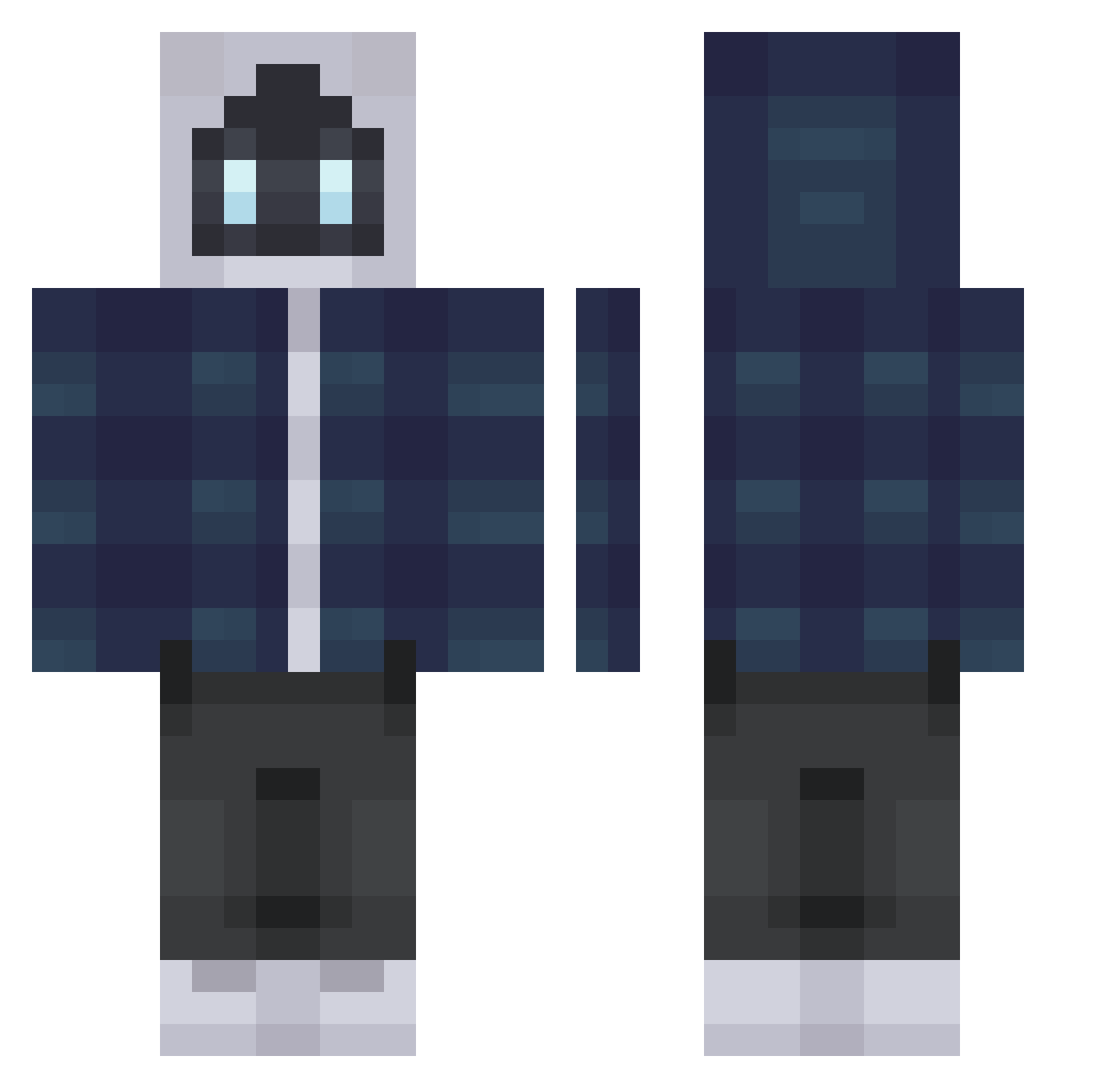
Current Minecraft skin of the player Bon1987, loaded from the official Mojang API. Rotate the 3D model with your mouse or finger, then download the skin as a PNG file and use it in Minecraft: Bedrock Edition or Java Edition for free. When Bon1987 changes their skin, this page updates automatically and the old skin stays in the history below.
Other players with this skin (265)
Bon1987 was the 114th player we have seen with this skin, first spotted on 28.08.2026. The same skin was seen on these players. Open a nickname to see their current skin and skin history.
 Krumshinkavsk HempLore ururun989 _Frostz_ PatientEmber TheeTyme NumeInofensiv changk999 lastveil michealkim7777 gkast_ plopop DuongDuong Simoms_03 GuillemVS GrimmaldusV Amugs_Randy Aabolan wfjh3433 SevenSeasLuffy zFoggy minhtriduc darkice0707 ImmoZZZ enargus iamamer1can Eumphira sunekazi Nyphinx dexkind Daeshu131 Probekoster Gijsmans4 Gglass Refurbish3d Koverk007 JJJunggg Medal1Q Pepitoooz NongKaToo choyoungwon Deereed kanesirosan TheColdCanadian K_king0476 _0zymandias GangSeung CawdeePanini Qualityie DeadLife20 7Soldier NodCazador ragnarokawakens bedass6512 kiwi2366
 Shiana410 JacobbbAlt11 SkySpartan137 VettoxPL Bananek123
More Robot Minecraft skins
How to install the Bon1987 skin
- Press the Download button above to save the skin as a PNG file.
- Minecraft: Bedrock Edition (PE): open the Dressing Room from the main menu (or tap your character → Edit Character), go to Classic Skins → Owned, press the + (new skin) button, choose the downloaded PNG and pick the Classic (Steve) model. Works on PC and mobile; consoles cannot import custom skins.
- Minecraft: Java Edition: open the Minecraft Launcher, go to the Skins tab, click New Skin, load the PNG, pick the Classic (Steve) model and press Save & Use. You can also upload it at minecraft.net → Profile → Change Skin.
The skin does not show up after import - what should I do?
Restart Minecraft and open the Dressing Room again - imported skins sometimes appear only after a restart. Also make sure you selected the imported skin and picked the Classic (Steve) model.
Which model should I choose, Classic or Slim?
This skin is designed for the Classic (Steve) model. If you pick the wrong model, the arms of the skin will look stretched or squeezed.
Is the skin of Bon1987 free to download?
Yes. Press Download, save the PNG file and use it in Minecraft: Bedrock Edition or Java Edition - no payment or registration needed. The skin also works on multiplayer servers and Realms.
More skins
Looking for more? Go back to all Minecraft skins and check the top skins of the week, month and all time, or find any player's skin by nickname.