
BlueAxalotl - Minecraft Skins & Skin History
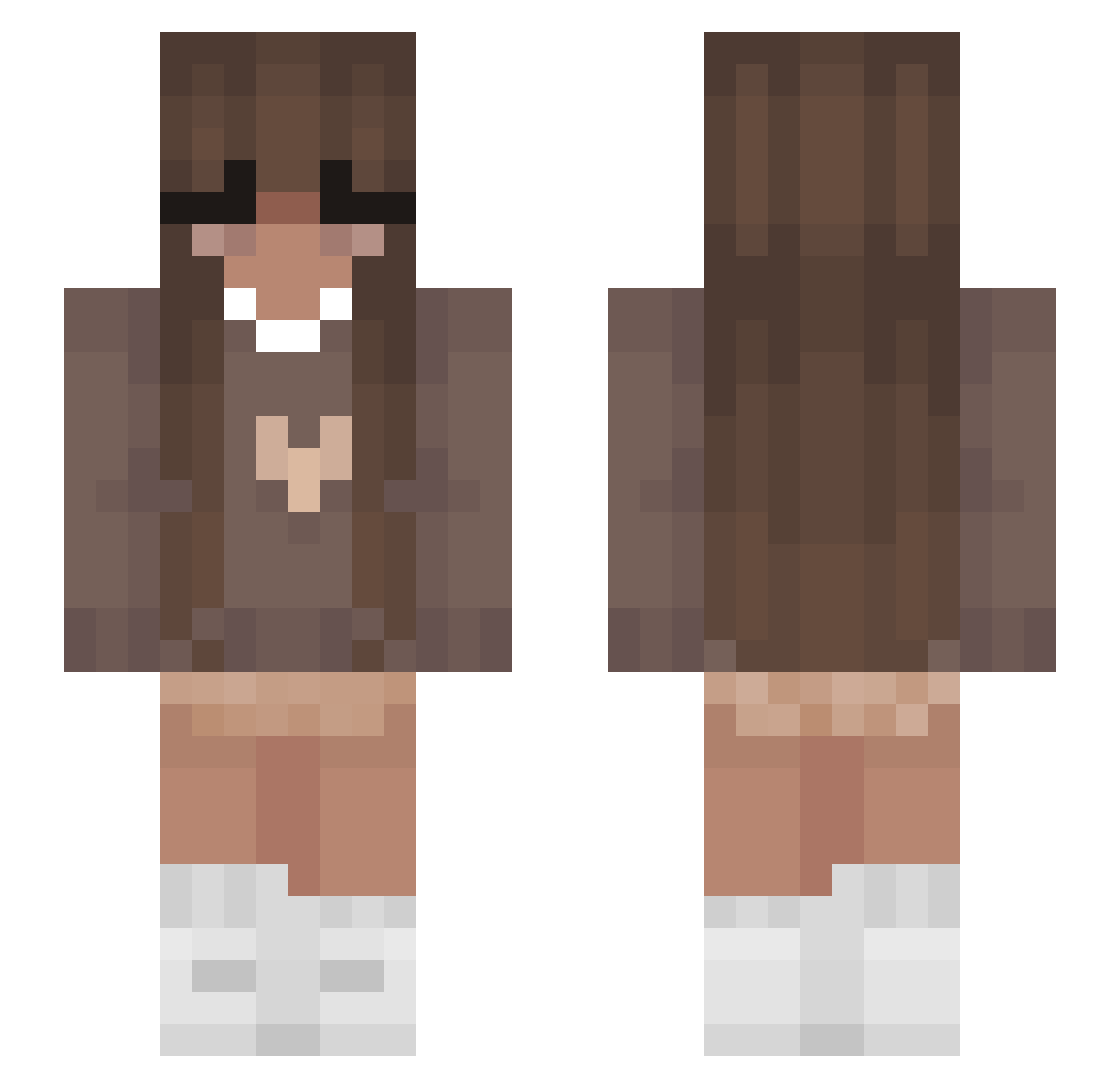
Current Minecraft skin of the player BlueAxalotl, loaded from the official Mojang API. Rotate the 3D model with your mouse or finger, then download the skin as a PNG file and use it in Minecraft: Bedrock Edition or Java Edition for free. When BlueAxalotl changes their skin, this page updates automatically and the old skin stays in the history below.
Other players with this skin (355)
BlueAxalotl was the 16th player we have seen with this skin, first spotted on 27.07.2026. The same skin was seen on these players. Open a nickname to see their current skin and skin history.
 Miliord Karma_0525 ganyux3 AquaStar01 Rose0404 Coeur_ aquaplus999 Czekoladka_04 Va1cris kakttus125 Potato_Chipz18 _jenna04 Kanino53 shaylagonewild Claraap ppp_ OurDayis22 kenziemaee naospellman BuddhaOnFire JOURNEYYYYY Aisha4ev sophie1304 Norie_b chiaaaaraaaaa Squirt6169 Lussebulle00 PrincessK1221 Marizel_007 its_marghe Biona3 TaIes BunnyDoux MsMoogleMog SpookyyBoo TotallynotAndy_ fortnite87 isabelluhhh0 YummySausages SliverMyron HotDogAndreanna sophmarie25 epuggie MelzIstCool DaniiPlop emilioSizzle GrimmStronghamer iamroos CoffeeAngel_ DragonSpirit501 RoseMinou carolss06 FakeKathii JustAnE_ Nikki2833
 MatuGor NovaDivinee Phoenixbean2024 Kxcnvr annecks
More Cozy Minecraft skins
How to install the BlueAxalotl skin
- Press the Download button above to save the skin as a PNG file.
- Minecraft: Bedrock Edition (PE): open the Dressing Room from the main menu (or tap your character → Edit Character), go to Classic Skins → Owned, press the + (new skin) button, choose the downloaded PNG and pick the Slim (Alex) model. Works on PC and mobile; consoles cannot import custom skins.
- Minecraft: Java Edition: open the Minecraft Launcher, go to the Skins tab, click New Skin, load the PNG, pick the Slim (Alex) model and press Save & Use. You can also upload it at minecraft.net → Profile → Change Skin.
The skin does not show up after import - what should I do?
Restart Minecraft and open the Dressing Room again - imported skins sometimes appear only after a restart. Also make sure you selected the imported skin and picked the Slim (Alex) model.
Which model should I choose, Classic or Slim?
This skin is designed for the Slim (Alex) model. If you pick the wrong model, the arms of the skin will look stretched or squeezed.
Is the skin of BlueAxalotl free to download?
Yes. Press Download, save the PNG file and use it in Minecraft: Bedrock Edition or Java Edition - no payment or registration needed. The skin also works on multiplayer servers and Realms.
More skins
Looking for more? Go back to all Minecraft skins and check the top skins of the week, month and all time, or find any player's skin by nickname.