
Blaze171614 - Minecraft Skins & Skin History
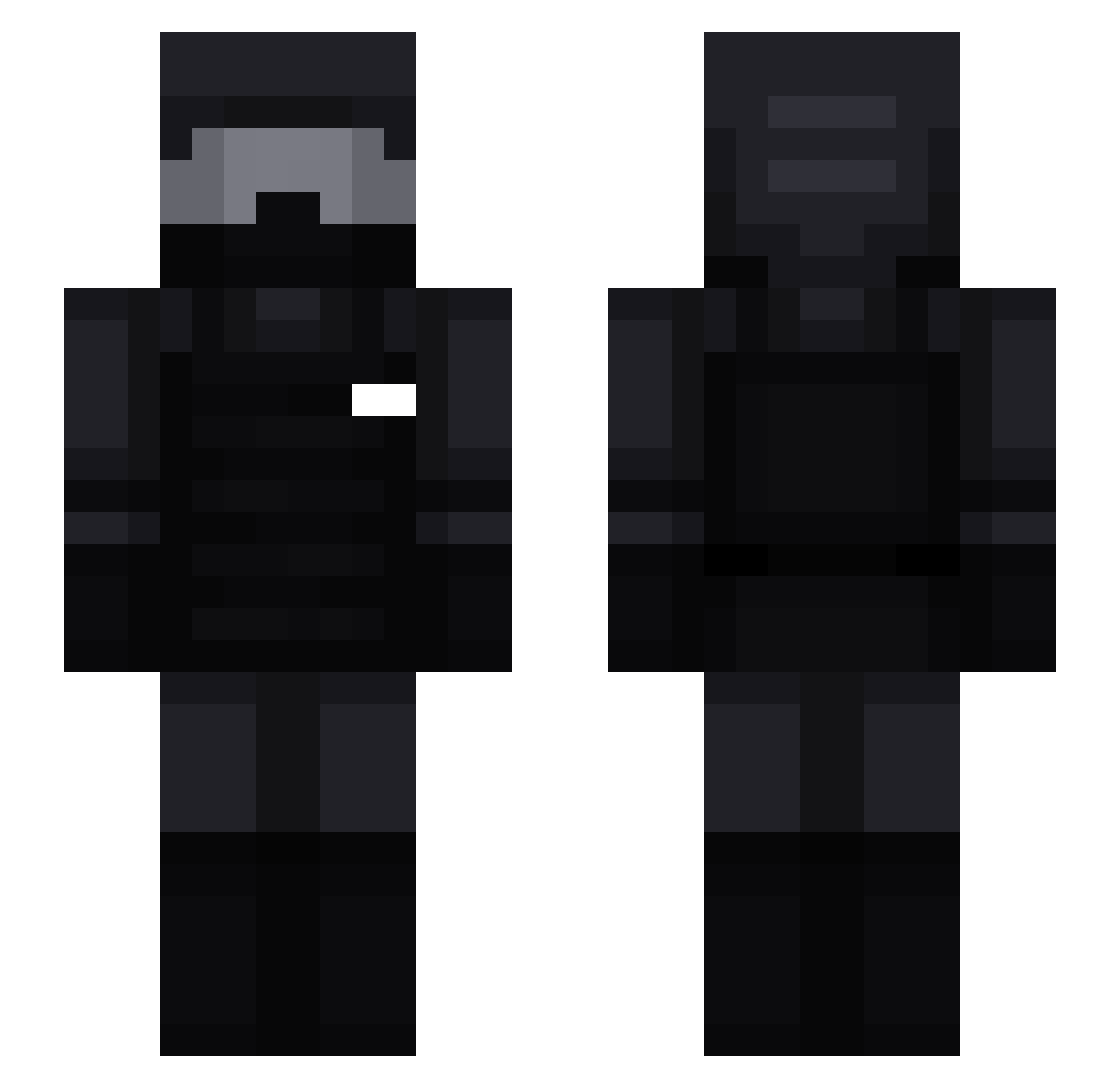
Current Minecraft skin of the player Blaze171614, loaded from the official Mojang API. Rotate the 3D model with your mouse or finger, then download the skin as a PNG file and use it in Minecraft: Bedrock Edition or Java Edition for free. When Blaze171614 changes their skin, this page updates automatically and the old skin stays in the history below.
Other players with this skin (201)
Blaze171614 was the 169th player we have seen with this skin, first spotted on 20.10.2026. The same skin was seen on these players. Open a nickname to see their current skin and skin history.
 OGbacon2x Praiseeeyyyy relays_ Hotcuppa DANGERdanya NielsBaakman MinecraftKaptain Baloon56 clarifyd Pianka02 xleoinarr Kochany_Adus Marcraftplayz Surculs stass06 xXToxicPenguinXx Luk3ta_ Nesky22 lordgames34567 mcaaisk_ BigColbs WINDJANG CardiB5 HaveBabies gunsou1048 NoRev64 BennettBestEU sWALTER_ULBRICHT FlankenRudi Anto_leone Lamacrt ZombieMan004 Matt081585 kachari 1Exploding_Steve Stumberfy Te_neam519 Maximus__2006 AlfieG LegendJJ21 pondddddd Raga88 N_RPL S6oggoth zWtap White_Pipo thefrost79 Senryakuu WorshipNBN nil0330 kuill_has_spoken Sylvia97 connorawr_ QumoBlackOut_ Mitico120 CaptainVik21 FaustInDarm ant169 GabrielSilva10 Poseidonk29
More Swat Minecraft skins
How to install the Blaze171614 skin
- Press the Download button above to save the skin as a PNG file.
- Minecraft: Bedrock Edition (PE): open the Dressing Room from the main menu (or tap your character → Edit Character), go to Classic Skins → Owned, press the + (new skin) button, choose the downloaded PNG and pick the Slim (Alex) model. Works on PC and mobile; consoles cannot import custom skins.
- Minecraft: Java Edition: open the Minecraft Launcher, go to the Skins tab, click New Skin, load the PNG, pick the Slim (Alex) model and press Save & Use. You can also upload it at minecraft.net → Profile → Change Skin.
The skin does not show up after import - what should I do?
Restart Minecraft and open the Dressing Room again - imported skins sometimes appear only after a restart. Also make sure you selected the imported skin and picked the Slim (Alex) model.
Which model should I choose, Classic or Slim?
This skin is designed for the Slim (Alex) model. If you pick the wrong model, the arms of the skin will look stretched or squeezed.
Is the skin of Blaze171614 free to download?
Yes. Press Download, save the PNG file and use it in Minecraft: Bedrock Edition or Java Edition - no payment or registration needed. The skin also works on multiplayer servers and Realms.
More skins
Looking for more? Go back to all Minecraft skins and check the top skins of the week, month and all time, or find any player's skin by nickname.