
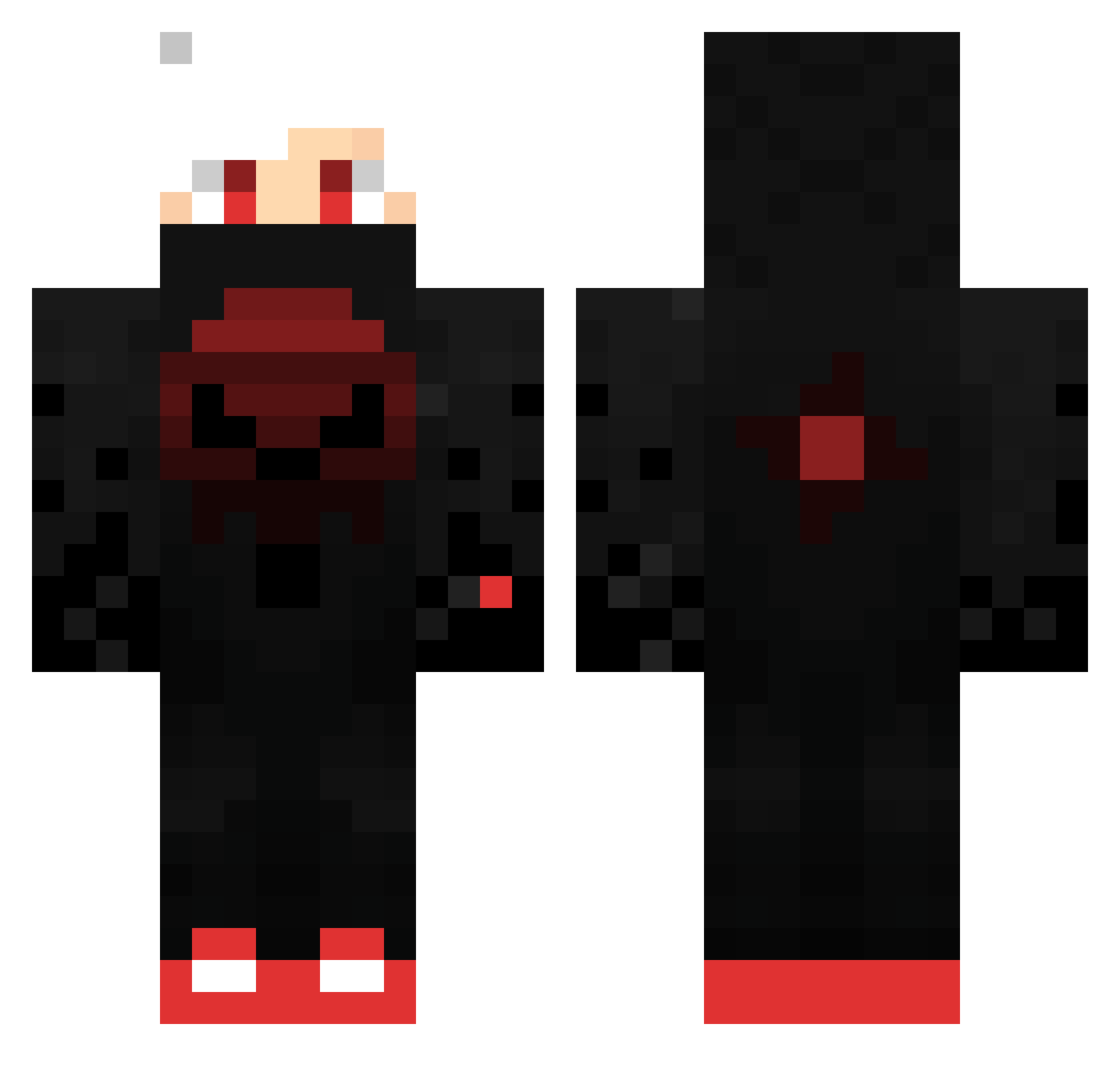
Current Minecraft skin of the player BladeLeague, loaded from the official Mojang API. Rotate the 3D model with your mouse or finger, then download the skin as a PNG file and use it in Minecraft: Bedrock Edition or Java Edition for free. When BladeLeague changes their skin, this page updates automatically and the old skin stays in the history below.
Other players with this skin (358)
BladeLeague was the 345th player we have seen with this skin, first spotted on 13.10.2026. The same skin was seen on these players. Open a nickname to see their current skin and skin history.
 ManU__22 Fvmaa Fan7233 Bertram531 MrTPoops Abdulrohmann Hithesh_444 NarkoZ78 aiviori Pascazouk DarkTV994 LuscaBr2 M4TTY8805 naim1994 Luxeeon IGI3213 Folkrom78 SubzeroGTx Low_E91 blbdit DEATH_David3 Positive_EL x_Dark_Plasma_x Blakely123456 lpatt61 EnterDesepter darkninga2011 Drew7788 KRONO_TU_PAPI xmichallox MasterScout007 KillerEsel TweetiesFir081 MWBIG Se7z Albatraox2 Quinzin BlackMrKrabs ShoePlays RSA_M0NST3R Drago_5 Gunda_bhai leonardos555 Clive0702 yuesoka MasterBrian7 XxDnknDonutsxX Shadowdemon_10 SnikeN__ omar552865 robertjan052060 _OWT_ gab22223 MAXandKEEl GucciCr0cs LolipopJonas1 KubaRedstone LoNe_Aidan RayhanF hq_king
More Skull Minecraft skins
How to install the BladeLeague skin
- Press the Download button above to save the skin as a PNG file.
- Minecraft: Bedrock Edition (PE): open the Dressing Room from the main menu (or tap your character → Edit Character), go to Classic Skins → Owned, press the + (new skin) button, choose the downloaded PNG and pick the Classic (Steve) model. Works on PC and mobile; consoles cannot import custom skins.
- Minecraft: Java Edition: open the Minecraft Launcher, go to the Skins tab, click New Skin, load the PNG, pick the Classic (Steve) model and press Save & Use. You can also upload it at minecraft.net → Profile → Change Skin.
The skin does not show up after import - what should I do?
Restart Minecraft and open the Dressing Room again - imported skins sometimes appear only after a restart. Also make sure you selected the imported skin and picked the Classic (Steve) model.
Which model should I choose, Classic or Slim?
This skin is designed for the Classic (Steve) model. If you pick the wrong model, the arms of the skin will look stretched or squeezed.
Is the skin of BladeLeague free to download?
Yes. Press Download, save the PNG file and use it in Minecraft: Bedrock Edition or Java Edition - no payment or registration needed. The skin also works on multiplayer servers and Realms.
More skins
Looking for more? Go back to all Minecraft skins and check the top skins of the week, month and all time, or find any player's skin by nickname.