
BlackShadow1307 - Minecraft Skins & Skin History
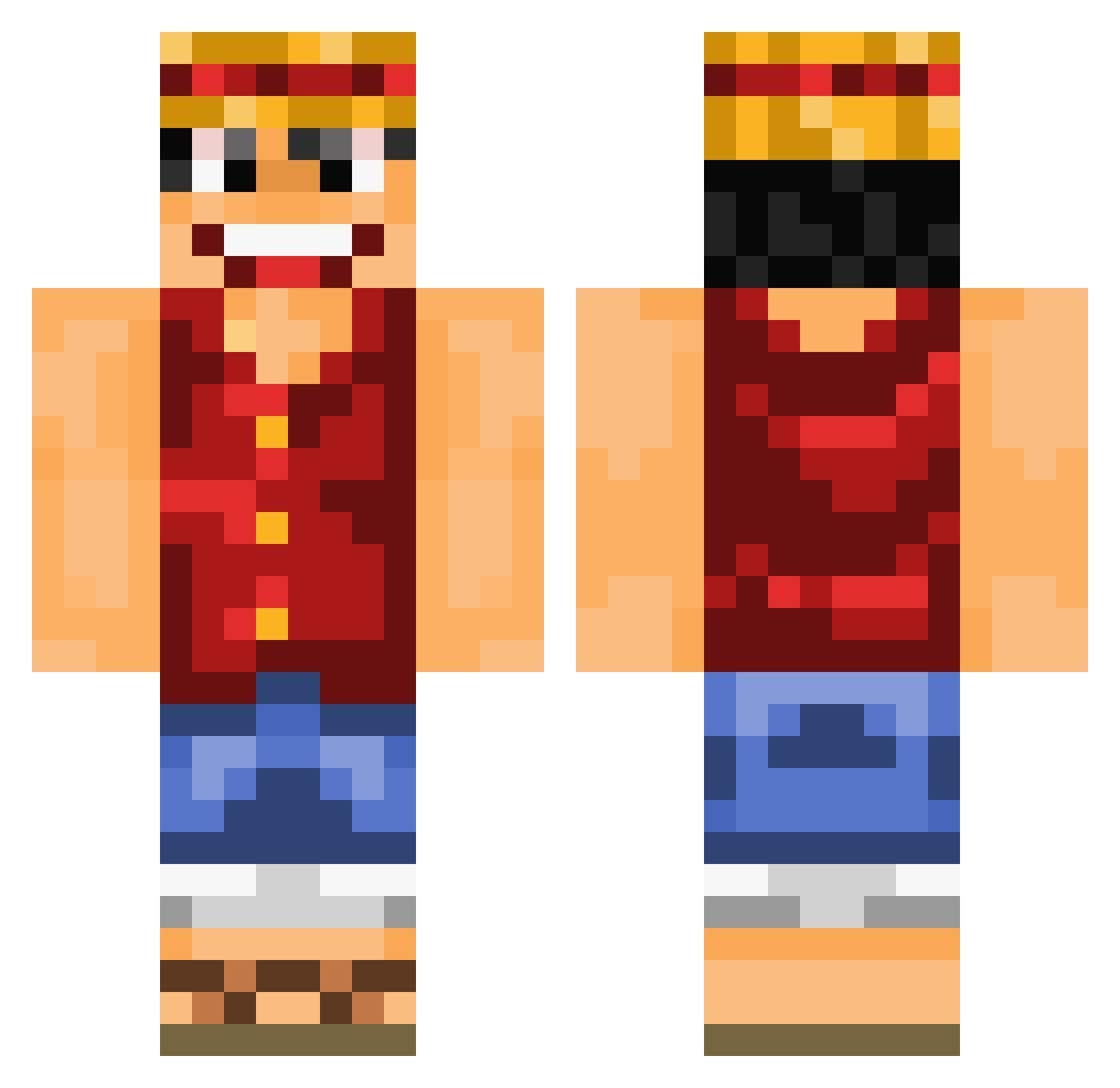
Current Minecraft skin of the player BlackShadow1307, loaded from the official Mojang API. Rotate the 3D model with your mouse or finger, then download the skin as a PNG file and use it in Minecraft: Bedrock Edition or Java Edition for free. When BlackShadow1307 changes their skin, this page updates automatically and the old skin stays in the history below.
Other players with this skin (892)
BlackShadow1307 was the 755th player we have seen with this skin, first spotted on 11.10.2026. The same skin was seen on these players. Open a nickname to see their current skin and skin history.
 Pokemoncatcher20 FA200394 XMonsterCreeperX SpaceLooop Talrula MattTheHoog xherox669 atrautm0 McFlames8 Trappo Galvao1 Redolinu eojra xXRaMiz Randman234 Its_Ruffy Hhercine Marco_Phoenix Erdekim kaan7ee6 PublicError Brodholm Hagnar05 Ryzzahh DefJamFoNY TokenTakke ZuldargITA ka3kawi2 IboRekt Ziip81 viverent LolRexo ZIayher Slinfuly Jimboray stephanv89 Chernobylninja blynch411 Grim_Nick thereduck imsozahid Philipp97531 Deanoooooooo psikokiller23 jasperke003 fuzzy99 OnlyMork martteo Zaubaerschnitzel samman993 Monkey1209 KaelUK lianglei rorena15 whitewedding Klotzzwerg nukinth willy0703 marcgandias Jskier98
More Luffy Minecraft skins
How to install the BlackShadow1307 skin
- Press the Download button above to save the skin as a PNG file.
- Minecraft: Bedrock Edition (PE): open the Dressing Room from the main menu (or tap your character → Edit Character), go to Classic Skins → Owned, press the + (new skin) button, choose the downloaded PNG and pick the Classic (Steve) model. Works on PC and mobile; consoles cannot import custom skins.
- Minecraft: Java Edition: open the Minecraft Launcher, go to the Skins tab, click New Skin, load the PNG, pick the Classic (Steve) model and press Save & Use. You can also upload it at minecraft.net → Profile → Change Skin.
The skin does not show up after import - what should I do?
Restart Minecraft and open the Dressing Room again - imported skins sometimes appear only after a restart. Also make sure you selected the imported skin and picked the Classic (Steve) model.
Which model should I choose, Classic or Slim?
This skin is designed for the Classic (Steve) model. If you pick the wrong model, the arms of the skin will look stretched or squeezed.
Is the skin of BlackShadow1307 free to download?
Yes. Press Download, save the PNG file and use it in Minecraft: Bedrock Edition or Java Edition - no payment or registration needed. The skin also works on multiplayer servers and Realms.
More skins
Looking for more? Go back to all Minecraft skins and check the top skins of the week, month and all time, or find any player's skin by nickname.