
Bjorn538 - Minecraft Skins & Skin History
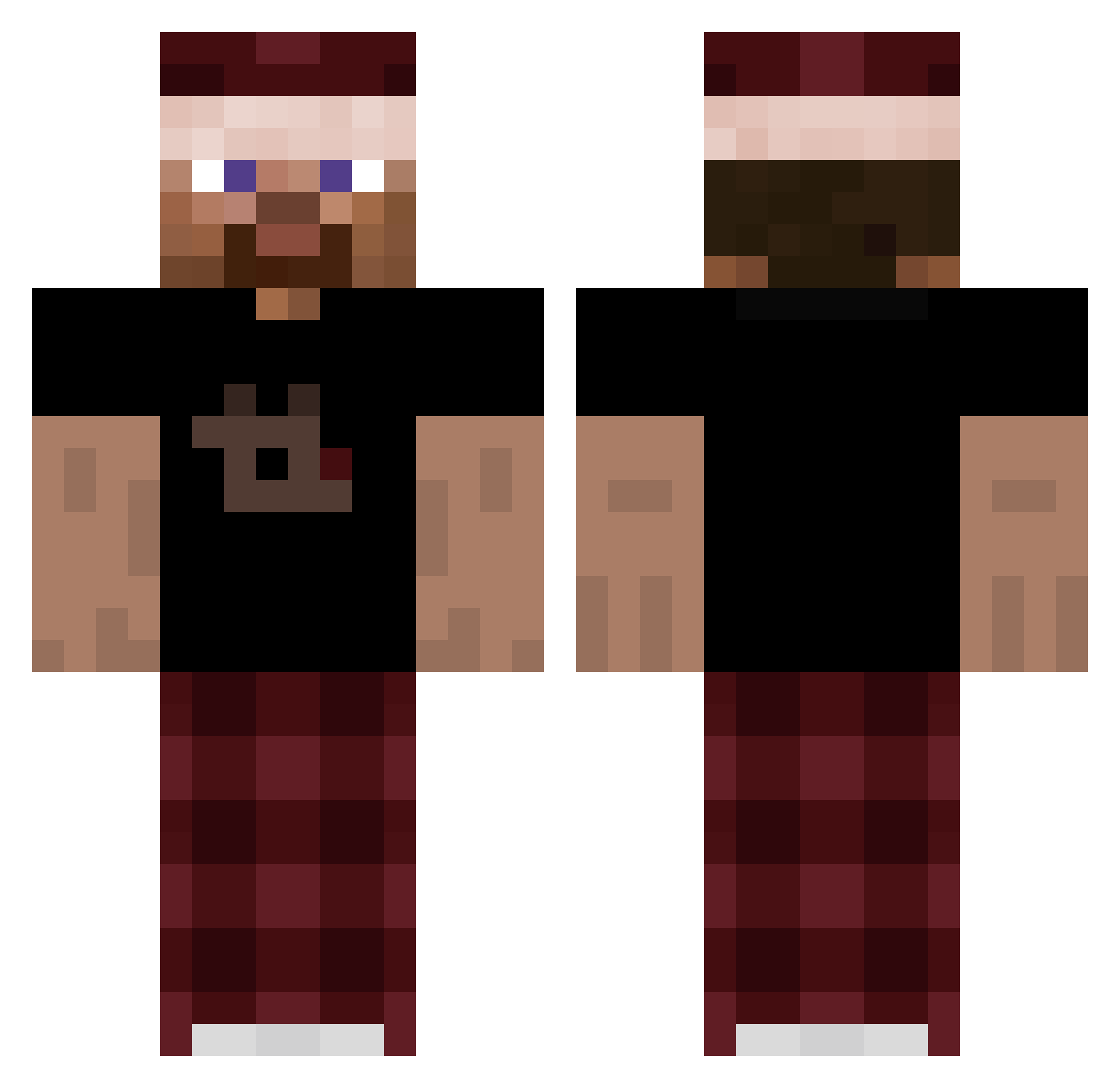
Current Minecraft skin of the player Bjorn538, loaded from the official Mojang API. Rotate the 3D model with your mouse or finger, then download the skin as a PNG file and use it in Minecraft: Bedrock Edition or Java Edition for free. When Bjorn538 changes their skin, this page updates automatically and the old skin stays in the history below.
Other players with this skin (310)
Bjorn538 was the 286th player we have seen with this skin, first spotted on 10.11.2026. The same skin was seen on these players. Open a nickname to see their current skin and skin history.
 StrippedHippo43 Stefan_the_true eishnt Morgiano Ballekuken muriloovBR Daqzt6 Leo34111 Sniper42gamer SSzymek1102 JohnJames1900 Mikebok d0m1theone wipzeyy eh6_msmc_dd3 SnippixMC 2recewMilence Marco18211 Qikb RANCHHHHHH ukill MxHx08 TimBKing_ l00k1ezinho ohiorizzzgod Noxvas042 tudyboybv JCWK_22 El_Santiii Wolhelm Btuo _mlodyyordzin2 FancyCK 1qve Chrisu1908 FUUFUUUUUU Dcdub27_kk weak666 __Th4gustDMC__ JDYOgaming perlo_ legomaster20004 A7XYZ 88ni GasAlarm narin0001 Eddy32 henrisama bathshiva Struk0 eliasnotthere jpaulo2 megxde Olektokox jhkq Cerezzo Hubok ocimum Deftt91 B3n_MC_
How to install the Bjorn538 skin
- Press the Download button above to save the skin as a PNG file.
- Minecraft: Bedrock Edition (PE): open the Dressing Room from the main menu (or tap your character → Edit Character), go to Classic Skins → Owned, press the + (new skin) button, choose the downloaded PNG and pick the Classic (Steve) model. Works on PC and mobile; consoles cannot import custom skins.
- Minecraft: Java Edition: open the Minecraft Launcher, go to the Skins tab, click New Skin, load the PNG, pick the Classic (Steve) model and press Save & Use. You can also upload it at minecraft.net → Profile → Change Skin.
The skin does not show up after import - what should I do?
Restart Minecraft and open the Dressing Room again - imported skins sometimes appear only after a restart. Also make sure you selected the imported skin and picked the Classic (Steve) model.
Which model should I choose, Classic or Slim?
This skin is designed for the Classic (Steve) model. If you pick the wrong model, the arms of the skin will look stretched or squeezed.
Is the skin of Bjorn538 free to download?
Yes. Press Download, save the PNG file and use it in Minecraft: Bedrock Edition or Java Edition - no payment or registration needed. The skin also works on multiplayer servers and Realms.
More skins
Looking for more? Go back to all Minecraft skins and check the top skins of the week, month and all time, or find any player's skin by nickname.