
Bixoniiii - Minecraft Skins & Skin History
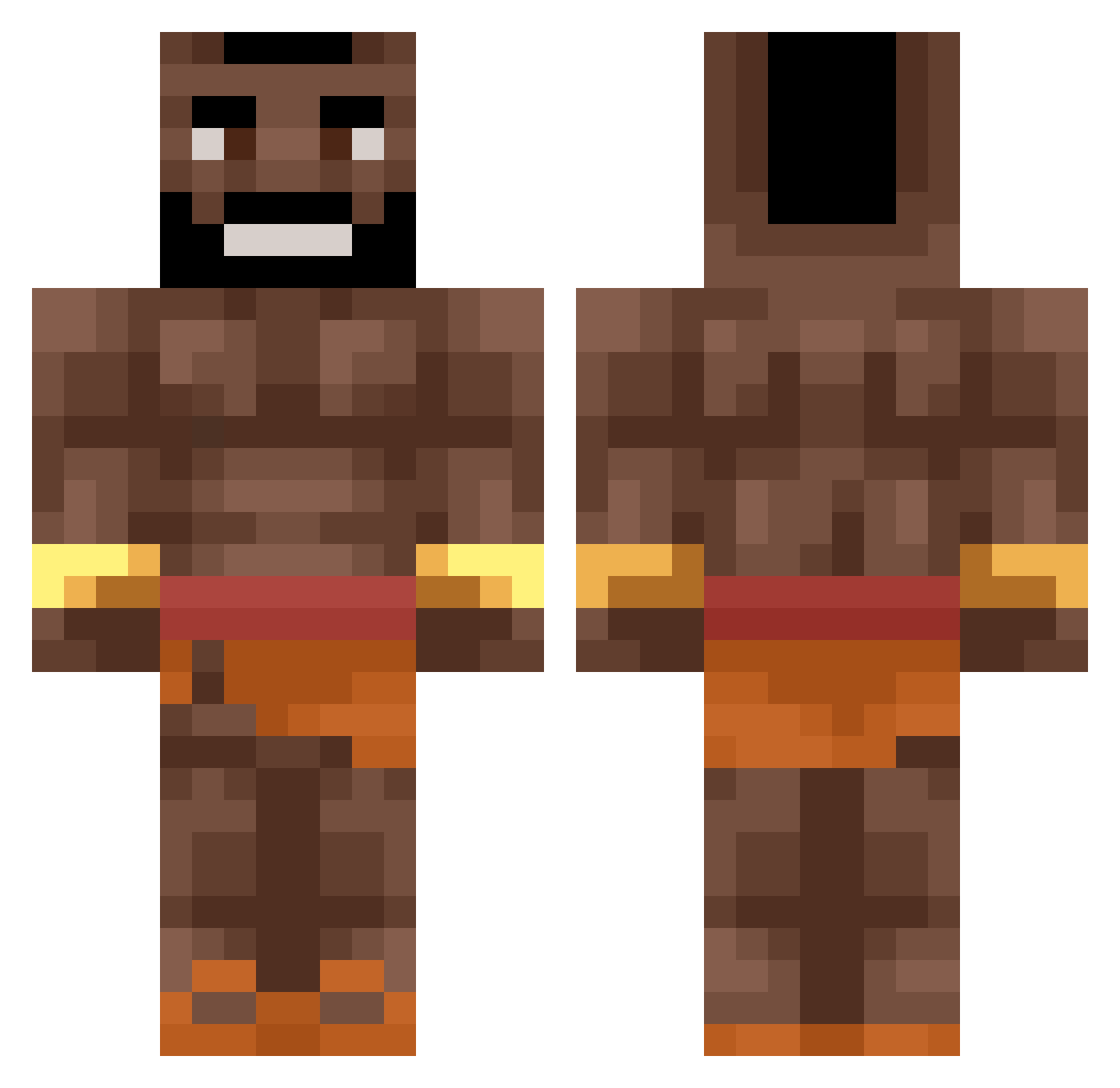
Current Minecraft skin of the player Bixoniiii, loaded from the official Mojang API. Rotate the 3D model with your mouse or finger, then download the skin as a PNG file and use it in Minecraft: Bedrock Edition or Java Edition for free. When Bixoniiii changes their skin, this page updates automatically and the old skin stays in the history below.
Other players with this skin (491)
Bixoniiii was the 172nd player we have seen with this skin, first spotted on 01.09.2026. The same skin was seen on these players. Open a nickname to see their current skin and skin history.
 FilyPlays LUKANIUM Ley_In Koradal zonkill1 BADATGAMESIAM pierdziwiatr UndaZaWotah wydeh_ DrTocino234 Brunonek242 Freeman___ Edward2013_2023 __Smoking__ kubanotisland
 Arrilucea Panda_Pax prod_Trixz BigSchmeatDamon zhj_mc Etsillac bruxo450 TotallyNoSpy007 Epexx11 Parra_Jack RLobo27 hog_rider123123 Emcn3D Anal_general_ SuperEll Saulo_19 pattycake_ LUBOBAZIZASTER PilXz_ pauleck16 CyberMMA _pisunchick_ Vannxzx ukecik tnnertenet JP24KA Dissapeared sito8686 weraikuba Trans_Uranchik DerInder1848 Koemin leonswl splashballs LIXEZ6 1eleonora Razr15 Decachino KimKolwiek_ rasochi Bobthetomato868 ravvyonpc PenguWasTaken Samu28_ Konservant2780
More Actor Minecraft skins
How to install the Bixoniiii skin
- Press the Download button above to save the skin as a PNG file.
- Minecraft: Bedrock Edition (PE): open the Dressing Room from the main menu (or tap your character → Edit Character), go to Classic Skins → Owned, press the + (new skin) button, choose the downloaded PNG and pick the Classic (Steve) model. Works on PC and mobile; consoles cannot import custom skins.
- Minecraft: Java Edition: open the Minecraft Launcher, go to the Skins tab, click New Skin, load the PNG, pick the Classic (Steve) model and press Save & Use. You can also upload it at minecraft.net → Profile → Change Skin.
The skin does not show up after import - what should I do?
Restart Minecraft and open the Dressing Room again - imported skins sometimes appear only after a restart. Also make sure you selected the imported skin and picked the Classic (Steve) model.
Which model should I choose, Classic or Slim?
This skin is designed for the Classic (Steve) model. If you pick the wrong model, the arms of the skin will look stretched or squeezed.
Is the skin of Bixoniiii free to download?
Yes. Press Download, save the PNG file and use it in Minecraft: Bedrock Edition or Java Edition - no payment or registration needed. The skin also works on multiplayer servers and Realms.
More skins
Looking for more? Go back to all Minecraft skins and check the top skins of the week, month and all time, or find any player's skin by nickname.