
BigManThoup - Minecraft Skins & Skin History
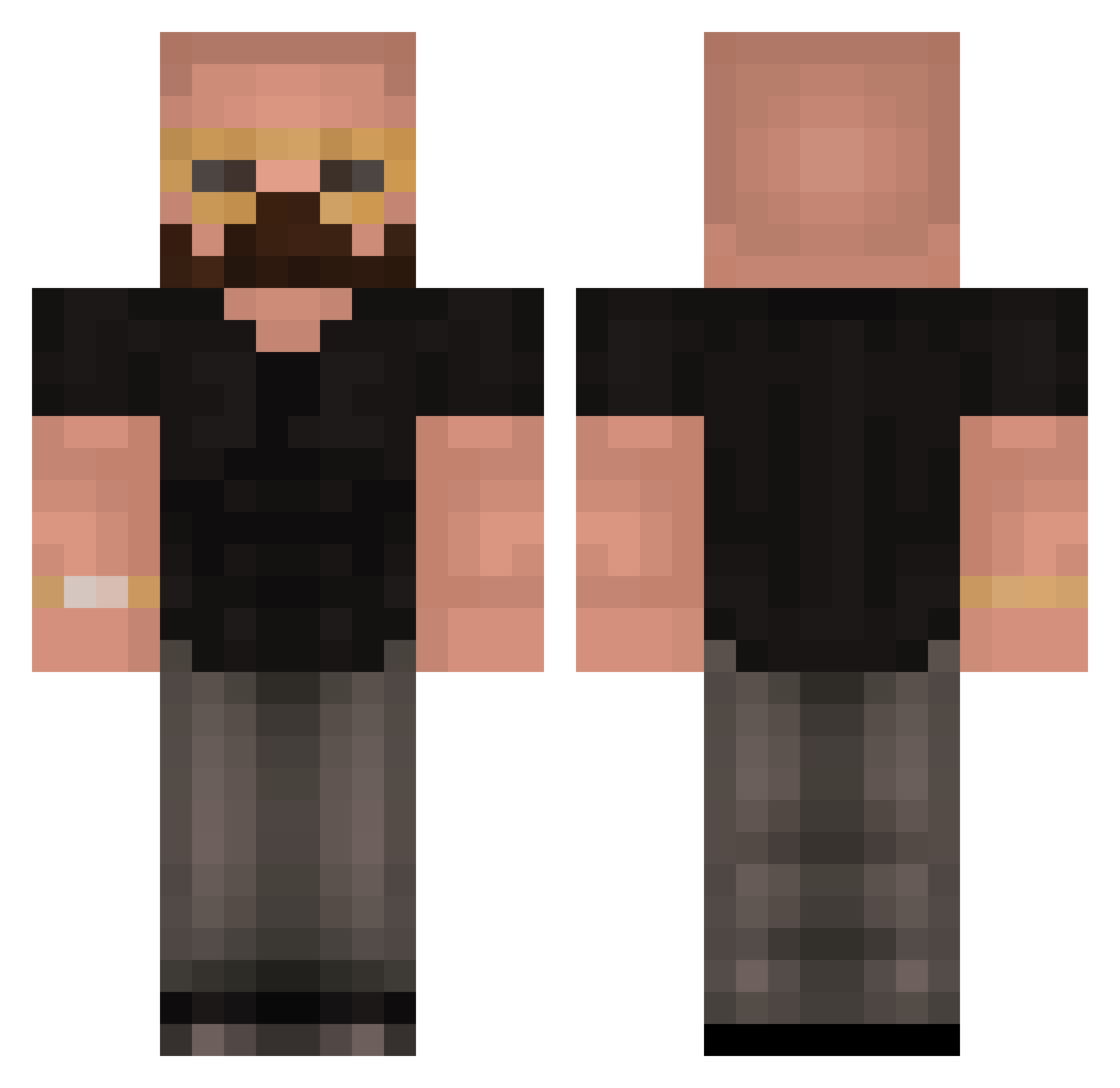
Current Minecraft skin of the player BigManThoup, loaded from the official Mojang API. Rotate the 3D model with your mouse or finger, then download the skin as a PNG file and use it in Minecraft: Bedrock Edition or Java Edition for free. When BigManThoup changes their skin, this page updates automatically and the old skin stays in the history below.
Other players with this skin (418)
BigManThoup was the 194th player we have seen with this skin, first spotted on 17.09.2026. The same skin was seen on these players. Open a nickname to see their current skin and skin history.
 Appelplant Hypergamer07 LinusMyWay Arito000 DaddyTate CrazyMoj0 ANDREW_TATE_TOP_ N2deep_1310 API1403 EXECI0US DezssabatSensei TheDipDip Drippus ckuhlmann06 jokubassewi perunakellari doctorben8 58I0 The_racist_dude Vortsky B0dziuS deadshot123abc kojne mr_steal_your_g harrisonw_2012 OPDestroyer18 CrazyJesse101 OConnell loungegaming Ripper2469 Franjo997 faasta gabethebabe44 BENNIEBEUNHAAAS Eshayyz MoltenKnight283 jake2icey1 bivhisonvapern WkappaVII oWxnter NotCubic47 cor420 Kursorius s3ig0ps straighthair HaxOnGfuel AadDeDriller gerollteNusswurs _imagineWagons Domenic365 Zingx KomodoSensei John_Dave2 UncivilizedAhmad Arag25 AbdoAlhadi Emi_LR noyz79 Sturier chickenuggies810
More Heisenberg Minecraft skins
How to install the BigManThoup skin
- Press the Download button above to save the skin as a PNG file.
- Minecraft: Bedrock Edition (PE): open the Dressing Room from the main menu (or tap your character → Edit Character), go to Classic Skins → Owned, press the + (new skin) button, choose the downloaded PNG and pick the Classic (Steve) model. Works on PC and mobile; consoles cannot import custom skins.
- Minecraft: Java Edition: open the Minecraft Launcher, go to the Skins tab, click New Skin, load the PNG, pick the Classic (Steve) model and press Save & Use. You can also upload it at minecraft.net → Profile → Change Skin.
The skin does not show up after import - what should I do?
Restart Minecraft and open the Dressing Room again - imported skins sometimes appear only after a restart. Also make sure you selected the imported skin and picked the Classic (Steve) model.
Which model should I choose, Classic or Slim?
This skin is designed for the Classic (Steve) model. If you pick the wrong model, the arms of the skin will look stretched or squeezed.
Is the skin of BigManThoup free to download?
Yes. Press Download, save the PNG file and use it in Minecraft: Bedrock Edition or Java Edition - no payment or registration needed. The skin also works on multiplayer servers and Realms.
More skins
Looking for more? Go back to all Minecraft skins and check the top skins of the week, month and all time, or find any player's skin by nickname.