
BearlyThere28 - Minecraft Skins & Skin History
Current Minecraft skin of the player BearlyThere28, loaded from the official Mojang API. Rotate the 3D model with your mouse or finger, then download the skin as a PNG file and use it in Minecraft: Bedrock Edition or Java Edition for free. When BearlyThere28 changes their skin, this page updates automatically and the old skin stays in the history below.
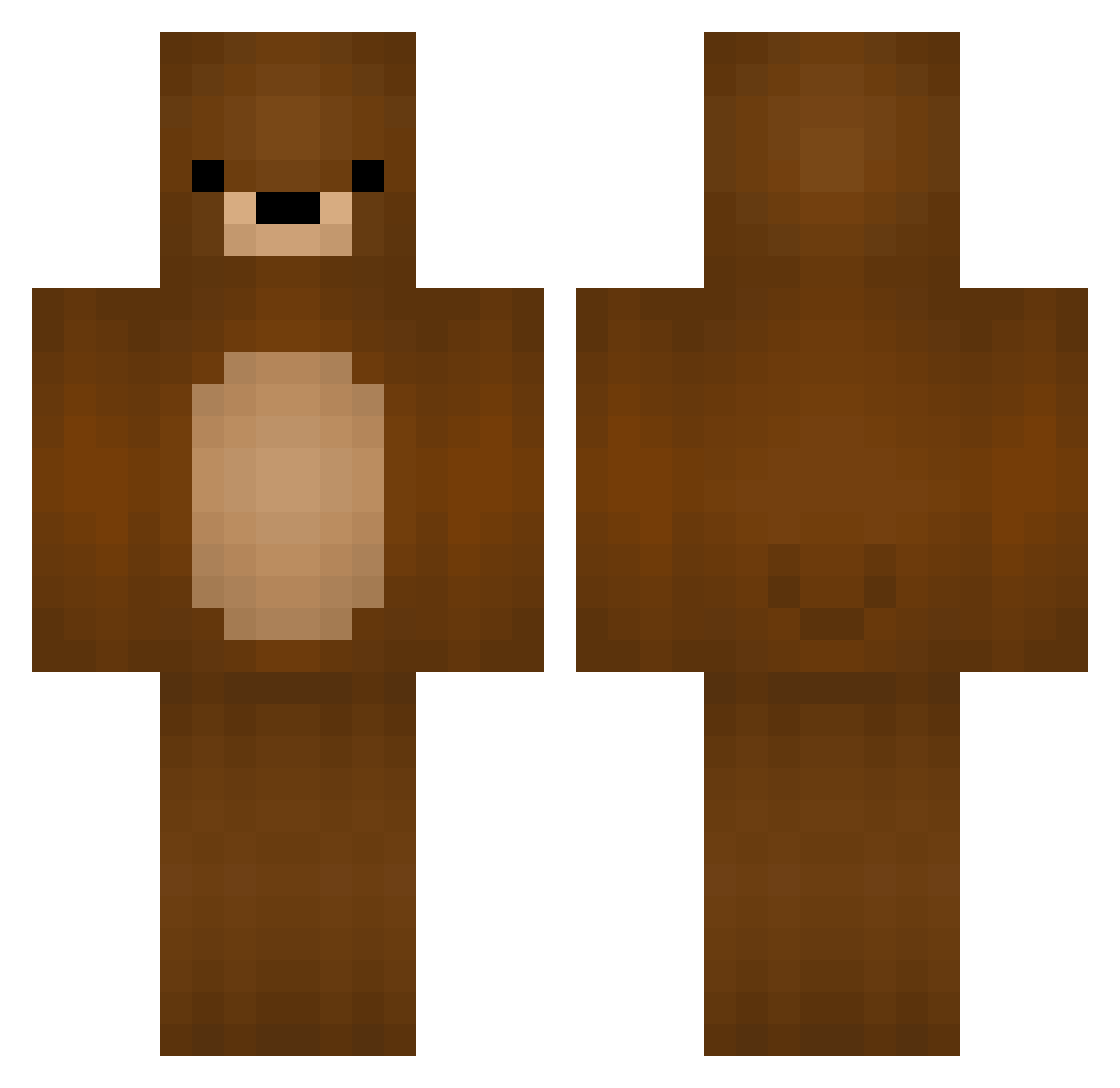
Other players with this skin (329)
BearlyThere28 was the 193rd player we have seen with this skin, first spotted on 22.09.2026. The same skin was seen on these players. Open a nickname to see their current skin and skin history.
 feiertag16 Kameleonyu AnanasGaming119 Bear0813 Softbear0078 W1ltops bummybryce Macesz5 Dracodraw PlaygroundEduard Sprinkles_211 soypolo areyoueee KorLin bigbignooooooob ElaForLyf yukidaruma46 Nepo TfumNastY Giggins_RU Bjornoes nelecoj Exx0tic Primodius_ Haskyr carabidulebabat PicoTheYeagerist rubivivi tttumuuubaba Servuc JOBumm Stasikuchence14 NukinqWalls kieraaea Aaduh89 Karibeu rockybalboa757 leona678 zatoken Ousikou Padovinha13 imabox123 swervooooooooooo NotJohnnyBoy tomaiden NovaG4m3r BEEAAARR PRAMMaster YEPmarol Plsfood Kaumaruka Vipah1 gtdf Brave_JUN MissTwinkie N1GHTBEARS amberstone2610 starsx92 MurseNikko Spo0kyBeard
More Teddy Bear Minecraft skins
How to install the BearlyThere28 skin
- Press the Download button above to save the skin as a PNG file.
- Minecraft: Bedrock Edition (PE): open the Dressing Room from the main menu (or tap your character → Edit Character), go to Classic Skins → Owned, press the + (new skin) button, choose the downloaded PNG and pick the Classic (Steve) model. Works on PC and mobile; consoles cannot import custom skins.
- Minecraft: Java Edition: open the Minecraft Launcher, go to the Skins tab, click New Skin, load the PNG, pick the Classic (Steve) model and press Save & Use. You can also upload it at minecraft.net → Profile → Change Skin.
The skin does not show up after import - what should I do?
Restart Minecraft and open the Dressing Room again - imported skins sometimes appear only after a restart. Also make sure you selected the imported skin and picked the Classic (Steve) model.
Which model should I choose, Classic or Slim?
This skin is designed for the Classic (Steve) model. If you pick the wrong model, the arms of the skin will look stretched or squeezed.
Is the skin of BearlyThere28 free to download?
Yes. Press Download, save the PNG file and use it in Minecraft: Bedrock Edition or Java Edition - no payment or registration needed. The skin also works on multiplayer servers and Realms.
More skins
Looking for more? Go back to all Minecraft skins and check the top skins of the week, month and all time, or find any player's skin by nickname.