
Baboooooooooon - Minecraft Skins & Skin History
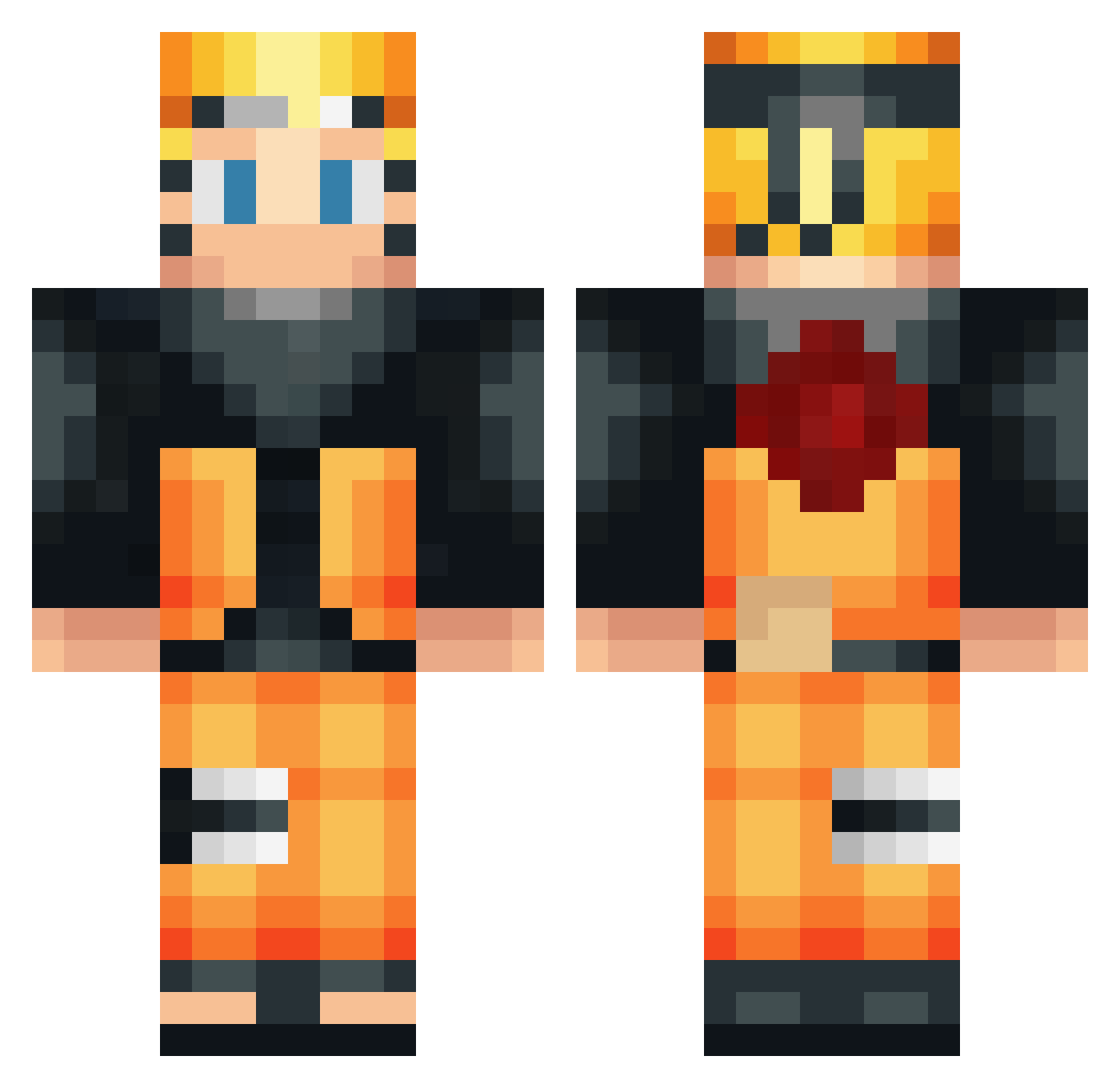
Current Minecraft skin of the player Baboooooooooon, loaded from the official Mojang API. Rotate the 3D model with your mouse or finger, then download the skin as a PNG file and use it in Minecraft: Bedrock Edition or Java Edition for free. When Baboooooooooon changes their skin, this page updates automatically and the old skin stays in the history below.
Other players with this skin (532)
Baboooooooooon was the 168th player we have seen with this skin, first spotted on 01.09.2026. The same skin was seen on these players. Open a nickname to see their current skin and skin history.
 CheeseDo0dles Twekster BBAASS LikingWig739722 koh01 greg13fr MrZenoV Pipokabr Reiguard ViniciusMunari Youngs_Modulus m4musmentality ndnkwe DRAGONFIRE0911 GiovaniYz marlon_flp RomanGuran JustxChristian VortaLaOuki jixi20 Cfelipe Jr_payne Ivanivienen_23 GrahamCracker511 Ceezar raphfllt Andris10 GrasenderElch eros1404 kikurage03 hahaharute Palioo Luloh ergit26 kazuyukinosuke Stunyn HarmonicBen k0n1 Blacktomix Donutlegends nxphilim Hylioss Defni_ cloutgamer009 Neexouu Chock2b PhiloShadow tdromankillz25 Snooze57 Oelsadin Fodesco abnascimento Ky3bMA_B_TAHKE Kubsonides Cashoutvivi tekimo69 NICOKRACK17 haise45 Irgendetwas321 DarkPoenixe180
More Naruto Uzumaki Minecraft skins
See all 473 Naruto Uzumaki skins
How to install the Baboooooooooon skin
- Press the Download button above to save the skin as a PNG file.
- Minecraft: Bedrock Edition (PE): open the Dressing Room from the main menu (or tap your character → Edit Character), go to Classic Skins → Owned, press the + (new skin) button, choose the downloaded PNG and pick the Classic (Steve) model. Works on PC and mobile; consoles cannot import custom skins.
- Minecraft: Java Edition: open the Minecraft Launcher, go to the Skins tab, click New Skin, load the PNG, pick the Classic (Steve) model and press Save & Use. You can also upload it at minecraft.net → Profile → Change Skin.
The skin does not show up after import - what should I do?
Restart Minecraft and open the Dressing Room again - imported skins sometimes appear only after a restart. Also make sure you selected the imported skin and picked the Classic (Steve) model.
Which model should I choose, Classic or Slim?
This skin is designed for the Classic (Steve) model. If you pick the wrong model, the arms of the skin will look stretched or squeezed.
Is the skin of Baboooooooooon free to download?
Yes. Press Download, save the PNG file and use it in Minecraft: Bedrock Edition or Java Edition - no payment or registration needed. The skin also works on multiplayer servers and Realms.
More skins
Looking for more? Go back to all Minecraft skins and check the top skins of the week, month and all time, or find any player's skin by nickname.