
BTSRainbows - Minecraft Skins & Skin History
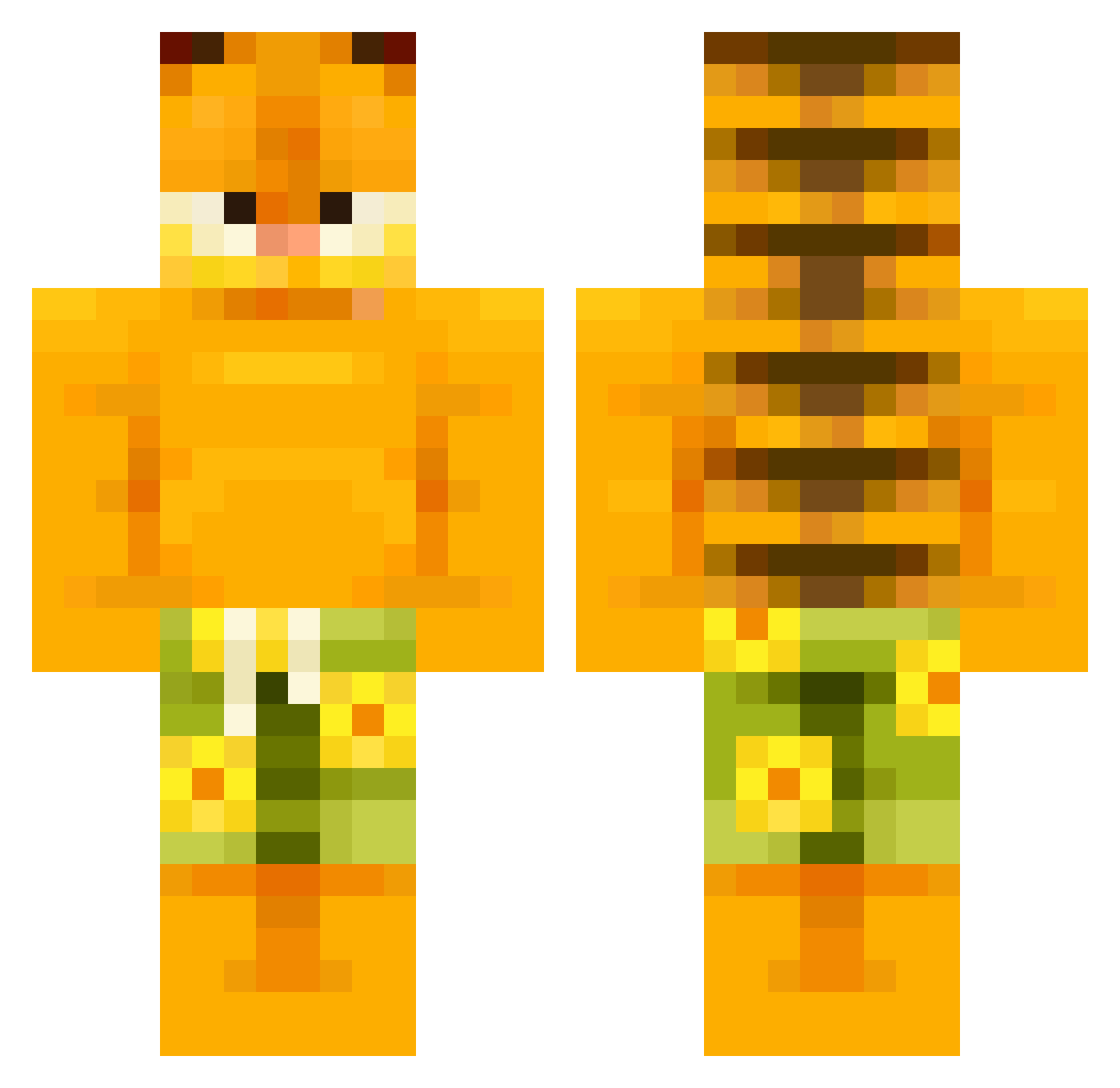
Current Minecraft skin of the player BTSRainbows, loaded from the official Mojang API. Rotate the 3D model with your mouse or finger, then download the skin as a PNG file and use it in Minecraft: Bedrock Edition or Java Edition for free. When BTSRainbows changes their skin, this page updates automatically and the old skin stays in the history below.
Other players with this skin (504)
BTSRainbows was the 60th player we have seen with this skin, first spotted on 04.08.2026. The same skin was seen on these players. Open a nickname to see their current skin and skin history.
 No31l
No31l Colxy enebeb NoahRex9663 Ozgur_03 throwinupma3s Ester840920 Pink_wool_party Fr1g M_G_Monki qiuvx azujie CHUNK_GATO jonasl_l WidFide madefrommulaa Ahoiya Fensi20 AwBear69 SaladaGrega aP0Ian menesao ianhendrixx Walchuck Radis09 literalbop jayiswonky TheCrougher evari04 Lazytownie ElWey01016
 Fire_Wolf64 Zzvono gabrielelaur_ pisonjo Agusy rose_My_Be0ved frank7758 Toby3900 BerkayMalmsteen HerrObama Human2810
 helloikki RuizZz01 t0msswag Kubiszooon Glod00 dk3aa zeno_4 Dalton_Legendary LOBA2 Inedium jugiss
 Remdv Dragon0788 slrrpyyyy Beefo6970 superduperfrog
 Wuddlez Kodiak_Kid
More Garfield Minecraft skins
How to install the BTSRainbows skin
- Press the Download button above to save the skin as a PNG file.
- Minecraft: Bedrock Edition (PE): open the Dressing Room from the main menu (or tap your character → Edit Character), go to Classic Skins → Owned, press the + (new skin) button, choose the downloaded PNG and pick the Classic (Steve) model. Works on PC and mobile; consoles cannot import custom skins.
- Minecraft: Java Edition: open the Minecraft Launcher, go to the Skins tab, click New Skin, load the PNG, pick the Classic (Steve) model and press Save & Use. You can also upload it at minecraft.net → Profile → Change Skin.
The skin does not show up after import - what should I do?
Restart Minecraft and open the Dressing Room again - imported skins sometimes appear only after a restart. Also make sure you selected the imported skin and picked the Classic (Steve) model.
Which model should I choose, Classic or Slim?
This skin is designed for the Classic (Steve) model. If you pick the wrong model, the arms of the skin will look stretched or squeezed.
Is the skin of BTSRainbows free to download?
Yes. Press Download, save the PNG file and use it in Minecraft: Bedrock Edition or Java Edition - no payment or registration needed. The skin also works on multiplayer servers and Realms.
More skins
Looking for more? Go back to all Minecraft skins and check the top skins of the week, month and all time, or find any player's skin by nickname.