
BLACKOUFT - Minecraft Skins & Skin History
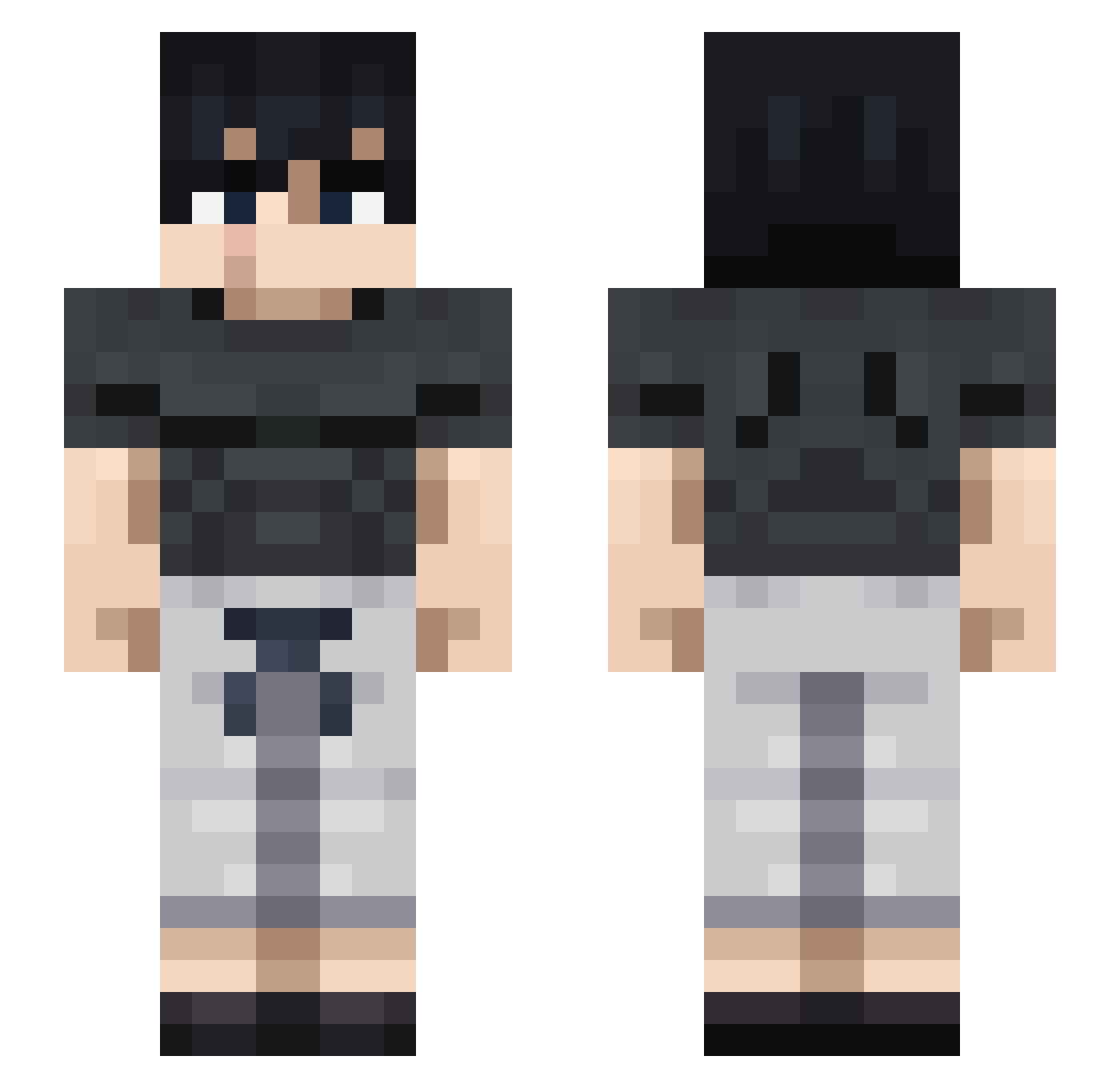
Current Minecraft skin of the player BLACKOUFT, loaded from the official Mojang API. Rotate the 3D model with your mouse or finger, then download the skin as a PNG file and use it in Minecraft: Bedrock Edition or Java Edition for free. When BLACKOUFT changes their skin, this page updates automatically and the old skin stays in the history below.
Other players with this skin (712)
BLACKOUFT was the 311th player we have seen with this skin, first spotted on 02.09.2026. The same skin was seen on these players. Open a nickname to see their current skin and skin history.
 Expcu cale403 Aom_Hoshi _IACHI_ Anastasis16 Charmander97 Kutsal_Sosis JarrodT11 toji_fush1 cermod LucasAlvox TojiFushigur0 FzNico11 LordIvan01 ezejde Crushesdept Peelerino toj11 taigo24 Toji_S JungleThumper MrAlexJ YeaboiGriff Felipe2jz JAYUNOMI TheSafeKiller zipbtw iRaveNzx Dimidius tefan_ Tsu08 Nachopana Flytzinho JoohnPoork Wische_ glor2k yoipit IIBraveII lmao3335 DJWillem51 L0stUchiha SpudAim World711 soapapiia ElConesa BlackWolf487 Skworchi SombreHaunt InvitingCircle R2Yee2 PieroPaolo JugadorPromedio0 YavuzxkralTR Seg_22 Lencino09 kemurixxx Clarkejl1 Cerimony autismanXD
 Flex_Toji
More Casual Minecraft skins
How to install the BLACKOUFT skin
- Press the Download button above to save the skin as a PNG file.
- Minecraft: Bedrock Edition (PE): open the Dressing Room from the main menu (or tap your character → Edit Character), go to Classic Skins → Owned, press the + (new skin) button, choose the downloaded PNG and pick the Slim (Alex) model. Works on PC and mobile; consoles cannot import custom skins.
- Minecraft: Java Edition: open the Minecraft Launcher, go to the Skins tab, click New Skin, load the PNG, pick the Slim (Alex) model and press Save & Use. You can also upload it at minecraft.net → Profile → Change Skin.
The skin does not show up after import - what should I do?
Restart Minecraft and open the Dressing Room again - imported skins sometimes appear only after a restart. Also make sure you selected the imported skin and picked the Slim (Alex) model.
Which model should I choose, Classic or Slim?
This skin is designed for the Slim (Alex) model. If you pick the wrong model, the arms of the skin will look stretched or squeezed.
Is the skin of BLACKOUFT free to download?
Yes. Press Download, save the PNG file and use it in Minecraft: Bedrock Edition or Java Edition - no payment or registration needed. The skin also works on multiplayer servers and Realms.
More skins
Looking for more? Go back to all Minecraft skins and check the top skins of the week, month and all time, or find any player's skin by nickname.