
BC_Animations - Minecraft Skins & Skin History
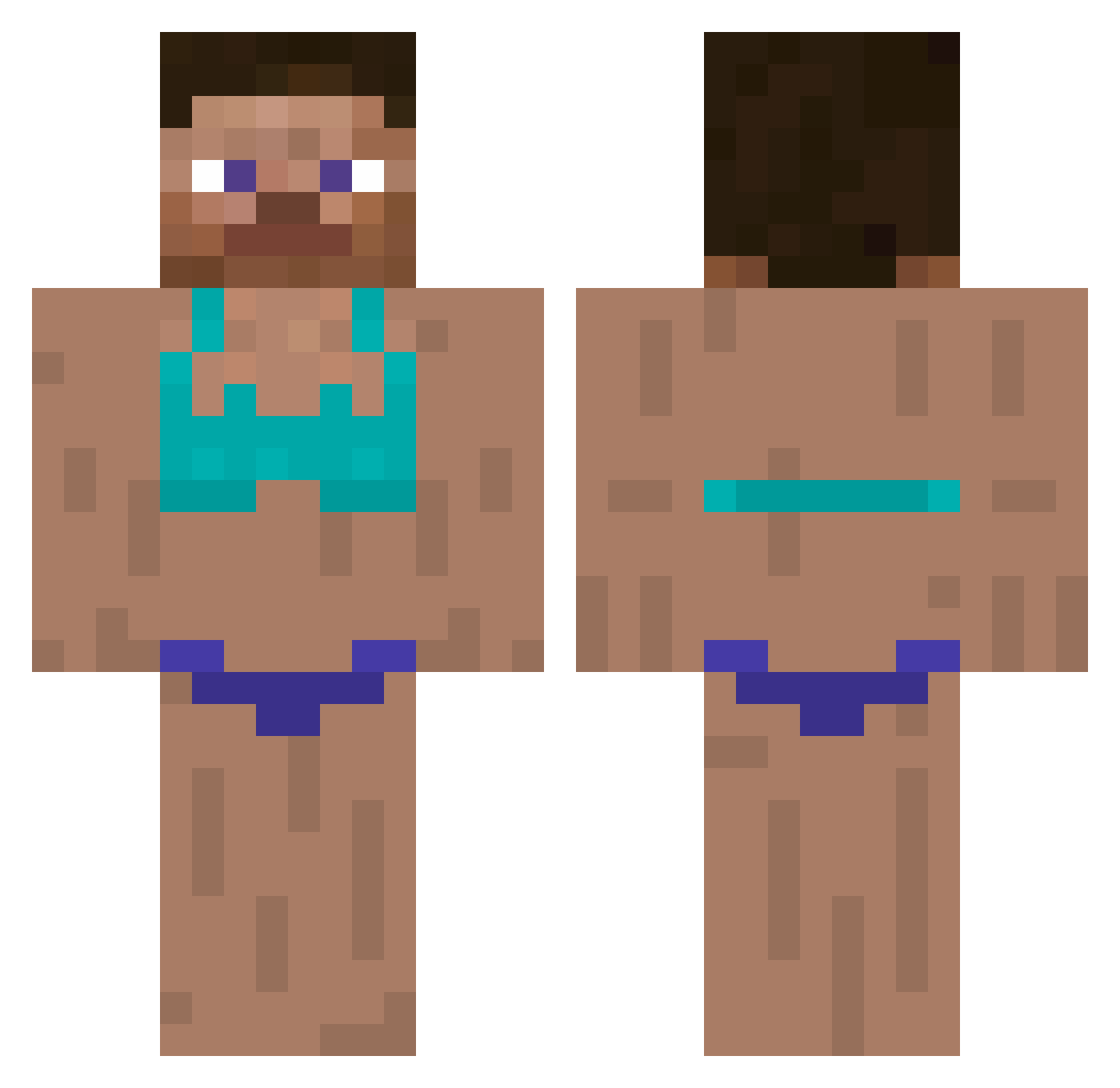
Current Minecraft skin of the player BC_Animations, loaded from the official Mojang API. Rotate the 3D model with your mouse or finger, then download the skin as a PNG file and use it in Minecraft: Bedrock Edition or Java Edition for free. When BC_Animations changes their skin, this page updates automatically and the old skin stays in the history below.
Other players with this skin (294)
BC_Animations was the 258th player we have seen with this skin, first spotted on 10.10.2026. The same skin was seen on these players. Open a nickname to see their current skin and skin history.
 matulko123 minkyu0621 Corruptblitz447 GamerKrazyKid07 peanut1320 xdWigam ByKreeps Oscar_0fc Flukemom BBoRaeRo blackjew42 suc_vat K4mileQ1 Chatiley Xinato Osianmac14 Vedonkey OlliPro tiod Dartig Ca693 YS_K0203 karoshiee dishkady jura03 flappybirding23 YDBDDK DlnkeIberg s1mbledimble PWTBD3490 arianneve AndiAmer_YT TopGVoltic minecraftify hamster_stalker __BaSiLe__00 Lolpower13 kayra_842_ Thegamingdude151 cvqzz Megunakan TonieRobert Hyemini02 KindPhantom Crus4n1c beanthebeanto bennobueno RyanWasTakenYT MathieBoy TOLOTO H2ocss65 daan_claes rew1224 slimgym980 kristynchua d1n0nugz LustMolch32 abbwri abvsdlvlslo123 daheeeb
More Swimsuit Minecraft skins
How to install the BC_Animations skin
- Press the Download button above to save the skin as a PNG file.
- Minecraft: Bedrock Edition (PE): open the Dressing Room from the main menu (or tap your character → Edit Character), go to Classic Skins → Owned, press the + (new skin) button, choose the downloaded PNG and pick the Classic (Steve) model. Works on PC and mobile; consoles cannot import custom skins.
- Minecraft: Java Edition: open the Minecraft Launcher, go to the Skins tab, click New Skin, load the PNG, pick the Classic (Steve) model and press Save & Use. You can also upload it at minecraft.net → Profile → Change Skin.
The skin does not show up after import - what should I do?
Restart Minecraft and open the Dressing Room again - imported skins sometimes appear only after a restart. Also make sure you selected the imported skin and picked the Classic (Steve) model.
Which model should I choose, Classic or Slim?
This skin is designed for the Classic (Steve) model. If you pick the wrong model, the arms of the skin will look stretched or squeezed.
Is the skin of BC_Animations free to download?
Yes. Press Download, save the PNG file and use it in Minecraft: Bedrock Edition or Java Edition - no payment or registration needed. The skin also works on multiplayer servers and Realms.
More skins
Looking for more? Go back to all Minecraft skins and check the top skins of the week, month and all time, or find any player's skin by nickname.