
AveryEB - Minecraft Skins & Skin History
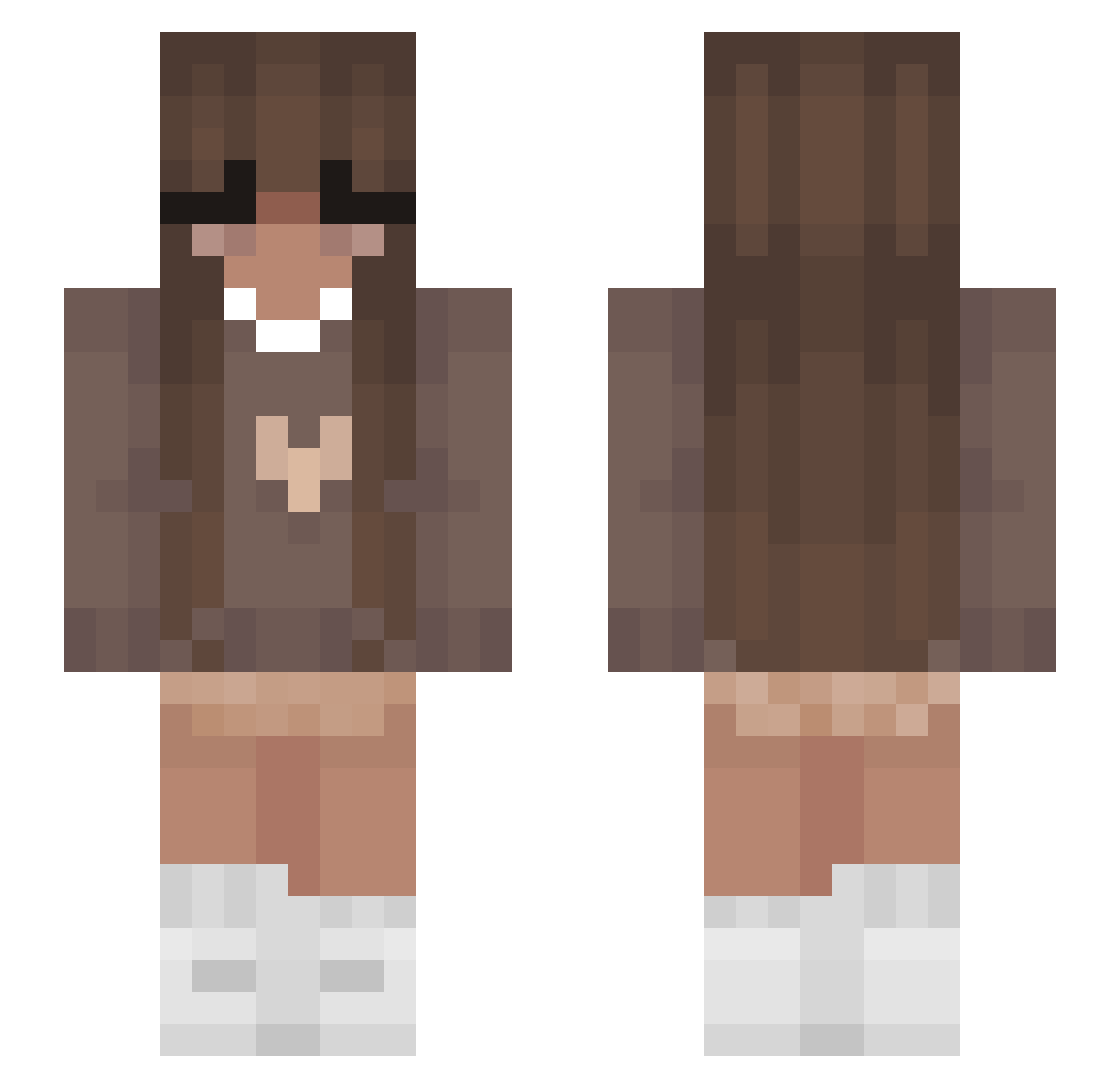
Current Minecraft skin of the player AveryEB, loaded from the official Mojang API. Rotate the 3D model with your mouse or finger, then download the skin as a PNG file and use it in Minecraft: Bedrock Edition or Java Edition for free. When AveryEB changes their skin, this page updates automatically and the old skin stays in the history below.
Other players with this skin (355)
AveryEB was the 277th player we have seen with this skin, first spotted on 12.10.2026. The same skin was seen on these players. Open a nickname to see their current skin and skin history.
 TindraB1 Natalitha lucycbbw TheDree21 0s1an Admorssy Reaperxo69 Eg1794 purpledition Lexiana_freeman linsregent GabiGabiP jnnyatw AkaMiniMee ayeava no1213141516 RoosUnicorn30 whySimba bedyall123 evb10 jaydenmarie7 succulentpork lilshrooma01235 hascheroo reniscrazy2 ItsLeah_ qlflea orcaax ItsAEasyKill soulmago superbal0u CrystalCandy10 ItzVishous XxLetsPlayx1 dwc_06 Menix_YT PewPewHax8 Kiralusion TheDrifter_RR ExiaGraphic jayyyyy2866 AnaMaria06 Mononuii Head__space selma29 eeeeeeeeeeeee_ee ahsuri Remmie1 TheSourLemon2 bbypradaa CassidieDiane jen_is_robert minygii Calista253 Goonahgirl ukulayle aubbro nelabcpzdr axqvnt fabiaborza
More Cozy Minecraft skins
How to install the AveryEB skin
- Press the Download button above to save the skin as a PNG file.
- Minecraft: Bedrock Edition (PE): open the Dressing Room from the main menu (or tap your character → Edit Character), go to Classic Skins → Owned, press the + (new skin) button, choose the downloaded PNG and pick the Slim (Alex) model. Works on PC and mobile; consoles cannot import custom skins.
- Minecraft: Java Edition: open the Minecraft Launcher, go to the Skins tab, click New Skin, load the PNG, pick the Slim (Alex) model and press Save & Use. You can also upload it at minecraft.net → Profile → Change Skin.
The skin does not show up after import - what should I do?
Restart Minecraft and open the Dressing Room again - imported skins sometimes appear only after a restart. Also make sure you selected the imported skin and picked the Slim (Alex) model.
Which model should I choose, Classic or Slim?
This skin is designed for the Slim (Alex) model. If you pick the wrong model, the arms of the skin will look stretched or squeezed.
Is the skin of AveryEB free to download?
Yes. Press Download, save the PNG file and use it in Minecraft: Bedrock Edition or Java Edition - no payment or registration needed. The skin also works on multiplayer servers and Realms.
More skins
Looking for more? Go back to all Minecraft skins and check the top skins of the week, month and all time, or find any player's skin by nickname.