
Ars_20 - Minecraft Skins & Skin History
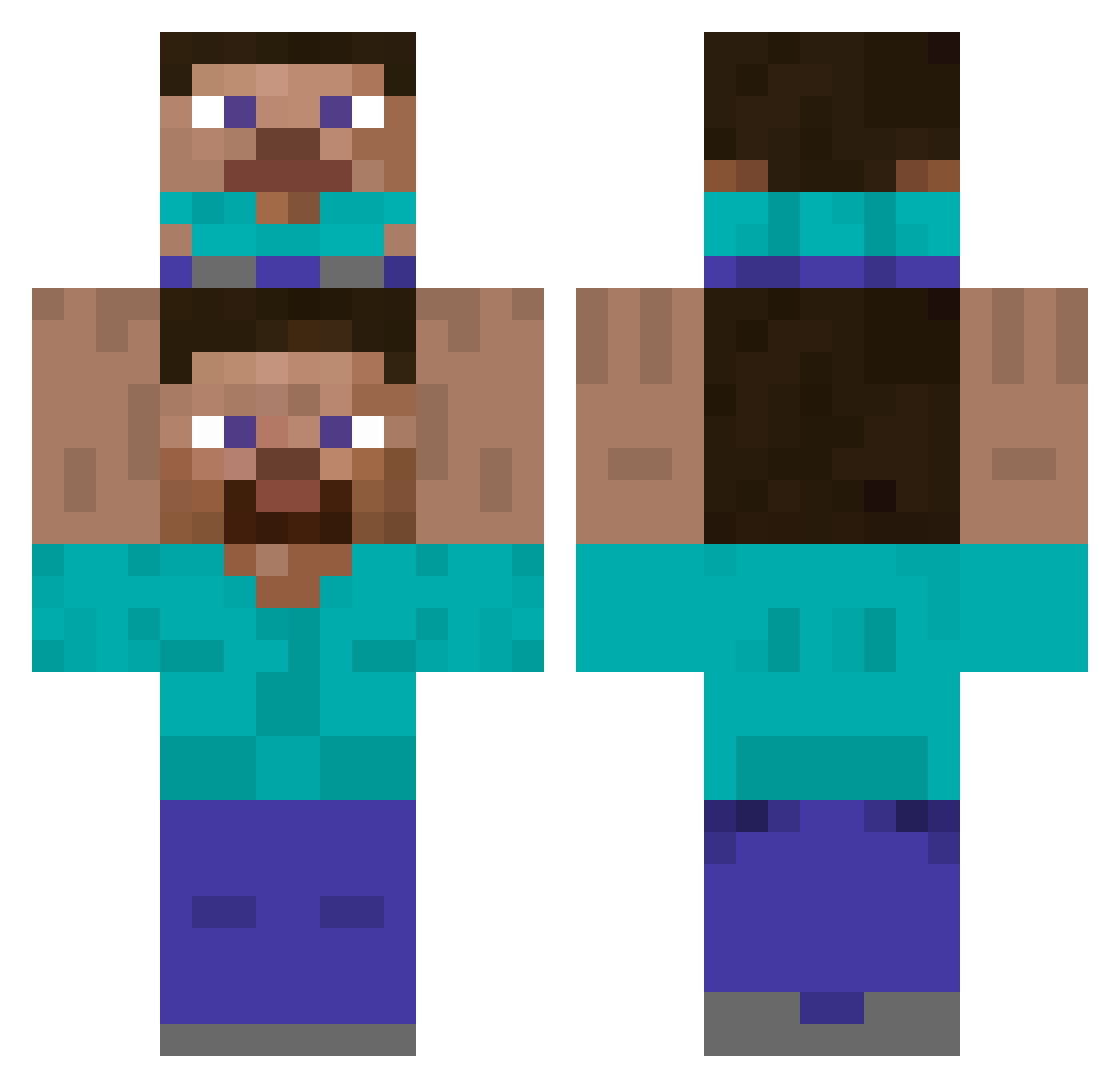
Current Minecraft skin of the player Ars_20, loaded from the official Mojang API. Rotate the 3D model with your mouse or finger, then download the skin as a PNG file and use it in Minecraft: Bedrock Edition or Java Edition for free. When Ars_20 changes their skin, this page updates automatically and the old skin stays in the history below.
Other players with this skin (441)
Ars_20 was the 132nd player we have seen with this skin, first spotted on 22.08.2026. The same skin was seen on these players. Open a nickname to see their current skin and skin history.
 _mr_niceguy KMS0330 ouzor SkrtSkrt37 Bugy__ WoCao_NiMa redux225 xamp Ploess Epicstrings LucasFolha Rui_666 Gugugaga_035 btwitsmk _Mr_Bread_ YordlePiggy Jotddang Na_Sae paka0719 creative1912 Corpseparty07 Ud72 esunsecreto SexMachine_69 Xapheryte Jdafi sunghyun99 mycatsiru Wibyy zzx22alva XxACDxX Coristrum GuidingMonkey Yeegong 1ida00 Xesquimm YeomU Tony20060412
 Noel7896 IHaveAPlane matt13ks yes723 Ananasek49 mark_m4d zack0648 Jeann2009 UniversalPull Eung_Ga JeSuisJeanCastex Squanchy_69 haishen930625 yunglilJosh Eliasdurl Maldonad0 sneerick LR_3000 CyberBear034 EliLikesRice Zabrooo ZKnightT
How to install the Ars_20 skin
- Press the Download button above to save the skin as a PNG file.
- Minecraft: Bedrock Edition (PE): open the Dressing Room from the main menu (or tap your character → Edit Character), go to Classic Skins → Owned, press the + (new skin) button, choose the downloaded PNG and pick the Classic (Steve) model. Works on PC and mobile; consoles cannot import custom skins.
- Minecraft: Java Edition: open the Minecraft Launcher, go to the Skins tab, click New Skin, load the PNG, pick the Classic (Steve) model and press Save & Use. You can also upload it at minecraft.net → Profile → Change Skin.
The skin does not show up after import - what should I do?
Restart Minecraft and open the Dressing Room again - imported skins sometimes appear only after a restart. Also make sure you selected the imported skin and picked the Classic (Steve) model.
Which model should I choose, Classic or Slim?
This skin is designed for the Classic (Steve) model. If you pick the wrong model, the arms of the skin will look stretched or squeezed.
Is the skin of Ars_20 free to download?
Yes. Press Download, save the PNG file and use it in Minecraft: Bedrock Edition or Java Edition - no payment or registration needed. The skin also works on multiplayer servers and Realms.
More skins
Looking for more? Go back to all Minecraft skins and check the top skins of the week, month and all time, or find any player's skin by nickname.