
Ari_134 - Minecraft Skins & Skin History
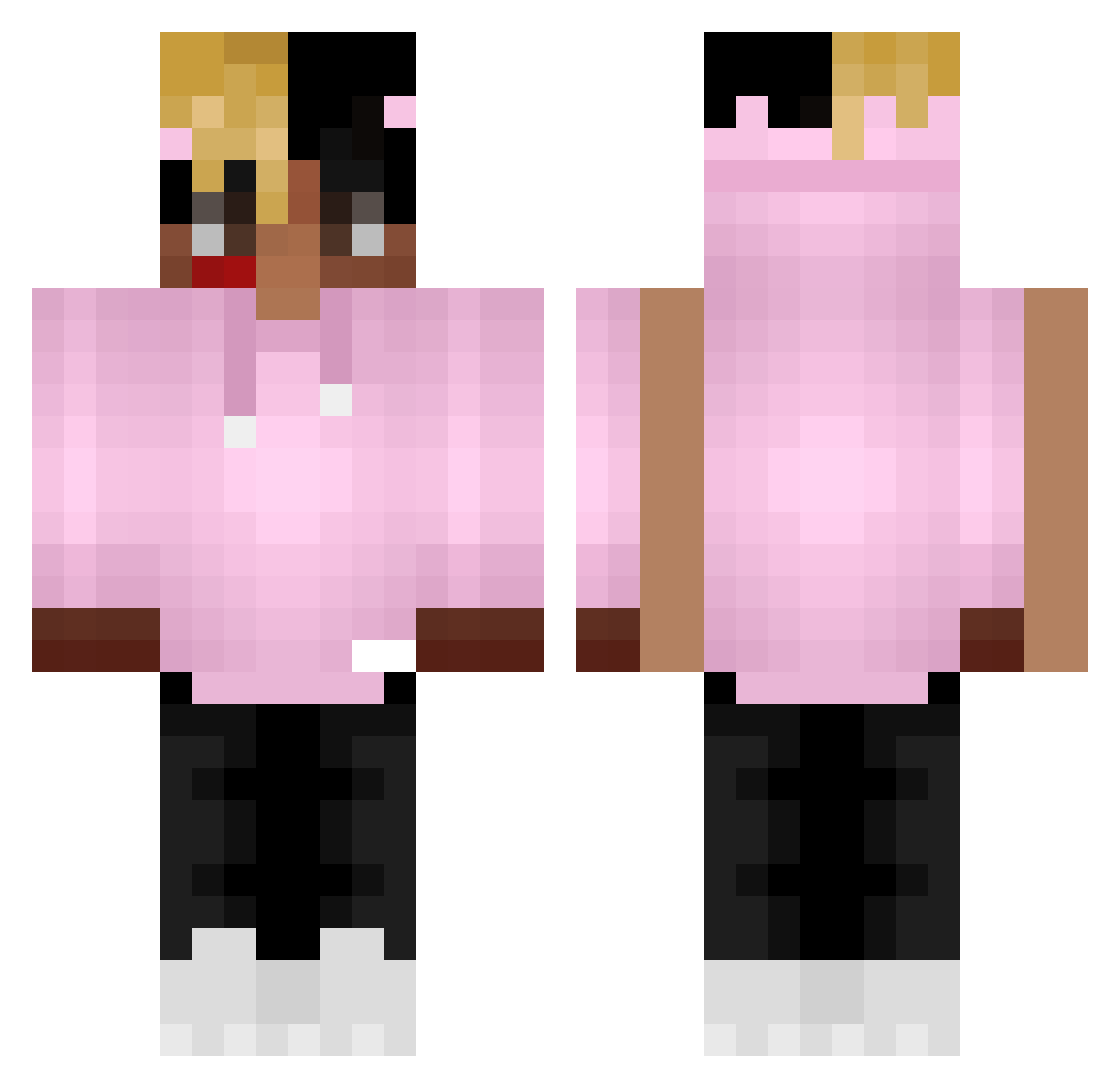
Current Minecraft skin of the player Ari_134, loaded from the official Mojang API. Rotate the 3D model with your mouse or finger, then download the skin as a PNG file and use it in Minecraft: Bedrock Edition or Java Edition for free. When Ari_134 changes their skin, this page updates automatically and the old skin stays in the history below.
Other players with this skin (368)
Ari_134 was the 26th player we have seen with this skin, first spotted on 29.07.2026. The same skin was seen on these players. Open a nickname to see their current skin and skin history.
 Brux_ redstone2599 GermishFear FG_GAMER DragonFireloard1 Nollekk ceteaa YourWaifusTrash Callahxn Vegallace OtiOti gyeong_ho_02 MarcelekkOK slendercows Manetz Freshikae massa4 savudanut Kwatts1 Adios_10k The_Stoner_Hobo erPontti Sarfan KoBe_ButterFTW R1kudOFF uhhbradley GhostDLX Cyprrexx 999CROWN rubianoo redponcho3 xXxigorxXx Zeboulax EmirYsl Diablohub polopika MagicPants001 danicm8 theBattosai Zubils37 ByLeguende EuSouNobre BuLkA16 nofster123 SYousef24 Ollivanderson Guppy4life AidenWRLD1910 PapiYoshi planzon Kochampiwko GizzaS KaczorBRS GalihDipa D3MGame ChocoHaze_ ddevilder santiago_pessa Foxytastic _SuperMilk___
More Xxxtentacion Minecraft skins
See all 407 Xxxtentacion skins
How to install the Ari_134 skin
- Press the Download button above to save the skin as a PNG file.
- Minecraft: Bedrock Edition (PE): open the Dressing Room from the main menu (or tap your character → Edit Character), go to Classic Skins → Owned, press the + (new skin) button, choose the downloaded PNG and pick the Classic (Steve) model. Works on PC and mobile; consoles cannot import custom skins.
- Minecraft: Java Edition: open the Minecraft Launcher, go to the Skins tab, click New Skin, load the PNG, pick the Classic (Steve) model and press Save & Use. You can also upload it at minecraft.net → Profile → Change Skin.
The skin does not show up after import - what should I do?
Restart Minecraft and open the Dressing Room again - imported skins sometimes appear only after a restart. Also make sure you selected the imported skin and picked the Classic (Steve) model.
Which model should I choose, Classic or Slim?
This skin is designed for the Classic (Steve) model. If you pick the wrong model, the arms of the skin will look stretched or squeezed.
Is the skin of Ari_134 free to download?
Yes. Press Download, save the PNG file and use it in Minecraft: Bedrock Edition or Java Edition - no payment or registration needed. The skin also works on multiplayer servers and Realms.
More skins
Looking for more? Go back to all Minecraft skins and check the top skins of the week, month and all time, or find any player's skin by nickname.