
Arcturus933 - Minecraft Skins & Skin History
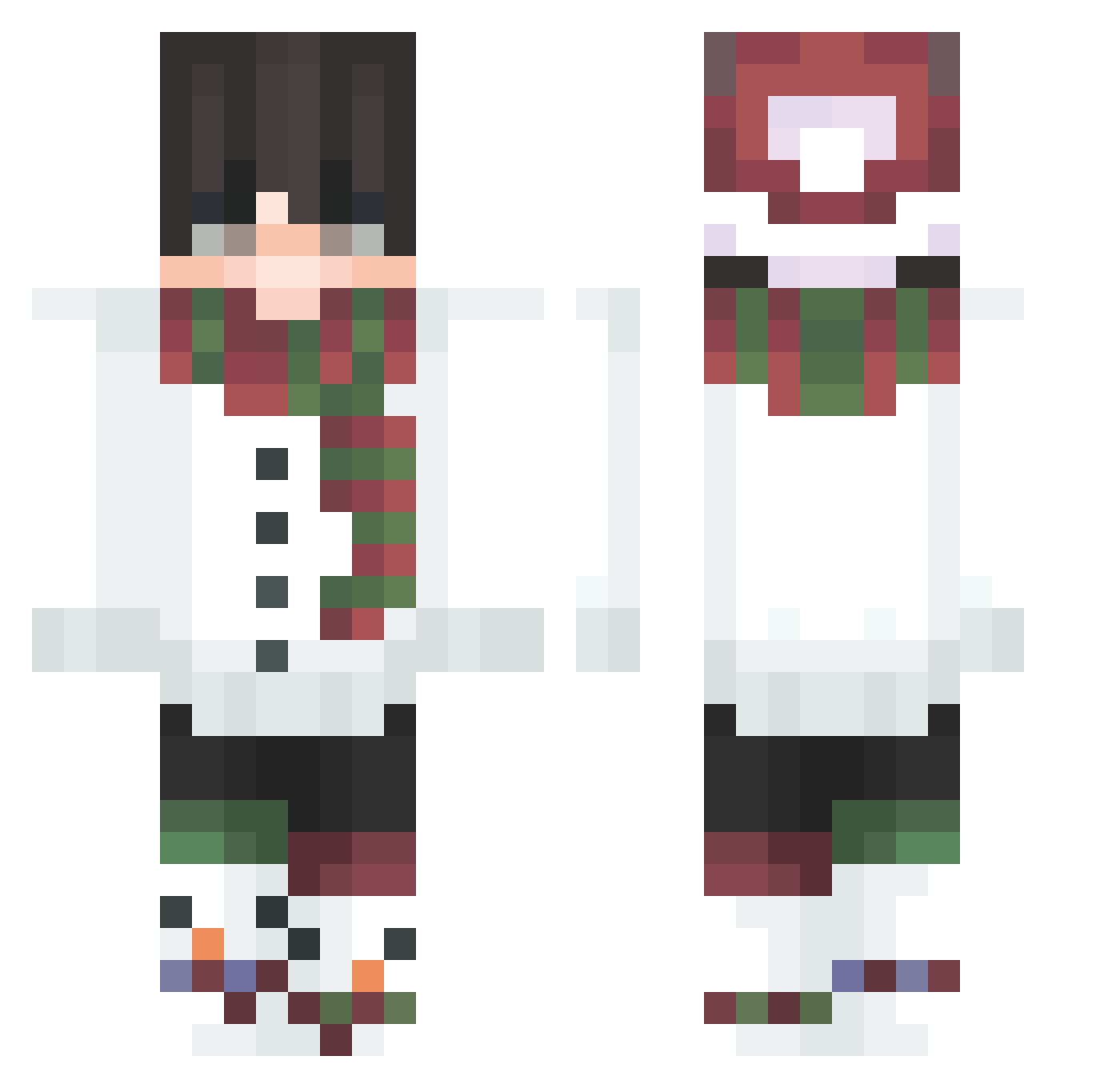
Current Minecraft skin of the player Arcturus933, loaded from the official Mojang API. Rotate the 3D model with your mouse or finger, then download the skin as a PNG file and use it in Minecraft: Bedrock Edition or Java Edition for free. When Arcturus933 changes their skin, this page updates automatically and the old skin stays in the history below.
Other players with this skin (88)
Arcturus933 was the 65th player we have seen with this skin, first spotted on 25.10.2026. The same skin was seen on these players. Open a nickname to see their current skin and skin history.
 Frostskive ISSUMEYUKI lee_jinwu HACKE228 IVAMEx PuninekoJP Hyun306 GrimReaper_51 xuhaojing _Mifiy_ Hystricine_ Zhenyaplays _Innocent__ stenteev H0C04EK Jaxeran zSuperDam yunpil76 Robert2932983128 SpookyFzR NiloGamingSFAIV accerso ReJaiy TronUltimate JiuAnovo PJH07 JonoriousTheWood LuffyLuixz Kartonovii CuriousPotatoes NafeuyZ NiloGamingV MarcusPragensis Heshang_ uhcwiadro MarvEr16 sunziping2016 naytva Kryo77 yozora520 DaanNL shark_1204 KacfeL murakumo623 Hank0r homylopig mako123adi SkiLuxe_Ski Oiller jm12150 _lukegermany_ Me_41th Art_Vandelay351 jjunjuny071226 sui_41 Far_OF_Alpaka SqdDoF_ MattGeniuz KnJtDnezU Sahoe
More Snowman Minecraft skins
How to install the Arcturus933 skin
- Press the Download button above to save the skin as a PNG file.
- Minecraft: Bedrock Edition (PE): open the Dressing Room from the main menu (or tap your character → Edit Character), go to Classic Skins → Owned, press the + (new skin) button, choose the downloaded PNG and pick the Classic (Steve) model. Works on PC and mobile; consoles cannot import custom skins.
- Minecraft: Java Edition: open the Minecraft Launcher, go to the Skins tab, click New Skin, load the PNG, pick the Classic (Steve) model and press Save & Use. You can also upload it at minecraft.net → Profile → Change Skin.
The skin does not show up after import - what should I do?
Restart Minecraft and open the Dressing Room again - imported skins sometimes appear only after a restart. Also make sure you selected the imported skin and picked the Classic (Steve) model.
Which model should I choose, Classic or Slim?
This skin is designed for the Classic (Steve) model. If you pick the wrong model, the arms of the skin will look stretched or squeezed.
Is the skin of Arcturus933 free to download?
Yes. Press Download, save the PNG file and use it in Minecraft: Bedrock Edition or Java Edition - no payment or registration needed. The skin also works on multiplayer servers and Realms.
More skins
Looking for more? Go back to all Minecraft skins and check the top skins of the week, month and all time, or find any player's skin by nickname.