
Archtus - Minecraft Skins & Skin History
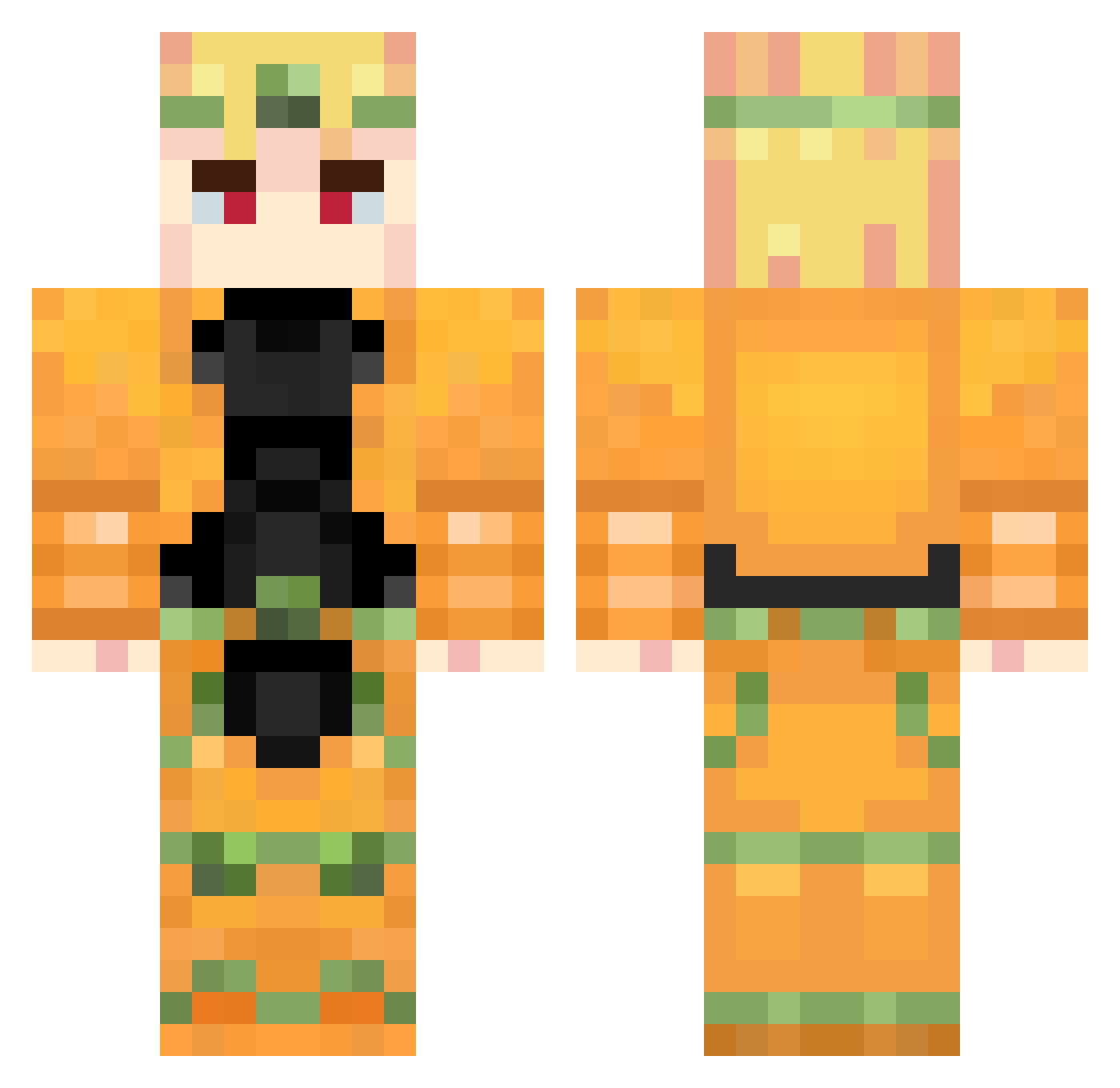
Current Minecraft skin of the player Archtus, loaded from the official Mojang API. Rotate the 3D model with your mouse or finger, then download the skin as a PNG file and use it in Minecraft: Bedrock Edition or Java Edition for free. When Archtus changes their skin, this page updates automatically and the old skin stays in the history below.
Other players with this skin (738)
Archtus was the 272nd player we have seen with this skin, first spotted on 29.08.2026. The same skin was seen on these players. Open a nickname to see their current skin and skin history.
 lolfass penguxco1234 Dhzll VitorNuno diobrando1 Gorgonola hamcheese14 Ezshots69 flauzenn Marcioso7124 marble_85 Orest3s JasQuatch13 Burak37 Michalicek5 D_emon007 Eden5Crixus S3kki17 KEVIN__Yaaaaan cowlex Flame101N bowshutter chocolatebunbun2 aizensosuke71 XlonoCrush InfamousHuss DOYSOUND polierteGlatze6 nitoom QWQ369 Halowar78 Donizets
 Converse05 HerPlane Paganini_0 fah8778 hellokitty06 Saternus gautgot35 _MsnLzn_ marspuppyy Josho_2010 Zenaqulfeo Sathrathus AgentToast47 InfinitySpider
 ratinhons AwesomeChease55 Canjas121 Golden_Liam Wryyyy124 BryanZayn ZaaWaarDoo Gojo0verHeaven MeyMey5133 Fizzy_39 superultrakiller lekhaidinh121 victorio0 Vipath
More Dio Brando Minecraft skins
How to install the Archtus skin
- Press the Download button above to save the skin as a PNG file.
- Minecraft: Bedrock Edition (PE): open the Dressing Room from the main menu (or tap your character → Edit Character), go to Classic Skins → Owned, press the + (new skin) button, choose the downloaded PNG and pick the Classic (Steve) model. Works on PC and mobile; consoles cannot import custom skins.
- Minecraft: Java Edition: open the Minecraft Launcher, go to the Skins tab, click New Skin, load the PNG, pick the Classic (Steve) model and press Save & Use. You can also upload it at minecraft.net → Profile → Change Skin.
The skin does not show up after import - what should I do?
Restart Minecraft and open the Dressing Room again - imported skins sometimes appear only after a restart. Also make sure you selected the imported skin and picked the Classic (Steve) model.
Which model should I choose, Classic or Slim?
This skin is designed for the Classic (Steve) model. If you pick the wrong model, the arms of the skin will look stretched or squeezed.
Is the skin of Archtus free to download?
Yes. Press Download, save the PNG file and use it in Minecraft: Bedrock Edition or Java Edition - no payment or registration needed. The skin also works on multiplayer servers and Realms.
More skins
Looking for more? Go back to all Minecraft skins and check the top skins of the week, month and all time, or find any player's skin by nickname.