
Arav101 - Minecraft Skins & Skin History
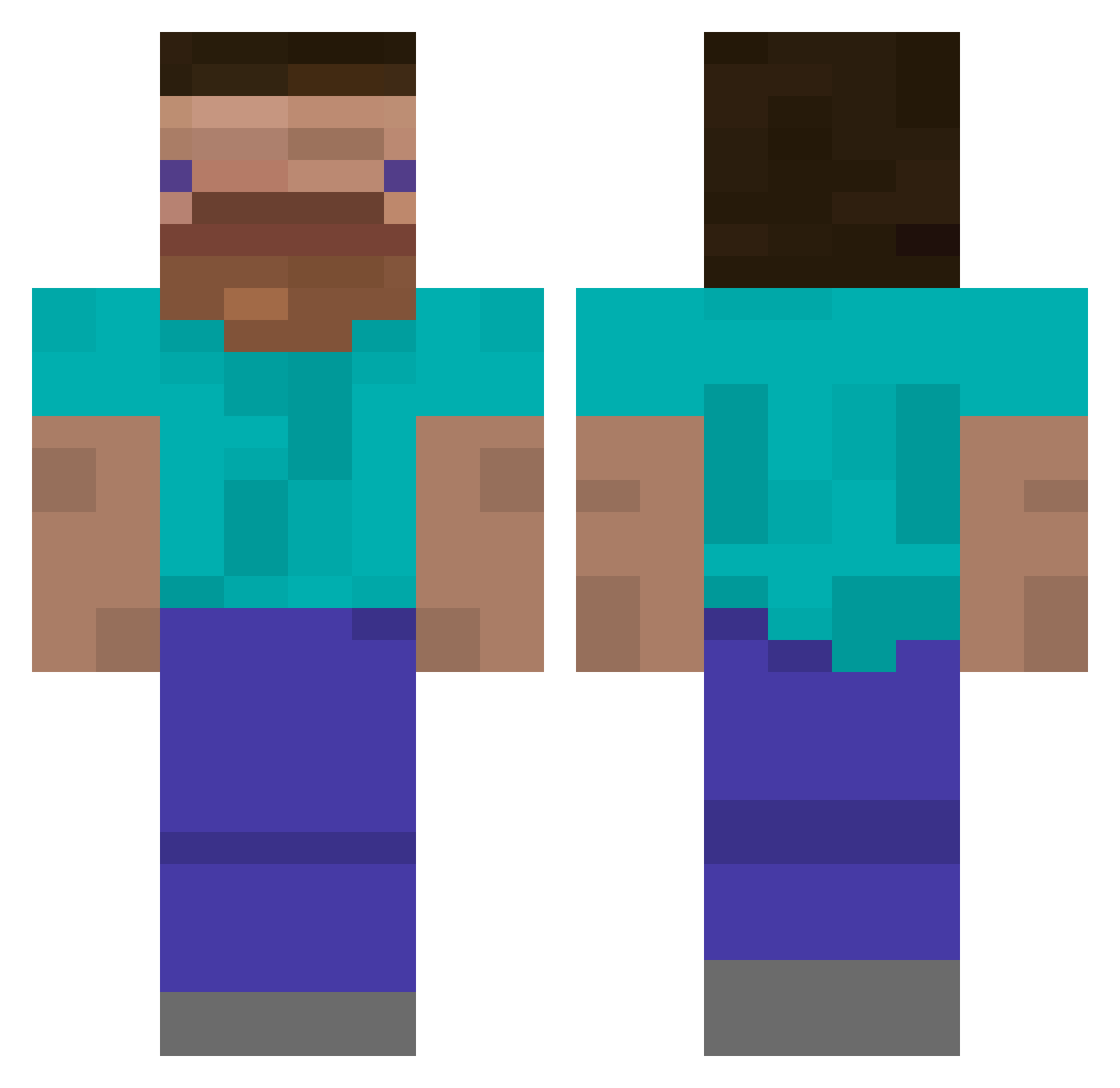
Current Minecraft skin of the player Arav101, loaded from the official Mojang API. Rotate the 3D model with your mouse or finger, then download the skin as a PNG file and use it in Minecraft: Bedrock Edition or Java Edition for free. When Arav101 changes their skin, this page updates automatically and the old skin stays in the history below.
Other players with this skin (482)
Arav101 was the 400th player we have seen with this skin, first spotted on 25.10.2026. The same skin was seen on these players. Open a nickname to see their current skin and skin history.
 TOP_slim cycloevt Miiskuboi Mrkvicka11 karimz_ AmgeshnikovecXX aubs__27 MCP_GamJa Anceph31 SALTY4F sdw0033 Liyan_3 LoopMeHarder SharkDestoyer Shingou DunnuD RDaaa Y109 blablabla004 Strong_Drinks IMDOLDOL Centiums kim_d3 koreajksk1 gordoks meniluv Btot1212 longholdpham YouDeserveToDie woshisb021 RoyBoyXD Levdragon3 SxdnessV2 El_Tago Jurakles whiplash427 bigreid lil23 freecow03 SnyGuy k1ngfancy Lucas_Le_Freeman Akatsiya2S3 S4BL mlechko iloveveganfurrys lolBit55 luiskillo uhh_hh THEWILDKID789 Cupcake401972 Faze_Masuo universalgojira coffeeanti Zaster_is_me Darkerrer kupsztal122 Nyrisith Faisal_TTrg ISellBalls
How to install the Arav101 skin
- Press the Download button above to save the skin as a PNG file.
- Minecraft: Bedrock Edition (PE): open the Dressing Room from the main menu (or tap your character → Edit Character), go to Classic Skins → Owned, press the + (new skin) button, choose the downloaded PNG and pick the Classic (Steve) model. Works on PC and mobile; consoles cannot import custom skins.
- Minecraft: Java Edition: open the Minecraft Launcher, go to the Skins tab, click New Skin, load the PNG, pick the Classic (Steve) model and press Save & Use. You can also upload it at minecraft.net → Profile → Change Skin.
The skin does not show up after import - what should I do?
Restart Minecraft and open the Dressing Room again - imported skins sometimes appear only after a restart. Also make sure you selected the imported skin and picked the Classic (Steve) model.
Which model should I choose, Classic or Slim?
This skin is designed for the Classic (Steve) model. If you pick the wrong model, the arms of the skin will look stretched or squeezed.
Is the skin of Arav101 free to download?
Yes. Press Download, save the PNG file and use it in Minecraft: Bedrock Edition or Java Edition - no payment or registration needed. The skin also works on multiplayer servers and Realms.
More skins
Looking for more? Go back to all Minecraft skins and check the top skins of the week, month and all time, or find any player's skin by nickname.