
AnteMcSwag8 - Minecraft Skins & Skin History
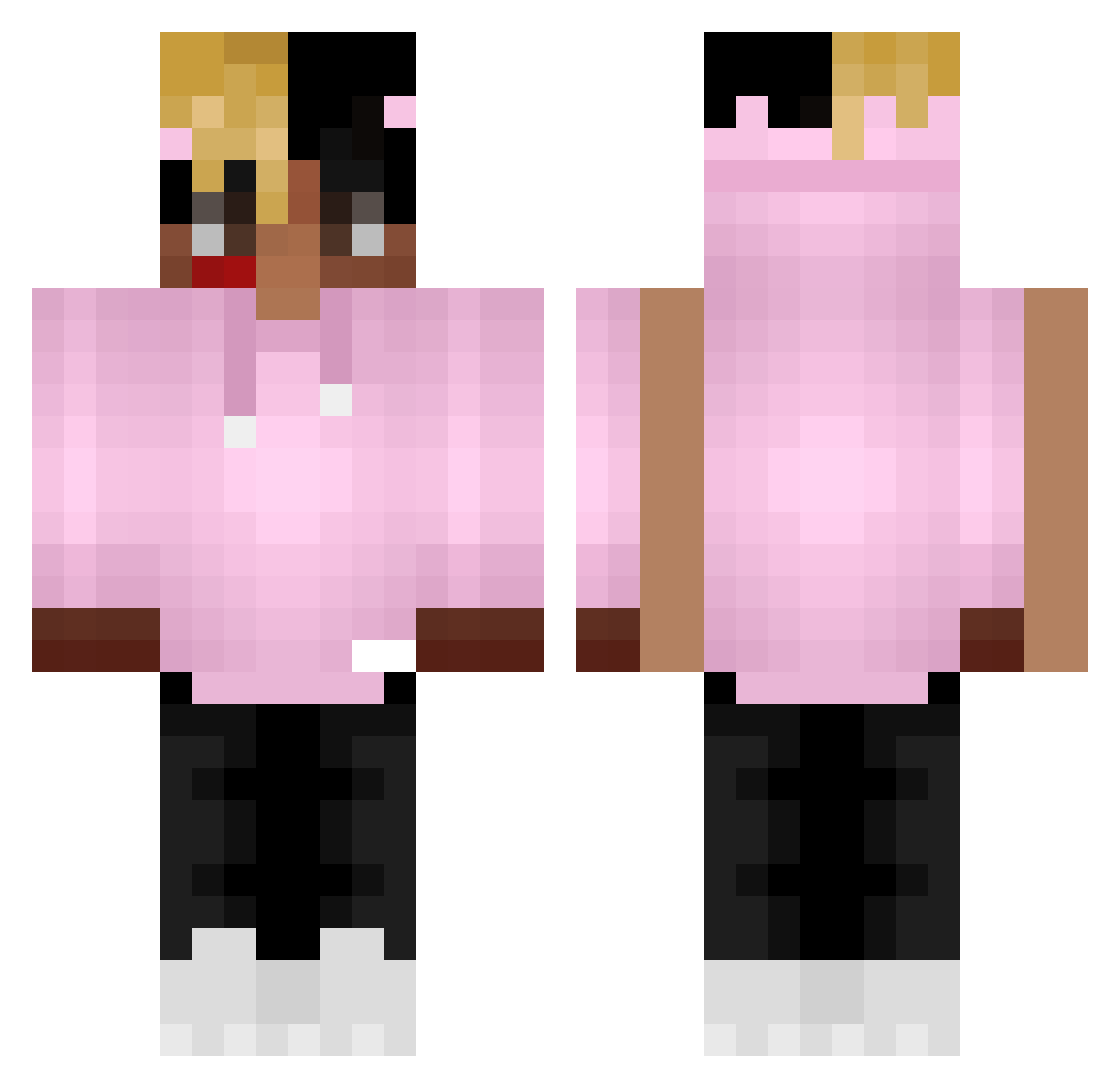
Current Minecraft skin of the player AnteMcSwag8, loaded from the official Mojang API. Rotate the 3D model with your mouse or finger, then download the skin as a PNG file and use it in Minecraft: Bedrock Edition or Java Edition for free. When AnteMcSwag8 changes their skin, this page updates automatically and the old skin stays in the history below.
Other players with this skin (368)
AnteMcSwag8 was the 159th player we have seen with this skin, first spotted on 10.09.2026. The same skin was seen on these players. Open a nickname to see their current skin and skin history.
 August143 Matusauce des_bok niko13013 Danyel999drvg qwertyFreak07 FFL0 Nerkooo GiulianoXIV Gingy_OUGhh Tommyrlttv DrYatty iluvfernando Scorpion0V0 Xpertllama21 Blockmasterr flags2 p013s Geo76 irockvtmnts MINECRAFTKEISI OpClaps_ NxRory Tobiaskoo eoineoin LegendRawEXE Audisterman Isaque0_ Rhoa7 rdouglas Garr3tt13 AKalEXEAK bot_tubias diamondcatcher39 gdoulouf4 DerRavioli IvanMolero6 _Dozzy_ aromero21 ElParalepipedoHD TryKeazer Whxxte juStorny ay_ThaSup_ya Vaixey JakisChopak T3kNyc_83YT Midcl Fitzy13 MelooYT D4rK09 maximfie NikZ712 J_DAWG8 L1l_Biscuit Fuwaii naik55 imposs1bl3 RoyalzPedro_ Ludicoloe
More Xxxtentacion Minecraft skins
See all 407 Xxxtentacion skins
How to install the AnteMcSwag8 skin
- Press the Download button above to save the skin as a PNG file.
- Minecraft: Bedrock Edition (PE): open the Dressing Room from the main menu (or tap your character → Edit Character), go to Classic Skins → Owned, press the + (new skin) button, choose the downloaded PNG and pick the Classic (Steve) model. Works on PC and mobile; consoles cannot import custom skins.
- Minecraft: Java Edition: open the Minecraft Launcher, go to the Skins tab, click New Skin, load the PNG, pick the Classic (Steve) model and press Save & Use. You can also upload it at minecraft.net → Profile → Change Skin.
The skin does not show up after import - what should I do?
Restart Minecraft and open the Dressing Room again - imported skins sometimes appear only after a restart. Also make sure you selected the imported skin and picked the Classic (Steve) model.
Which model should I choose, Classic or Slim?
This skin is designed for the Classic (Steve) model. If you pick the wrong model, the arms of the skin will look stretched or squeezed.
Is the skin of AnteMcSwag8 free to download?
Yes. Press Download, save the PNG file and use it in Minecraft: Bedrock Edition or Java Edition - no payment or registration needed. The skin also works on multiplayer servers and Realms.
More skins
Looking for more? Go back to all Minecraft skins and check the top skins of the week, month and all time, or find any player's skin by nickname.