
Andrecraft2k - Minecraft Skins & Skin History
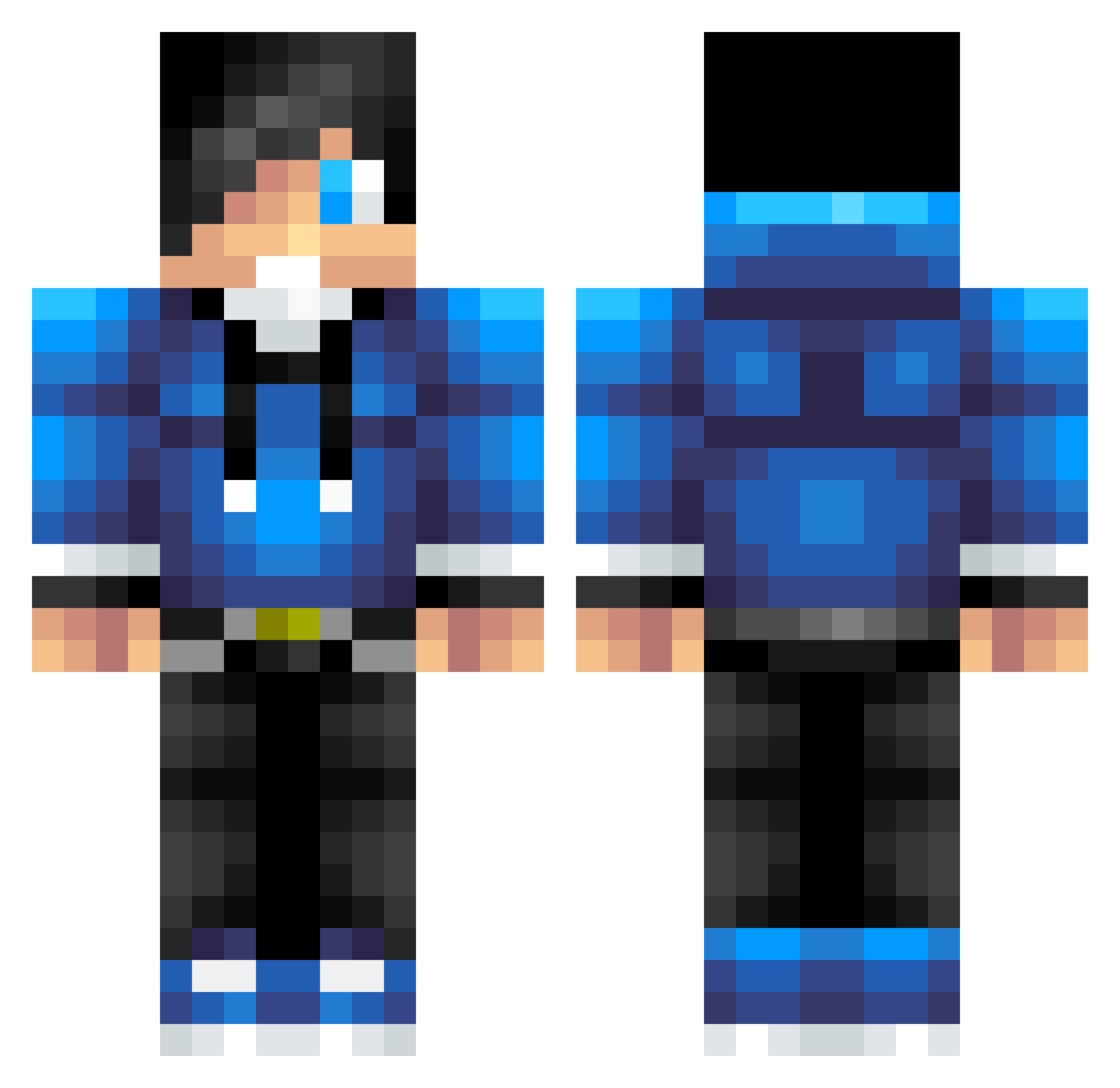
Current Minecraft skin of the player Andrecraft2k, loaded from the official Mojang API. Rotate the 3D model with your mouse or finger, then download the skin as a PNG file and use it in Minecraft: Bedrock Edition or Java Edition for free. When Andrecraft2k changes their skin, this page updates automatically and the old skin stays in the history below.
Other players with this skin (623)
Andrecraft2k was the 481st player we have seen with this skin, first spotted on 08.10.2026. The same skin was seen on these players. Open a nickname to see their current skin and skin history.
 mikeydplewis DJPickle PILLAGE_NYC Den228 Some_Squid snowman90808 00Bloodypvp00 C9_Huro captainalex12345 Paaseitje asiangamer213 adsaucedo PT119 Funkaii jerrytallwinner Tyawesome375 ronnie2guns diamondman2110 Kbade TheProhhie DeKwekGames nightminer1 Supernui NsFMaster jchoi16 leipzigsteff Joseph5964 GeneralKush Scottwesty25 LauraVO timcool2005 SinisterNeptune the_goldenlion eliblalock yolo555_2 Nolan_joshua MekkeBoy_ 210guns Brockstar1270_YT dustymonkey44 frostspider65 Talmond6 tydell21 OopicooO Leb7187 Relen_SVK Pushingguy tommy5902 supermanlygamer TNTking54 Monaliesa kaspeb HARRIBOmaster NormalGuyHA Scorpanda ALEXSANTERI1 redfoxjunior Marwin20003 switchtiger34 nate_b_d
How to install the Andrecraft2k skin
- Press the Download button above to save the skin as a PNG file.
- Minecraft: Bedrock Edition (PE): open the Dressing Room from the main menu (or tap your character → Edit Character), go to Classic Skins → Owned, press the + (new skin) button, choose the downloaded PNG and pick the Classic (Steve) model. Works on PC and mobile; consoles cannot import custom skins.
- Minecraft: Java Edition: open the Minecraft Launcher, go to the Skins tab, click New Skin, load the PNG, pick the Classic (Steve) model and press Save & Use. You can also upload it at minecraft.net → Profile → Change Skin.
The skin does not show up after import - what should I do?
Restart Minecraft and open the Dressing Room again - imported skins sometimes appear only after a restart. Also make sure you selected the imported skin and picked the Classic (Steve) model.
Which model should I choose, Classic or Slim?
This skin is designed for the Classic (Steve) model. If you pick the wrong model, the arms of the skin will look stretched or squeezed.
Is the skin of Andrecraft2k free to download?
Yes. Press Download, save the PNG file and use it in Minecraft: Bedrock Edition or Java Edition - no payment or registration needed. The skin also works on multiplayer servers and Realms.
More skins
Looking for more? Go back to all Minecraft skins and check the top skins of the week, month and all time, or find any player's skin by nickname.