
Amirale7491 - Minecraft Skins & Skin History
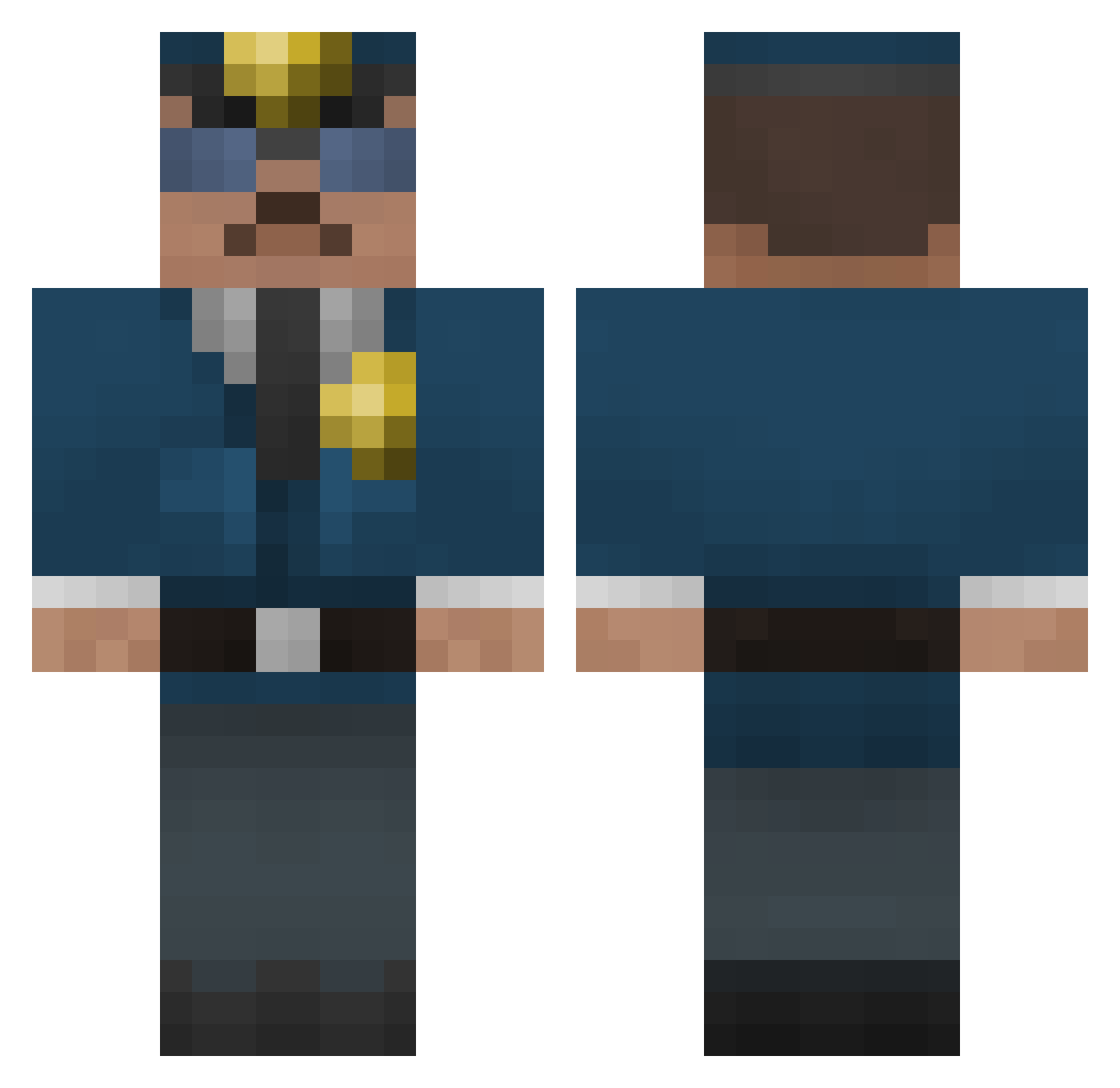
Current Minecraft skin of the player Amirale7491, loaded from the official Mojang API. Rotate the 3D model with your mouse or finger, then download the skin as a PNG file and use it in Minecraft: Bedrock Edition or Java Edition for free. When Amirale7491 changes their skin, this page updates automatically and the old skin stays in the history below.
Other players with this skin (305)
Amirale7491 was the 56th player we have seen with this skin, first spotted on 12.08.2026. The same skin was seen on these players. Open a nickname to see their current skin and skin history.
 lucke790 defense_Lt Skymen GuntherS Joao1623 Dipsy_xo carsonwells goose1245 reallucas04 frayedspool117 tri99er5eri0u5 Oconn12 water_HD Joseph2308 italictoaster808 danbentower DOD007 Politiand iPosss ImJeffe PercyJason BORRI4 mathiasmuf shi_princess Mueterfiker58 DanvilleMiners FATH3R_TIME MONSTERTRUCK602 minecraftgu25 SHEEPDOG231 AdventuresOfFoxx katsuma2013 jeb009 MisterShiine Piccolo83 leern KodaRanger Joshua_DaSilva FigoTheMachine Darbo69Bot15 bumca zoepasquale BlyR67 SrtCharger Twicehealed mister_flexi bassmaster9312 magnusthrysoe CerealLover1 DanAlt35 golv97 SRich12 pr0_star mcmaniacek midgetmastr OliverHanning MotoCopV1 CannonFodder11 SerialFly R3X1
More Cop Minecraft skins
How to install the Amirale7491 skin
- Press the Download button above to save the skin as a PNG file.
- Minecraft: Bedrock Edition (PE): open the Dressing Room from the main menu (or tap your character → Edit Character), go to Classic Skins → Owned, press the + (new skin) button, choose the downloaded PNG and pick the Classic (Steve) model. Works on PC and mobile; consoles cannot import custom skins.
- Minecraft: Java Edition: open the Minecraft Launcher, go to the Skins tab, click New Skin, load the PNG, pick the Classic (Steve) model and press Save & Use. You can also upload it at minecraft.net → Profile → Change Skin.
The skin does not show up after import - what should I do?
Restart Minecraft and open the Dressing Room again - imported skins sometimes appear only after a restart. Also make sure you selected the imported skin and picked the Classic (Steve) model.
Which model should I choose, Classic or Slim?
This skin is designed for the Classic (Steve) model. If you pick the wrong model, the arms of the skin will look stretched or squeezed.
Is the skin of Amirale7491 free to download?
Yes. Press Download, save the PNG file and use it in Minecraft: Bedrock Edition or Java Edition - no payment or registration needed. The skin also works on multiplayer servers and Realms.
More skins
Looking for more? Go back to all Minecraft skins and check the top skins of the week, month and all time, or find any player's skin by nickname.