
Allenyeh_77 - Minecraft Skins & Skin History
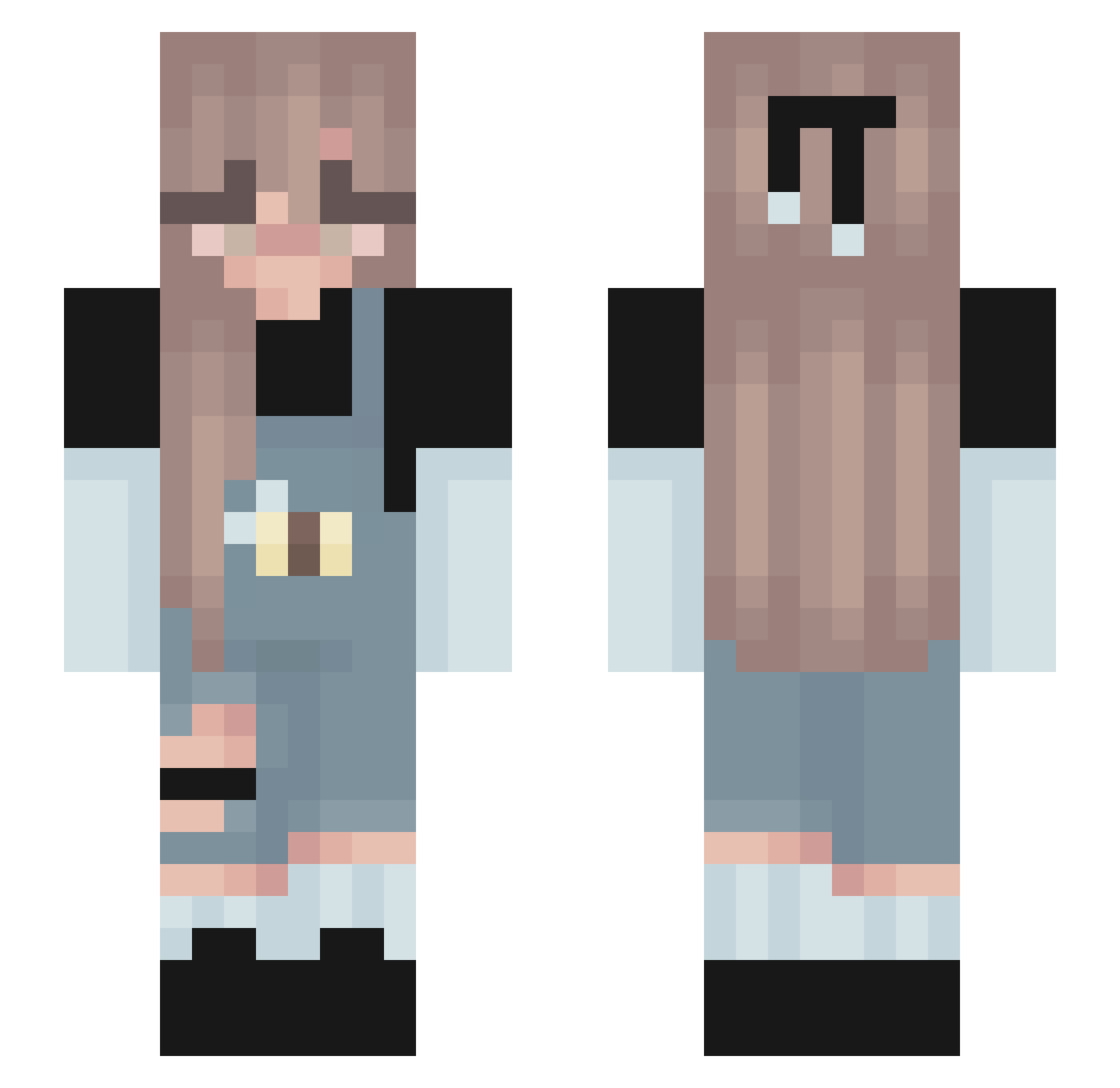
Current Minecraft skin of the player Allenyeh_77, loaded from the official Mojang API. Rotate the 3D model with your mouse or finger, then download the skin as a PNG file and use it in Minecraft: Bedrock Edition or Java Edition for free. When Allenyeh_77 changes their skin, this page updates automatically and the old skin stays in the history below.
Other players with this skin (139)
Allenyeh_77 was the 9th player we have seen with this skin, first spotted on 30.07.2026. The same skin was seen on these players. Open a nickname to see their current skin and skin history.
 YoonaBeeBee AlannaBanana45 Fa1thHealer nozyczki Michriv125 Dyslexicloser123 ComfyCactus56 moxiaoyang s_linn victxtoria Jdogisamadlad EinWildesLeena Nicix33 Badhorn3 notimejen _SweetCookies_ ELLAAHH PsychoDreaming_ ellaisyucky LilMiss1357 GwenAS rachelxoxo SmolLilBean MajErCitY hezzzzz Wiosenna_ Miriven EmileyRose septsoda LumberQ Melinda1207 Isa_385 Liesjebouwt Annafm27 Hehkutimu Trina157 chemakazi RainingSomething kira_090 endermen3333 Panda_P0w chantalceline_ Fridonia dancing_julie shqikhaaa seoyoning Nozomi_chan ImproveTank sinclairln Yakies Martynkaxdxd licy9 hannahh0101 skyboy1020 magicalunicorn39 birdy17 NikiRouq its_bby ghostygirl3 summer634
More Cute Minecraft skins
How to install the Allenyeh_77 skin
- Press the Download button above to save the skin as a PNG file.
- Minecraft: Bedrock Edition (PE): open the Dressing Room from the main menu (or tap your character → Edit Character), go to Classic Skins → Owned, press the + (new skin) button, choose the downloaded PNG and pick the Slim (Alex) model. Works on PC and mobile; consoles cannot import custom skins.
- Minecraft: Java Edition: open the Minecraft Launcher, go to the Skins tab, click New Skin, load the PNG, pick the Slim (Alex) model and press Save & Use. You can also upload it at minecraft.net → Profile → Change Skin.
The skin does not show up after import - what should I do?
Restart Minecraft and open the Dressing Room again - imported skins sometimes appear only after a restart. Also make sure you selected the imported skin and picked the Slim (Alex) model.
Which model should I choose, Classic or Slim?
This skin is designed for the Slim (Alex) model. If you pick the wrong model, the arms of the skin will look stretched or squeezed.
Is the skin of Allenyeh_77 free to download?
Yes. Press Download, save the PNG file and use it in Minecraft: Bedrock Edition or Java Edition - no payment or registration needed. The skin also works on multiplayer servers and Realms.
More skins
Looking for more? Go back to all Minecraft skins and check the top skins of the week, month and all time, or find any player's skin by nickname.