
Alex6291 - Minecraft Skins & Skin History
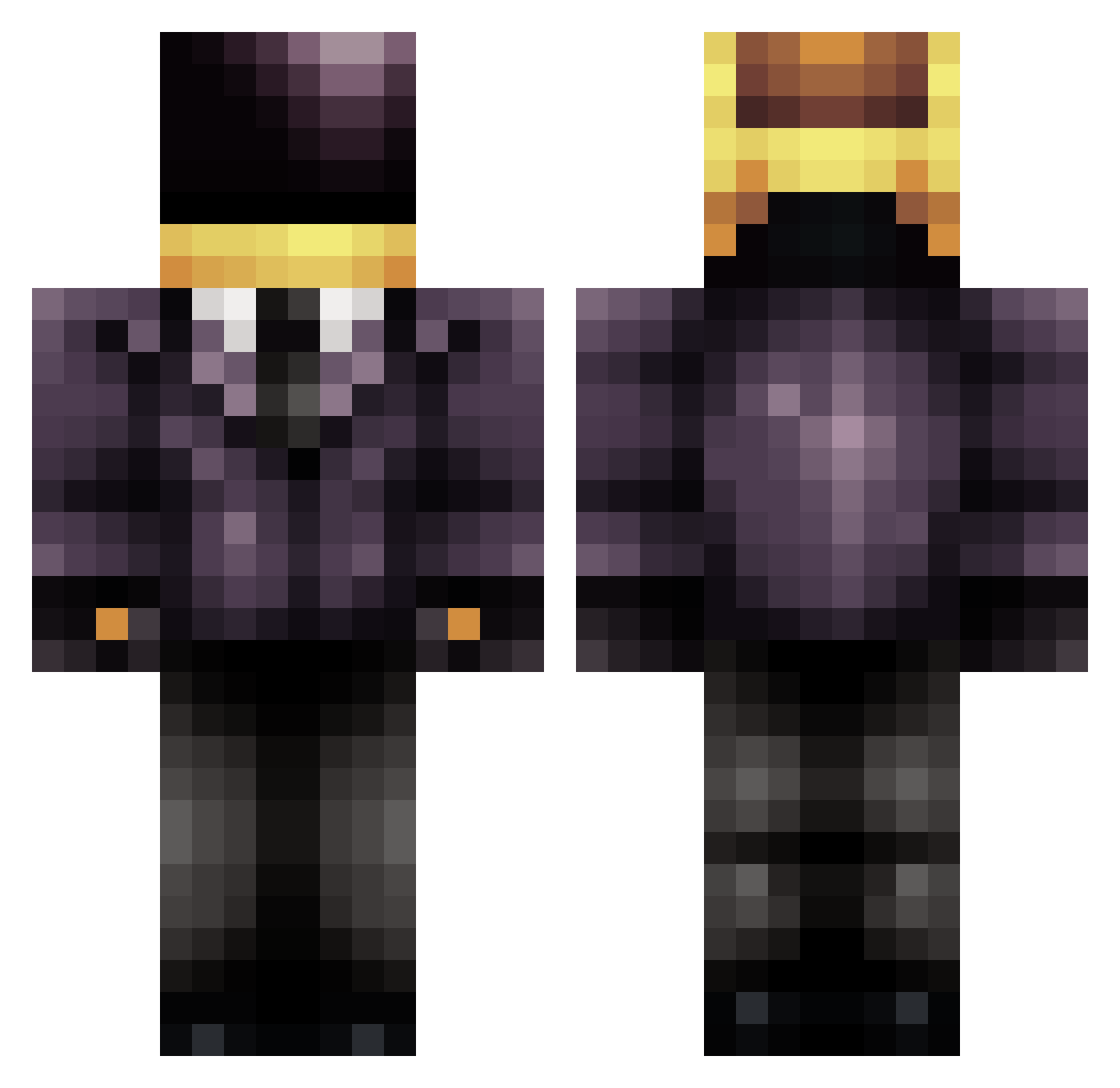
Current Minecraft skin of the player Alex6291, loaded from the official Mojang API. Rotate the 3D model with your mouse or finger, then download the skin as a PNG file and use it in Minecraft: Bedrock Edition or Java Edition for free. When Alex6291 changes their skin, this page updates automatically and the old skin stays in the history below.
Other players with this skin (830)
Alex6291 was the 646th player we have seen with this skin, first spotted on 24.10.2026. The same skin was seen on these players. Open a nickname to see their current skin and skin history.
 MrChauvin iiSpaCeee Crystalninja13 msgalaxy FussyMatic23 Guy_Man Zynxc Planckinator T_Wootang shadowguns Bruno_vp That_One_Miner Dovahkin910 shutEMoutFTW simdoesminecraft 1337hh123 _Drood_ Renegazed MrAwic ByronTheHorror DaTa_Evo InfamousBoundXx tori3551 ItalianJesus120 dexlan1 Paltdonald get_rekt_dongus ZachArnold Pot_Tesla JanuxHsu malsly bigdavedog Choolka migitman922 Amac4life manateeman72 Fredigood jaguar1516 sirr0 e_5 demonmoocow Deluxe028 Seal_MT SkyBlock898 frederik4410 Arrow915 _Wiwii_ A_Dibble quiky2 kneefin jaco1111 PieEaterBrian LethalDynasty caseyss10 DivergentReality liltunahalpert mongfish Schraubinho ludvigwilliam nickseb
More Daft Punk Minecraft skins
How to install the Alex6291 skin
- Press the Download button above to save the skin as a PNG file.
- Minecraft: Bedrock Edition (PE): open the Dressing Room from the main menu (or tap your character → Edit Character), go to Classic Skins → Owned, press the + (new skin) button, choose the downloaded PNG and pick the Classic (Steve) model. Works on PC and mobile; consoles cannot import custom skins.
- Minecraft: Java Edition: open the Minecraft Launcher, go to the Skins tab, click New Skin, load the PNG, pick the Classic (Steve) model and press Save & Use. You can also upload it at minecraft.net → Profile → Change Skin.
The skin does not show up after import - what should I do?
Restart Minecraft and open the Dressing Room again - imported skins sometimes appear only after a restart. Also make sure you selected the imported skin and picked the Classic (Steve) model.
Which model should I choose, Classic or Slim?
This skin is designed for the Classic (Steve) model. If you pick the wrong model, the arms of the skin will look stretched or squeezed.
Is the skin of Alex6291 free to download?
Yes. Press Download, save the PNG file and use it in Minecraft: Bedrock Edition or Java Edition - no payment or registration needed. The skin also works on multiplayer servers and Realms.
More skins
Looking for more? Go back to all Minecraft skins and check the top skins of the week, month and all time, or find any player's skin by nickname.