
Alessandro23144 - Minecraft Skins & Skin History
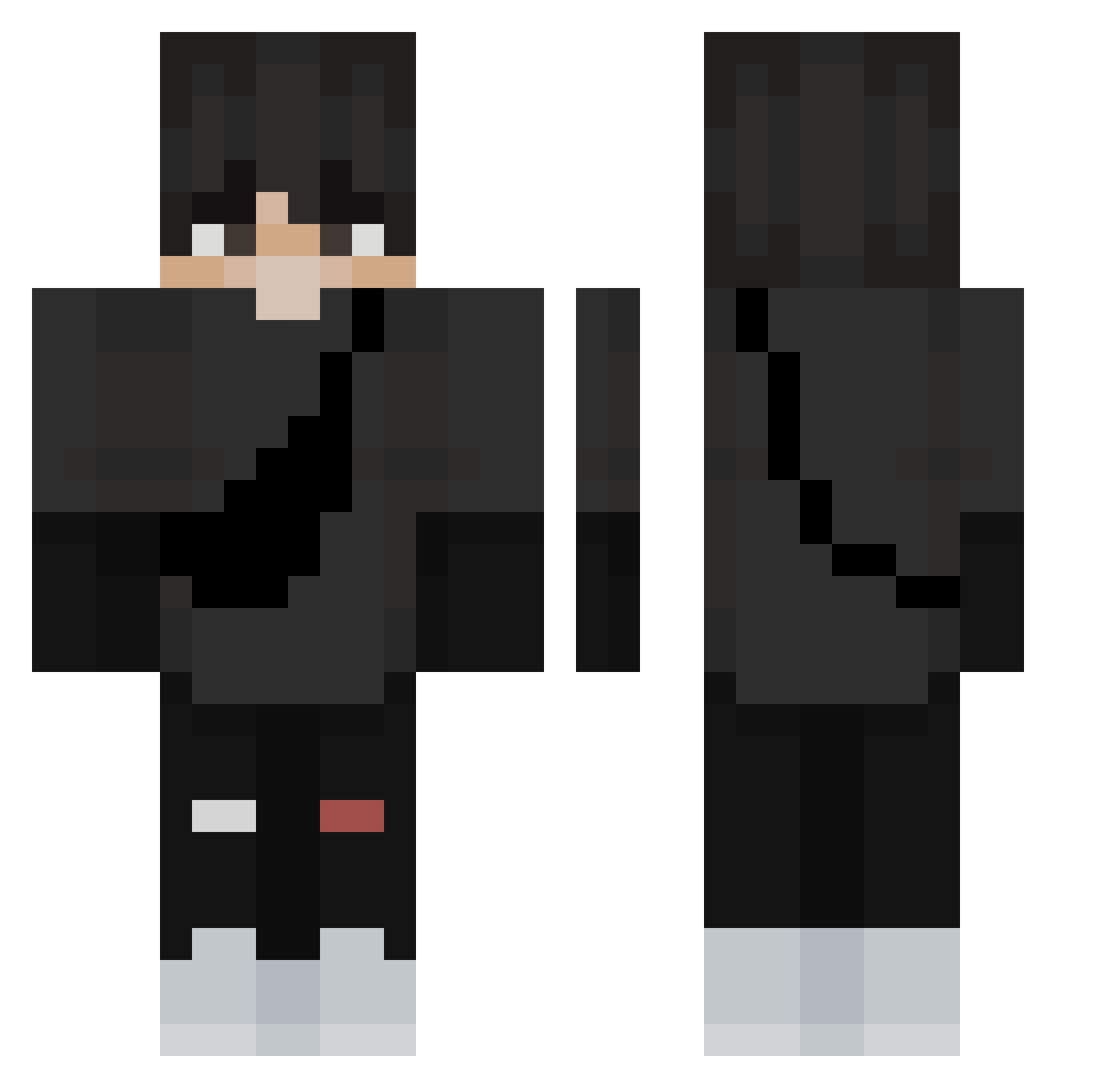
Current Minecraft skin of the player Alessandro23144, loaded from the official Mojang API. Rotate the 3D model with your mouse or finger, then download the skin as a PNG file and use it in Minecraft: Bedrock Edition or Java Edition for free. When Alessandro23144 changes their skin, this page updates automatically and the old skin stays in the history below.
Other players with this skin (269)
Alessandro23144 was the 21st player we have seen with this skin, first spotted on 01.08.2026. The same skin was seen on these players. Open a nickname to see their current skin and skin history.
 sufl
sufl Acleso zIsaque7 UDON777 smashmateo Yamamu2 sanalici KabzZEHEF Fazii_ Dahnzii oSkybrabo Cinek___ Plexoidy LeoLiss siscosunshine AUAblink Drashe8 flo_quinho YoungU_ Roy12104220 Filipsson03 pedroibz10 ahvail _oVinni FireBoyGamer ExpressOnRs HAX_MAN IceDragon0225 S771 Krzys540 Comsang phobbig Master_Yo_77 petiparkbr wrdrekd 506z RvfreitasM5 Abdivu WeeklongHoney2 DELLAKOS Cjplayz611 Florian5227 Ewaniwe2007 jumin9898 TANJIRO20 Fetzelstick _Migohst_ Hugstone EvXer_ damiano45 Estokelei dimsum1080 sealion3435 Makunnex __Lukasz_2115 NeutroEU Ksiwon Routineer MELONYTK JayDog1224
More E Boy Minecraft skins
How to install the Alessandro23144 skin
- Press the Download button above to save the skin as a PNG file.
- Minecraft: Bedrock Edition (PE): open the Dressing Room from the main menu (or tap your character → Edit Character), go to Classic Skins → Owned, press the + (new skin) button, choose the downloaded PNG and pick the Classic (Steve) model. Works on PC and mobile; consoles cannot import custom skins.
- Minecraft: Java Edition: open the Minecraft Launcher, go to the Skins tab, click New Skin, load the PNG, pick the Classic (Steve) model and press Save & Use. You can also upload it at minecraft.net → Profile → Change Skin.
The skin does not show up after import - what should I do?
Restart Minecraft and open the Dressing Room again - imported skins sometimes appear only after a restart. Also make sure you selected the imported skin and picked the Classic (Steve) model.
Which model should I choose, Classic or Slim?
This skin is designed for the Classic (Steve) model. If you pick the wrong model, the arms of the skin will look stretched or squeezed.
Is the skin of Alessandro23144 free to download?
Yes. Press Download, save the PNG file and use it in Minecraft: Bedrock Edition or Java Edition - no payment or registration needed. The skin also works on multiplayer servers and Realms.
More skins
Looking for more? Go back to all Minecraft skins and check the top skins of the week, month and all time, or find any player's skin by nickname.