
Ahja420 - Minecraft Skins & Skin History
Current Minecraft skin of the player Ahja420, loaded from the official Mojang API. Rotate the 3D model with your mouse or finger, then download the skin as a PNG file and use it in Minecraft: Bedrock Edition or Java Edition for free. When Ahja420 changes their skin, this page updates automatically and the old skin stays in the history below.
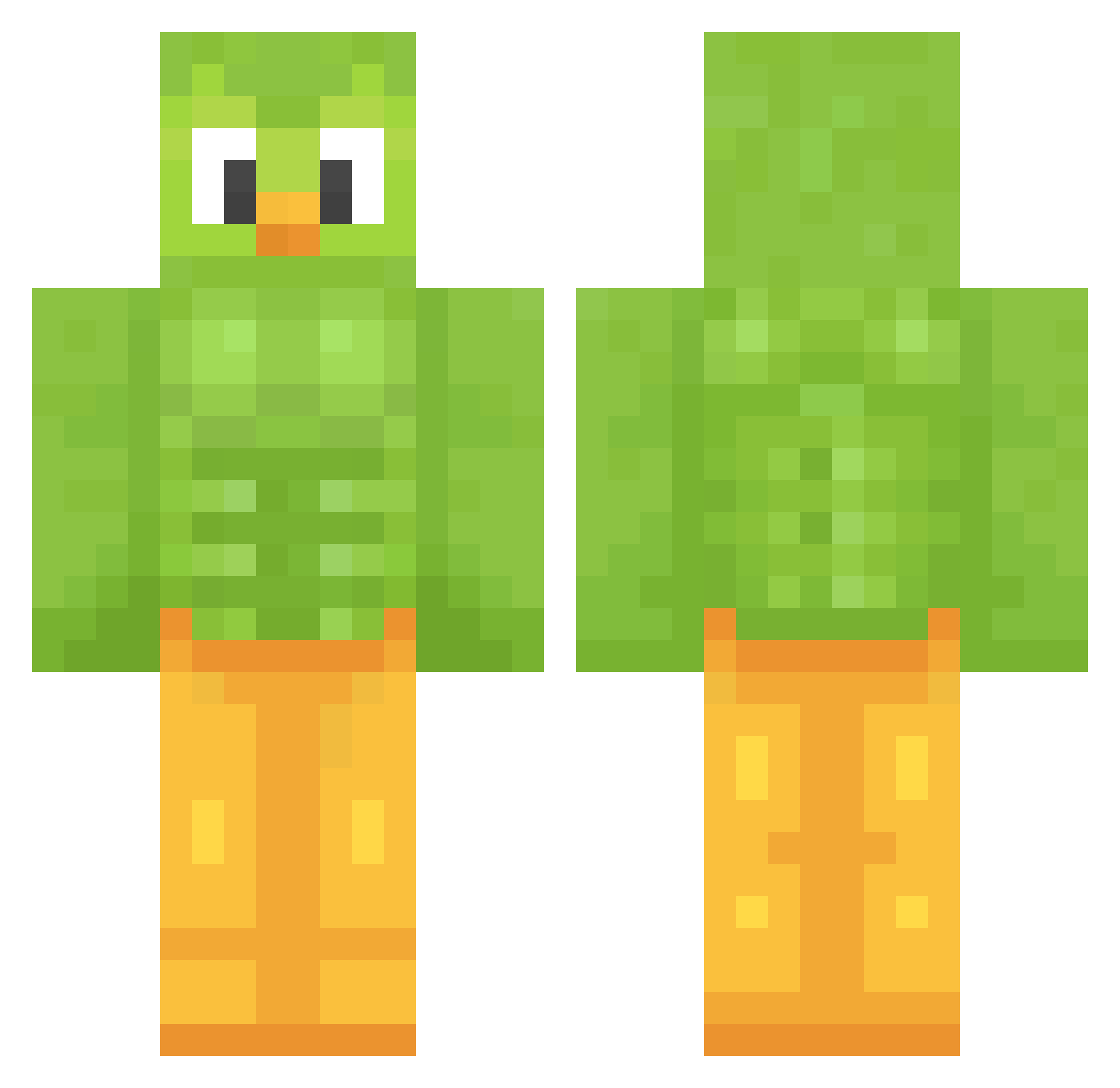
Other players with this skin (1209)
Ahja420 was the 319th player we have seen with this skin, first spotted on 19.08.2026. The same skin was seen on these players. Open a nickname to see their current skin and skin history.
 Rei_vax ayyben Hutaba28
 ZESTOFDAWEST TwoBasic CheetahGamerYT VineGirll endacat0224 MLGxaverPVP Garff18 TOASTEHAM SJL_IS_AWESOME MaddogMONEY352 Tusiekv2 Poseidon42214221 Swifty2444 gunuser42 worrrrd Novargin DrGanzo AndyGaming76 Holika Tartarossa420 milkb4cereal2128 Calitos666 WfhKing byggarenbob634 honzicek202553 gina_colada rhihaha elvo51 ImOverHeaven CatisaOrsilla Eddyroxta
 emimisita Lauber66 yukiakamishi93 katelynoak Nxkat CrunchyLegend soopertoona DualStorm teavg Meeads Azkard Bot202 ForrestSkull 0rgasmegutten69 LankyLettuce
 N_Dion Erii004 Crickets_Man MJonny4 DonutDude5253 Kn3pper menove Squinzy04 jeen16 A_Doppelganger GreedieZ
More Duo Minecraft skins
How to install the Ahja420 skin
- Press the Download button above to save the skin as a PNG file.
- Minecraft: Bedrock Edition (PE): open the Dressing Room from the main menu (or tap your character → Edit Character), go to Classic Skins → Owned, press the + (new skin) button, choose the downloaded PNG and pick the Classic (Steve) model. Works on PC and mobile; consoles cannot import custom skins.
- Minecraft: Java Edition: open the Minecraft Launcher, go to the Skins tab, click New Skin, load the PNG, pick the Classic (Steve) model and press Save & Use. You can also upload it at minecraft.net → Profile → Change Skin.
The skin does not show up after import - what should I do?
Restart Minecraft and open the Dressing Room again - imported skins sometimes appear only after a restart. Also make sure you selected the imported skin and picked the Classic (Steve) model.
Which model should I choose, Classic or Slim?
This skin is designed for the Classic (Steve) model. If you pick the wrong model, the arms of the skin will look stretched or squeezed.
Is the skin of Ahja420 free to download?
Yes. Press Download, save the PNG file and use it in Minecraft: Bedrock Edition or Java Edition - no payment or registration needed. The skin also works on multiplayer servers and Realms.
More skins
Looking for more? Go back to all Minecraft skins and check the top skins of the week, month and all time, or find any player's skin by nickname.