
AfroDwarf211 - Minecraft Skins & Skin History
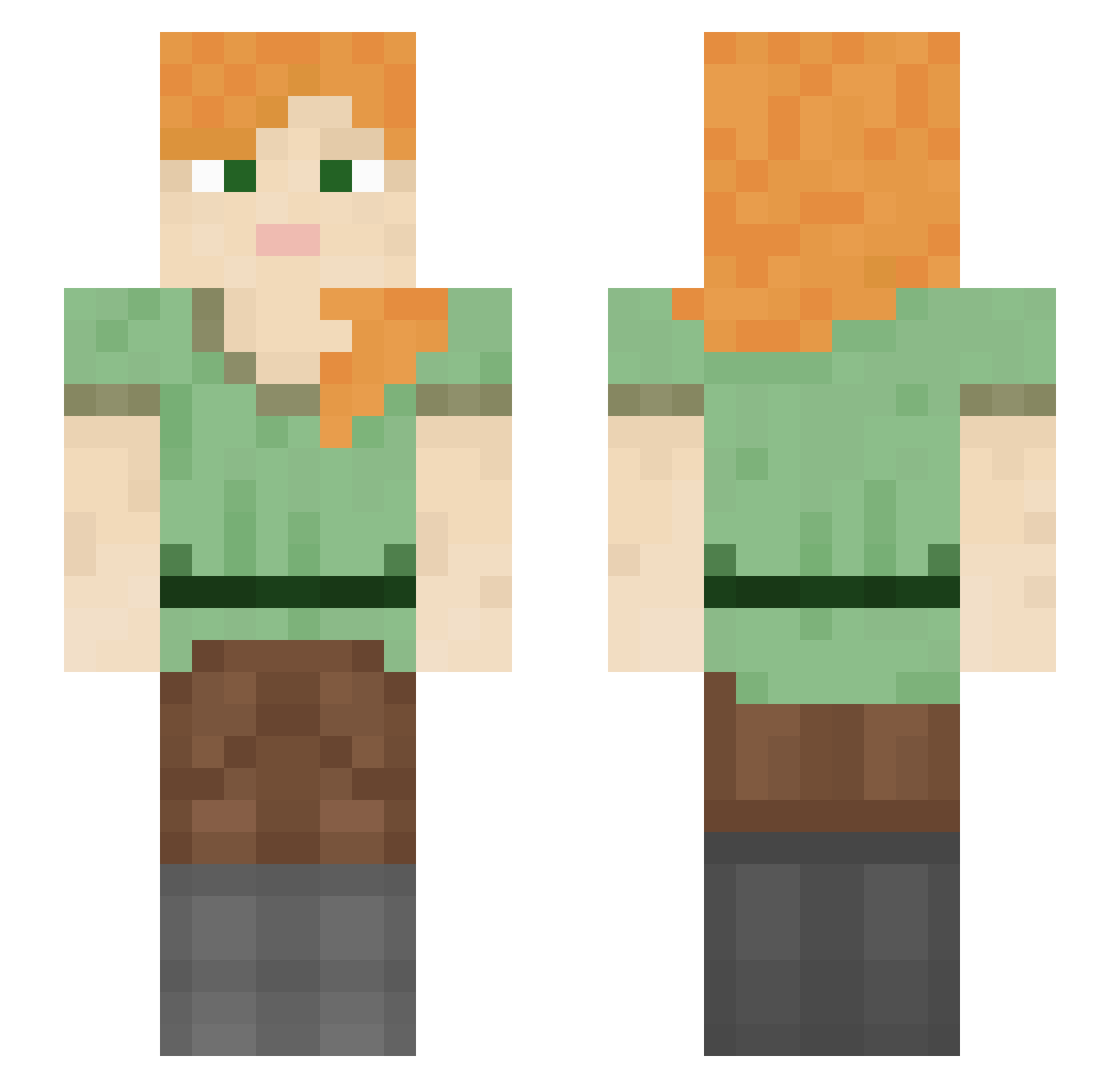
Current Minecraft skin of the player AfroDwarf211, loaded from the official Mojang API. Rotate the 3D model with your mouse or finger, then download the skin as a PNG file and use it in Minecraft: Bedrock Edition or Java Edition for free. When AfroDwarf211 changes their skin, this page updates automatically and the old skin stays in the history below.
Other players with this skin (1053)
AfroDwarf211 was the 92nd player we have seen with this skin, first spotted on 02.08.2026. The same skin was seen on these players. Open a nickname to see their current skin and skin history.
 beretta2013 StackHeap RonReiger SweetSageE pigpug_ bibizinh joeylistar12345 grandma1025 jociecxx protoplasmatic lizhiyyds DizzyDreamzDie Fl0ckaa Lmurpht Blitzerzz FrankGrin90 mel095 sfas_32 Pythonize Auruno yanloo97 amuguna XxMisticoxX Alicia botwars Sim3traa 230Amelia Nickeled mcterminator1442 Lame_Prince icefre894 070908 ammono Nvexx akaStatz 666OCEAN artexz0 Techno_Gypzi CR7MENTALITET GodAmongGods Asnip sdythmh Vinyavok Vorticella DaChazzy TheGrap3OfSpades adkqx_pvp Borderies Xx_steal_xX afamousdadjoke bravesfan14 jennydeathh STaSHeS spilth doctor_coconut Kukuruku Sofer Manolehackon Associated ma47
How to install the AfroDwarf211 skin
- Press the Download button above to save the skin as a PNG file.
- Minecraft: Bedrock Edition (PE): open the Dressing Room from the main menu (or tap your character → Edit Character), go to Classic Skins → Owned, press the + (new skin) button, choose the downloaded PNG and pick the Slim (Alex) model. Works on PC and mobile; consoles cannot import custom skins.
- Minecraft: Java Edition: open the Minecraft Launcher, go to the Skins tab, click New Skin, load the PNG, pick the Slim (Alex) model and press Save & Use. You can also upload it at minecraft.net → Profile → Change Skin.
The skin does not show up after import - what should I do?
Restart Minecraft and open the Dressing Room again - imported skins sometimes appear only after a restart. Also make sure you selected the imported skin and picked the Slim (Alex) model.
Which model should I choose, Classic or Slim?
This skin is designed for the Slim (Alex) model. If you pick the wrong model, the arms of the skin will look stretched or squeezed.
Is the skin of AfroDwarf211 free to download?
Yes. Press Download, save the PNG file and use it in Minecraft: Bedrock Edition or Java Edition - no payment or registration needed. The skin also works on multiplayer servers and Realms.
More skins
Looking for more? Go back to all Minecraft skins and check the top skins of the week, month and all time, or find any player's skin by nickname.