
AdXnis_1023 - Minecraft Skins & Skin History
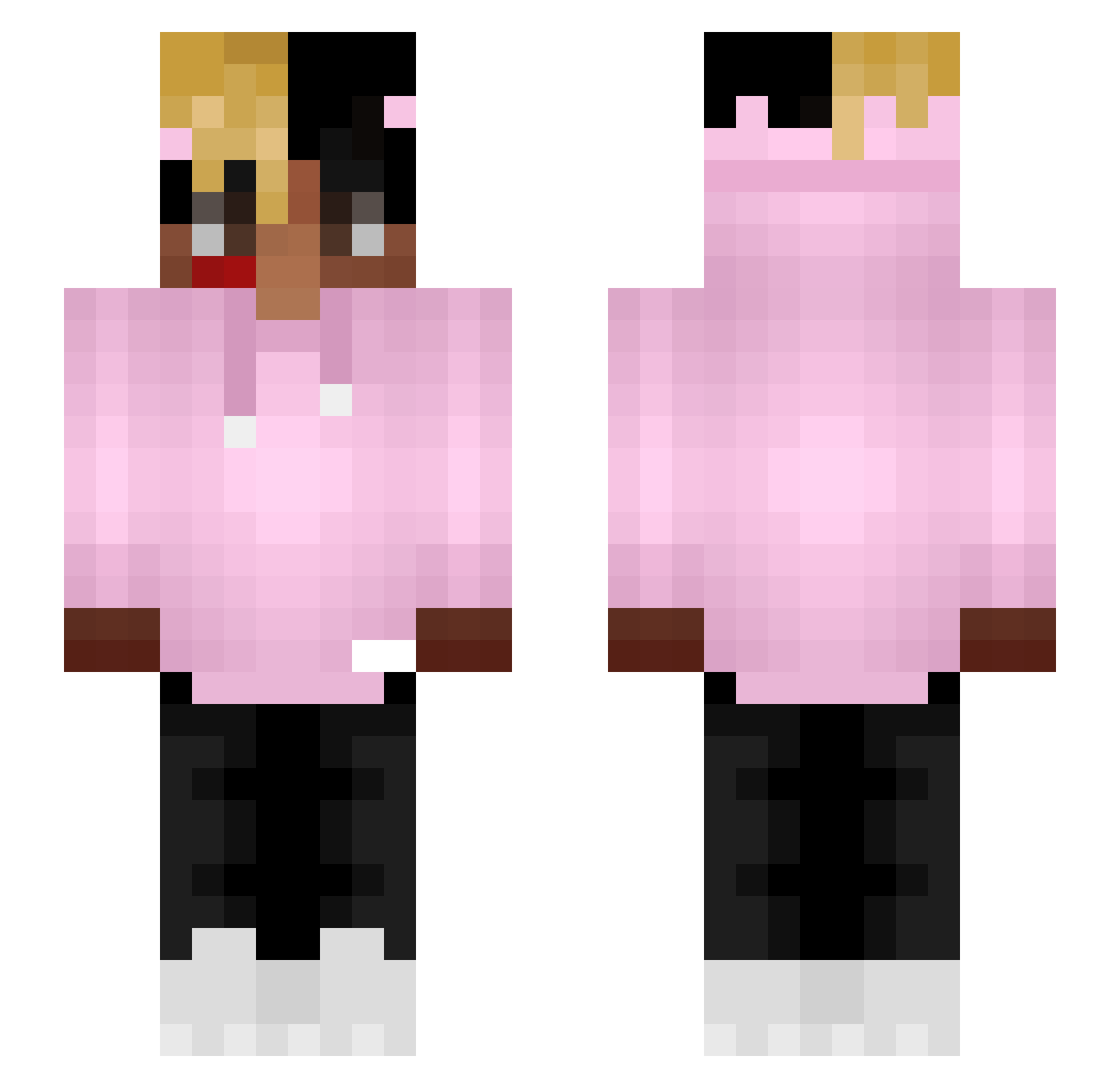
Current Minecraft skin of the player AdXnis_1023, loaded from the official Mojang API. Rotate the 3D model with your mouse or finger, then download the skin as a PNG file and use it in Minecraft: Bedrock Edition or Java Edition for free. When AdXnis_1023 changes their skin, this page updates automatically and the old skin stays in the history below.
Other players with this skin (69)
AdXnis_1023 was the 36th player we have seen with this skin, first spotted on 02.10.2026. The same skin was seen on these players. Open a nickname to see their current skin and skin history.
 Shaygui LIL_EM_ mr_goof05 JMountain26 Kanekiix TryHardVogel Rid789 Asdeshka RocketWuff BancBoulah Jqmr coleandre CULLZY Disturbia101 Clivious BluedogX Shpana jacobjva61 Adoomah AyyLmao32 SiegAfghanistan SendStreaks gutsy_xd ixta70 Gekyume__0nfroy yunglemon HitzLikeAlex brandonger_ 7yler23 SeanRL Mr_Mainjor Oufit xVeniix_HD Minecraft_bot1 xQc0W Monsieur_Jeune Blaszka2115 PingSlinga420 OwenMurray7 tacnyan14 skybc Rak427 oskull196 Cheques Endpaper strefkaaa_eZik KubaMalordy Kizohk_jar nicksfield Kudzxii gamedestroyer333 xDixie JahTypeBeat luigikw Sphanks TKSavage4 Sr_Shadow_Knight YebacDisa Bvki IBPS
More Xxxtentacion Minecraft skins
See all 407 Xxxtentacion skins
How to install the AdXnis_1023 skin
- Press the Download button above to save the skin as a PNG file.
- Minecraft: Bedrock Edition (PE): open the Dressing Room from the main menu (or tap your character → Edit Character), go to Classic Skins → Owned, press the + (new skin) button, choose the downloaded PNG and pick the Slim (Alex) model. Works on PC and mobile; consoles cannot import custom skins.
- Minecraft: Java Edition: open the Minecraft Launcher, go to the Skins tab, click New Skin, load the PNG, pick the Slim (Alex) model and press Save & Use. You can also upload it at minecraft.net → Profile → Change Skin.
The skin does not show up after import - what should I do?
Restart Minecraft and open the Dressing Room again - imported skins sometimes appear only after a restart. Also make sure you selected the imported skin and picked the Slim (Alex) model.
Which model should I choose, Classic or Slim?
This skin is designed for the Slim (Alex) model. If you pick the wrong model, the arms of the skin will look stretched or squeezed.
Is the skin of AdXnis_1023 free to download?
Yes. Press Download, save the PNG file and use it in Minecraft: Bedrock Edition or Java Edition - no payment or registration needed. The skin also works on multiplayer servers and Realms.
More skins
Looking for more? Go back to all Minecraft skins and check the top skins of the week, month and all time, or find any player's skin by nickname.