
AbsentMassive843 - Minecraft Skins & Skin History
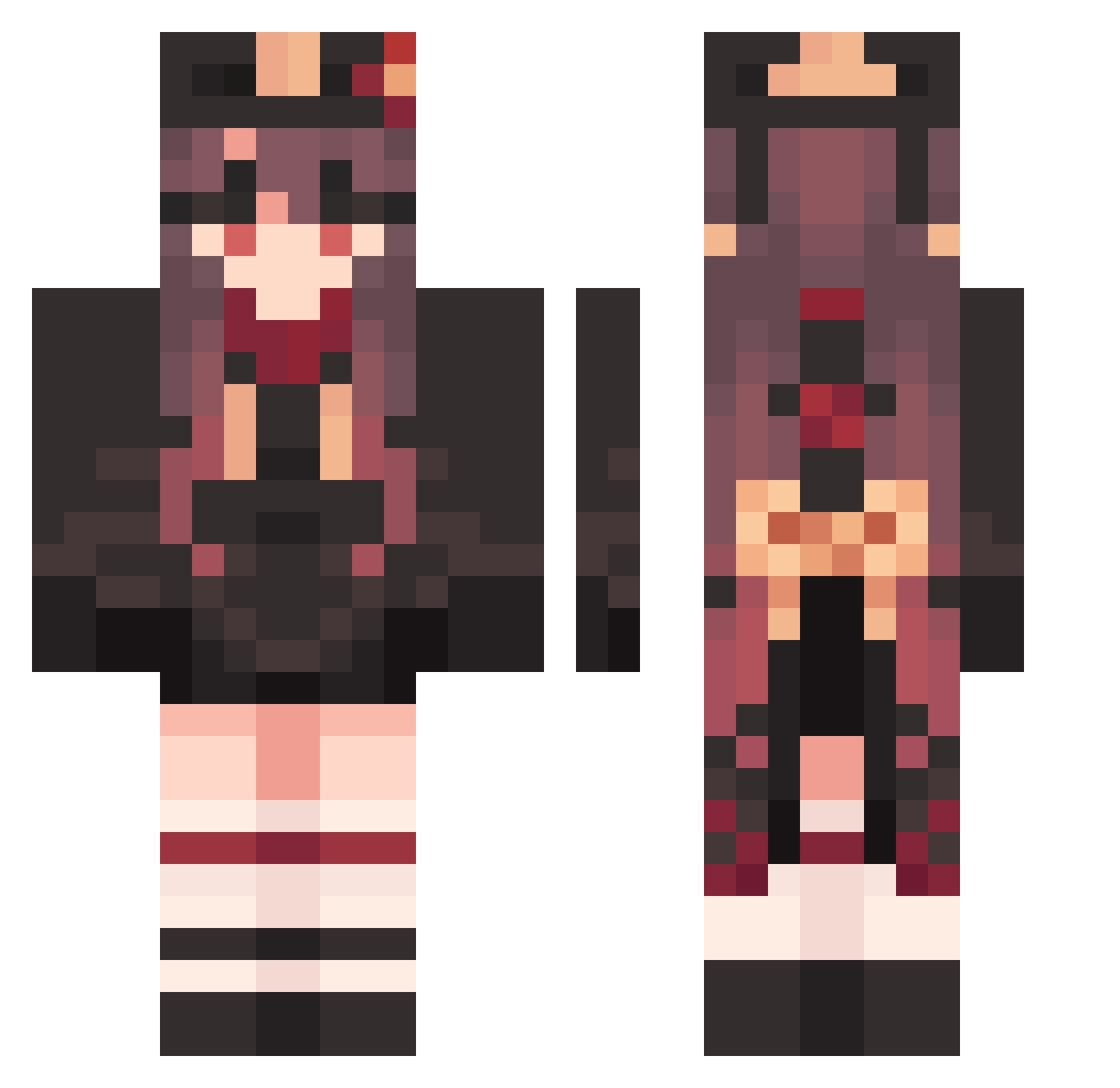
Current Minecraft skin of the player AbsentMassive843, loaded from the official Mojang API. Rotate the 3D model with your mouse or finger, then download the skin as a PNG file and use it in Minecraft: Bedrock Edition or Java Edition for free. When AbsentMassive843 changes their skin, this page updates automatically and the old skin stays in the history below.
Other players with this skin (1585)
AbsentMassive843 was the 1474th player we have seen with this skin, first spotted on 30.10.2026. The same skin was seen on these players. Open a nickname to see their current skin and skin history.
 popore6420 caketiramisuuu EconomicElite469 StraightBrief701 KRVAANYAD07 StingyPanicky416 MeaslyAmazing502 Hunter_Junior furitao Hutao_iHx398 XiaoGaolen Acl01 Hutao_xiMgyjL742 DevilishBrief491 tOE963 Pxep9 Hutao_DjiwSzz757 Hutao_wacBqBy391 Hutao_JQjfgah110 Futz12 nong_arm Hutao_TdliVGJ869 Hutao_rGfYwKo631 Hutao_MjYWsaT125 Hutao_WEevWof156 Ykn529 snowmimi00 Hutao_RvgtgVl558 LeahTheSeaborn tumamist FuzzyAwesome15 LyingVenomous840 Hutao_uJHEqns809 SP_esbit MapleFlowers Hanhanya1234 Hutao_pTtUNBn828 Hutao_aoadaCA122 ExultantShut749 Hutao_CbmoKbA345 chamomile258 BrainyUptight941 Dashy DeadFurry91 FertileWatery866 BrashDramatic943 Lead2one Hutao_aJRVfJS232 HappyHorrible233 Hutao_yDrnzJn674 h_romm McJiaxuan ScatteredSlow391 ImportedSalty498 ApollonNike Hutao_EXc369 Juliafofa SupremeHurt510 PoisedNimble255 MadlyPiquant58
More Hu Tao Minecraft skins
How to install the AbsentMassive843 skin
- Press the Download button above to save the skin as a PNG file.
- Minecraft: Bedrock Edition (PE): open the Dressing Room from the main menu (or tap your character → Edit Character), go to Classic Skins → Owned, press the + (new skin) button, choose the downloaded PNG and pick the Classic (Steve) model. Works on PC and mobile; consoles cannot import custom skins.
- Minecraft: Java Edition: open the Minecraft Launcher, go to the Skins tab, click New Skin, load the PNG, pick the Classic (Steve) model and press Save & Use. You can also upload it at minecraft.net → Profile → Change Skin.
The skin does not show up after import - what should I do?
Restart Minecraft and open the Dressing Room again - imported skins sometimes appear only after a restart. Also make sure you selected the imported skin and picked the Classic (Steve) model.
Which model should I choose, Classic or Slim?
This skin is designed for the Classic (Steve) model. If you pick the wrong model, the arms of the skin will look stretched or squeezed.
Is the skin of AbsentMassive843 free to download?
Yes. Press Download, save the PNG file and use it in Minecraft: Bedrock Edition or Java Edition - no payment or registration needed. The skin also works on multiplayer servers and Realms.
More skins
Looking for more? Go back to all Minecraft skins and check the top skins of the week, month and all time, or find any player's skin by nickname.