
Abeny_yt - Minecraft Skins & Skin History
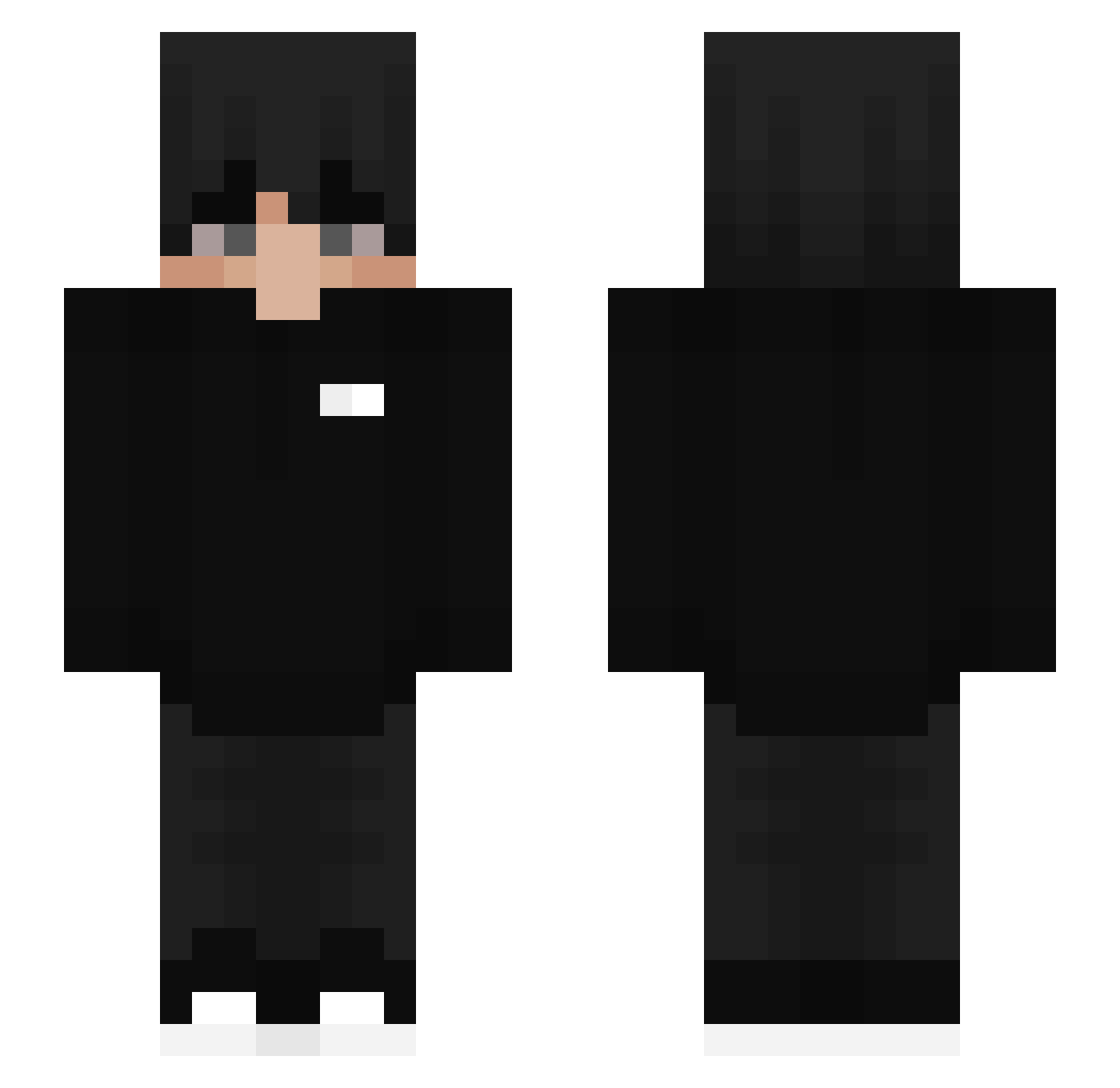
Current Minecraft skin of the player Abeny_yt, loaded from the official Mojang API. Rotate the 3D model with your mouse or finger, then download the skin as a PNG file and use it in Minecraft: Bedrock Edition or Java Edition for free. When Abeny_yt changes their skin, this page updates automatically and the old skin stays in the history below.
Other players with this skin (453)
Abeny_yt was the 383rd player we have seen with this skin, first spotted on 20.10.2026. The same skin was seen on these players. Open a nickname to see their current skin and skin history.
 SheLoveNic FantasmaGaspar jjpro100 WarriorVivek ArtsSyy Yojie pedro0106 Khoainho connor_mcquillan rsac0 Crucificial TmL_Ghosth AlaqmarKapasi65 ArticKar jvjke V0LKIMES Mystiks_Sn0w benb123456 JustWolfyCZ WXCH16 Unki Krutongmacka AprilSecond Kiku4089 _ampp OceanLore Cassiiian xer345 Marco11Damian RoyaL_YT xHoouty_ Ghostyk69 uiddd sheroX28 AmarLifter Feifoxtrot Qixey theshy7 Brooks1 zRyuku Kopany7331 _Qeleran_ xfouR_1337 xea6554 Rasseyanniy AkumaTom Trmv iSxnTx vSweaZy_1 s3bz03 Bkettell6 EkremTheLegit_ themxrcel Jona1590 ByDannyyy Huzzyy8544 ToniMaster0809 _Stenes_ BDLGabi yxize
How to install the Abeny_yt skin
- Press the Download button above to save the skin as a PNG file.
- Minecraft: Bedrock Edition (PE): open the Dressing Room from the main menu (or tap your character → Edit Character), go to Classic Skins → Owned, press the + (new skin) button, choose the downloaded PNG and pick the Slim (Alex) model. Works on PC and mobile; consoles cannot import custom skins.
- Minecraft: Java Edition: open the Minecraft Launcher, go to the Skins tab, click New Skin, load the PNG, pick the Slim (Alex) model and press Save & Use. You can also upload it at minecraft.net → Profile → Change Skin.
The skin does not show up after import - what should I do?
Restart Minecraft and open the Dressing Room again - imported skins sometimes appear only after a restart. Also make sure you selected the imported skin and picked the Slim (Alex) model.
Which model should I choose, Classic or Slim?
This skin is designed for the Slim (Alex) model. If you pick the wrong model, the arms of the skin will look stretched or squeezed.
Is the skin of Abeny_yt free to download?
Yes. Press Download, save the PNG file and use it in Minecraft: Bedrock Edition or Java Edition - no payment or registration needed. The skin also works on multiplayer servers and Realms.
More skins
Looking for more? Go back to all Minecraft skins and check the top skins of the week, month and all time, or find any player's skin by nickname.