
ATN51 - Minecraft Skins & Skin History
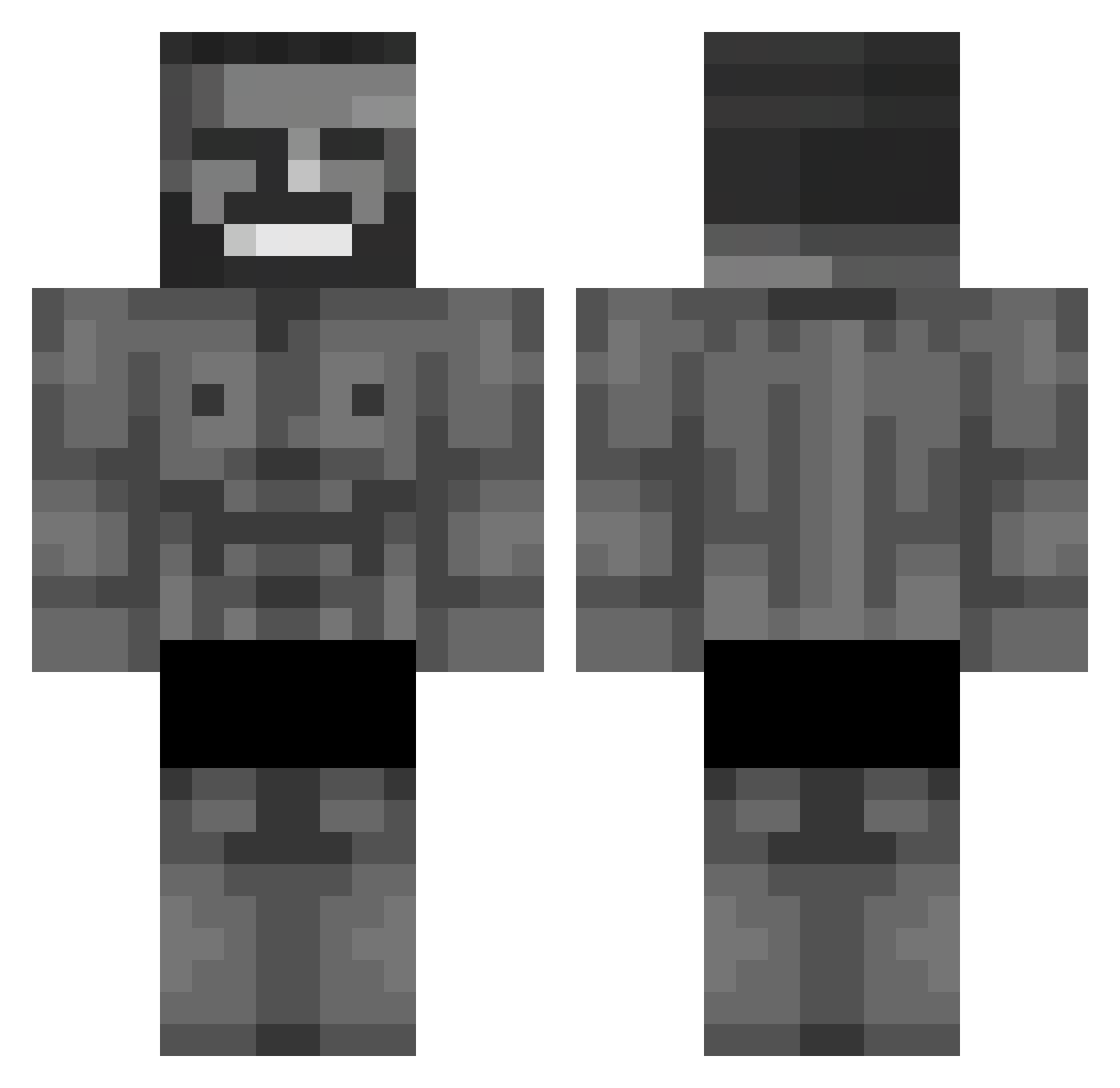
Current Minecraft skin of the player ATN51, loaded from the official Mojang API. Rotate the 3D model with your mouse or finger, then download the skin as a PNG file and use it in Minecraft: Bedrock Edition or Java Edition for free. When ATN51 changes their skin, this page updates automatically and the old skin stays in the history below.
Other players with this skin (652)
ATN51 was the 28th player we have seen with this skin, first spotted on 27.07.2026. The same skin was seen on these players. Open a nickname to see their current skin and skin history.
 Bledar_Nordique SantaBaIIz Oletrike MoisAbi LT_RxN TutoriaLs131 5metercuc Dplay_Gaming Canelaum mozver donPolllo Herohero53 Beliar1825 _MrReaperChanel_ tolga01 knife_noodle Jotavi VEAPONT wawamalak2323 zNarb Bonklz mstfmstf KeremZZ mrfrapper XXd132
 kyvext5 Cisco99 Acr0n__ killer449 holo61 SubZero1212 etwok Skool_Trooper zibikdlxs Darknight313131
 Kaan_12 Toha98 Bartoleo_5321 YarikLOVE04 _Zolt_ shun38300 Miniroyal2 Ignator_ Saetta__ k1r1ll11 Denis88888 BigDaddyD1507 FemboyPazarlayan Olektrombobolek Uzlet youngmasher Polako1 thelordoflegends Pants_On Seaburgh KasliKaan Negrillo69 Fibrion Sleepwather hak33
More Gigachad Minecraft skins
How to install the ATN51 skin
- Press the Download button above to save the skin as a PNG file.
- Minecraft: Bedrock Edition (PE): open the Dressing Room from the main menu (or tap your character → Edit Character), go to Classic Skins → Owned, press the + (new skin) button, choose the downloaded PNG and pick the Classic (Steve) model. Works on PC and mobile; consoles cannot import custom skins.
- Minecraft: Java Edition: open the Minecraft Launcher, go to the Skins tab, click New Skin, load the PNG, pick the Classic (Steve) model and press Save & Use. You can also upload it at minecraft.net → Profile → Change Skin.
The skin does not show up after import - what should I do?
Restart Minecraft and open the Dressing Room again - imported skins sometimes appear only after a restart. Also make sure you selected the imported skin and picked the Classic (Steve) model.
Which model should I choose, Classic or Slim?
This skin is designed for the Classic (Steve) model. If you pick the wrong model, the arms of the skin will look stretched or squeezed.
Is the skin of ATN51 free to download?
Yes. Press Download, save the PNG file and use it in Minecraft: Bedrock Edition or Java Edition - no payment or registration needed. The skin also works on multiplayer servers and Realms.
More skins
Looking for more? Go back to all Minecraft skins and check the top skins of the week, month and all time, or find any player's skin by nickname.