
ASDFGH12345678 - Minecraft Skins & Skin History
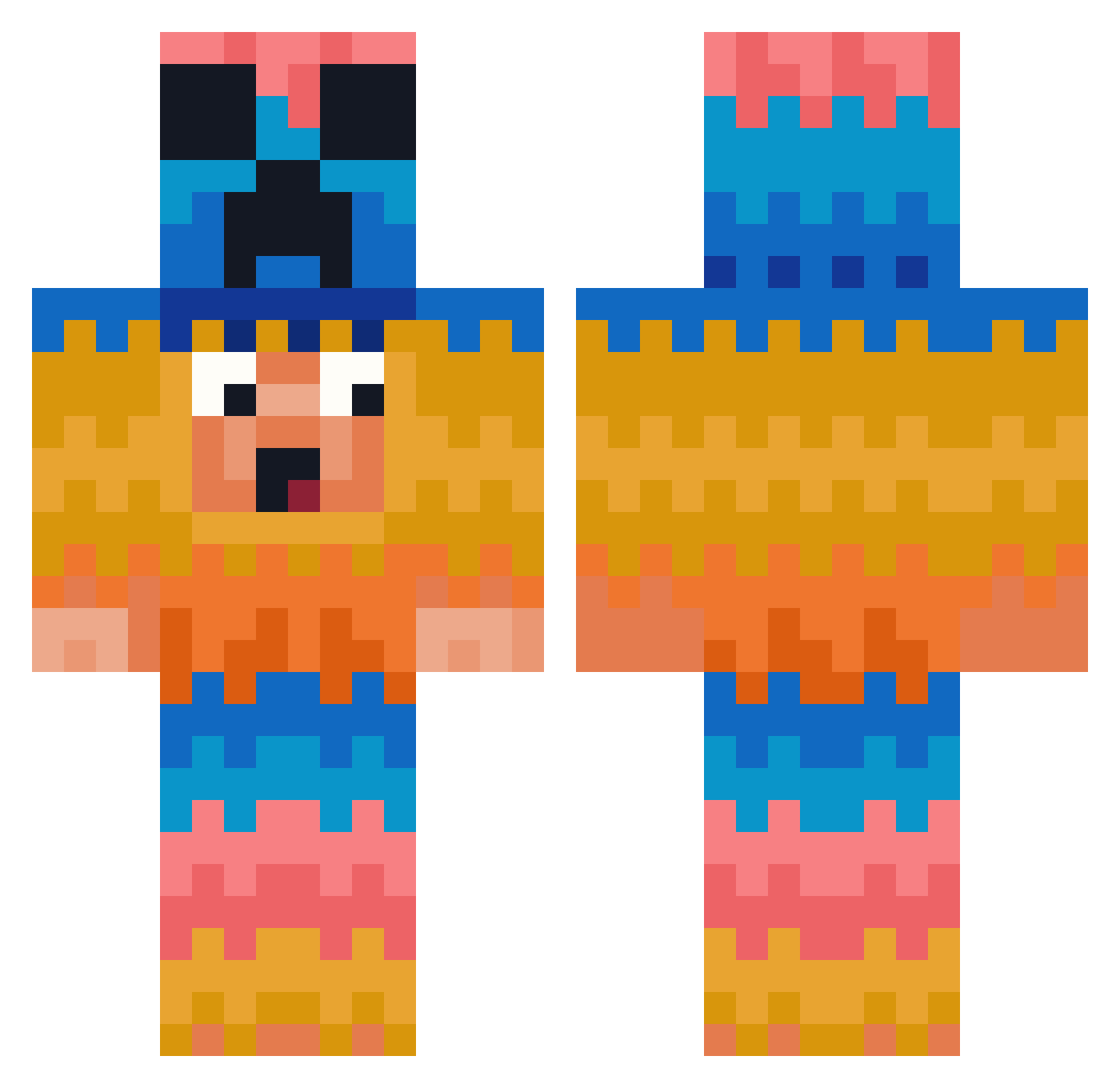
Current Minecraft skin of the player ASDFGH12345678, loaded from the official Mojang API. Rotate the 3D model with your mouse or finger, then download the skin as a PNG file and use it in Minecraft: Bedrock Edition or Java Edition for free. When ASDFGH12345678 changes their skin, this page updates automatically and the old skin stays in the history below.
Other players with this skin (381)
ASDFGH12345678 was the 297th player we have seen with this skin, first spotted on 11.10.2026. The same skin was seen on these players. Open a nickname to see their current skin and skin history.
 boldgaint Treverthegamer Jezziwz SuperCarA380 droguepot ivv22he XD_pLays von_Thron MaxOG12 dinis31 Rayan272010 xbizzx Allenmonkey16 labadada JBAJBA ReturnOfTheMare LittleSawce Fabo_D Chirkaja Rafus2 Lorix999 areg0 IsdaMailMan GunnartheGoat Recoil7211 sadoyol megumbunter69 lords300 X_40 GiveCookieOrDie Marcello27 fa_matt DaPro819 coolclubvr PhilippBe97 JIO1504 BrokenBolt susdfcveuysdjh Jiazuo SoyElJuan TTVTHECHIP Faehmi melandalan minecraft_delisi MikeShark 2araN Spaketi UnreaLR1V3RZ69 desimondo _1_M Lamayata1 SimplyBray SpooksMyBoy ukst1 nyhq6061 SmartBurrito190 Abbe2015 Dziura21 LodosWar greyrags1
More Pinata Minecraft skins
How to install the ASDFGH12345678 skin
- Press the Download button above to save the skin as a PNG file.
- Minecraft: Bedrock Edition (PE): open the Dressing Room from the main menu (or tap your character → Edit Character), go to Classic Skins → Owned, press the + (new skin) button, choose the downloaded PNG and pick the Classic (Steve) model. Works on PC and mobile; consoles cannot import custom skins.
- Minecraft: Java Edition: open the Minecraft Launcher, go to the Skins tab, click New Skin, load the PNG, pick the Classic (Steve) model and press Save & Use. You can also upload it at minecraft.net → Profile → Change Skin.
The skin does not show up after import - what should I do?
Restart Minecraft and open the Dressing Room again - imported skins sometimes appear only after a restart. Also make sure you selected the imported skin and picked the Classic (Steve) model.
Which model should I choose, Classic or Slim?
This skin is designed for the Classic (Steve) model. If you pick the wrong model, the arms of the skin will look stretched or squeezed.
Is the skin of ASDFGH12345678 free to download?
Yes. Press Download, save the PNG file and use it in Minecraft: Bedrock Edition or Java Edition - no payment or registration needed. The skin also works on multiplayer servers and Realms.
More skins
Looking for more? Go back to all Minecraft skins and check the top skins of the week, month and all time, or find any player's skin by nickname.