
ADRENALINE_RAPH - Minecraft Skins & Skin History
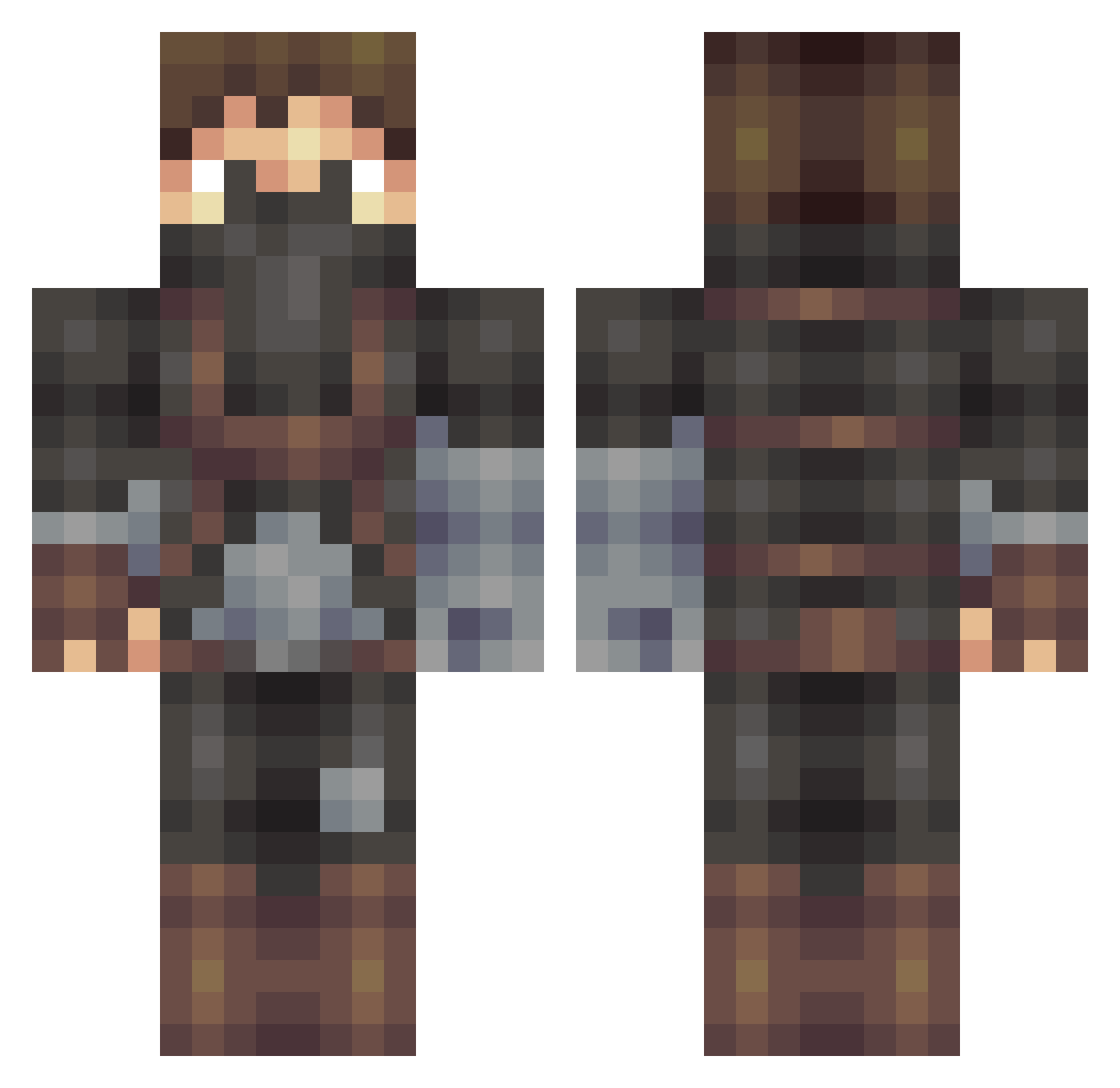
Current Minecraft skin of the player ADRENALINE_RAPH, loaded from the official Mojang API. Rotate the 3D model with your mouse or finger, then download the skin as a PNG file and use it in Minecraft: Bedrock Edition or Java Edition for free. When ADRENALINE_RAPH changes their skin, this page updates automatically and the old skin stays in the history below.
Other players with this skin (407)
ADRENALINE_RAPH was the 207th player we have seen with this skin, first spotted on 18.09.2026. The same skin was seen on these players. Open a nickname to see their current skin and skin history.
 SOKANARU I_Feliks_I Qhard1 snowfoxrose Redily498 Andyfus plague60 MrSimley RPLzer Sun660 Valdeuden Josueeh Night_Wolff84 Zenhya Acepunch bixr77 UnDeadX75 MicahWazowskiiii SoBoss1995 RozzieRozborn ColdWindy jacobthewild Avery_ny zetorista AfroThunder750 Yoo_Dew Dramlar Lonewarrior1 Brandon1heat RUSH11 p3muni0 mateus_brito 2f45t mathieuchoquette PestoNudeln wesleywher _zamu_ Komakazee Halfclick KEKER2 Voesi 28dz Cpt_Shadovv Dodders13 OasisBro skyfighter11234 Oscar114514 lucaru DISAR17 JokoFiskare CheEzy112 dannyvokje Mattzzi Ksaturn Velfury MisterBaars Haenks LeuksteTrioThijs GruffBasil WexarTC
More Rogue Minecraft skins
How to install the ADRENALINE_RAPH skin
- Press the Download button above to save the skin as a PNG file.
- Minecraft: Bedrock Edition (PE): open the Dressing Room from the main menu (or tap your character → Edit Character), go to Classic Skins → Owned, press the + (new skin) button, choose the downloaded PNG and pick the Classic (Steve) model. Works on PC and mobile; consoles cannot import custom skins.
- Minecraft: Java Edition: open the Minecraft Launcher, go to the Skins tab, click New Skin, load the PNG, pick the Classic (Steve) model and press Save & Use. You can also upload it at minecraft.net → Profile → Change Skin.
The skin does not show up after import - what should I do?
Restart Minecraft and open the Dressing Room again - imported skins sometimes appear only after a restart. Also make sure you selected the imported skin and picked the Classic (Steve) model.
Which model should I choose, Classic or Slim?
This skin is designed for the Classic (Steve) model. If you pick the wrong model, the arms of the skin will look stretched or squeezed.
Is the skin of ADRENALINE_RAPH free to download?
Yes. Press Download, save the PNG file and use it in Minecraft: Bedrock Edition or Java Edition - no payment or registration needed. The skin also works on multiplayer servers and Realms.
More skins
Looking for more? Go back to all Minecraft skins and check the top skins of the week, month and all time, or find any player's skin by nickname.