
99668 - Minecraft Skins & Skin History
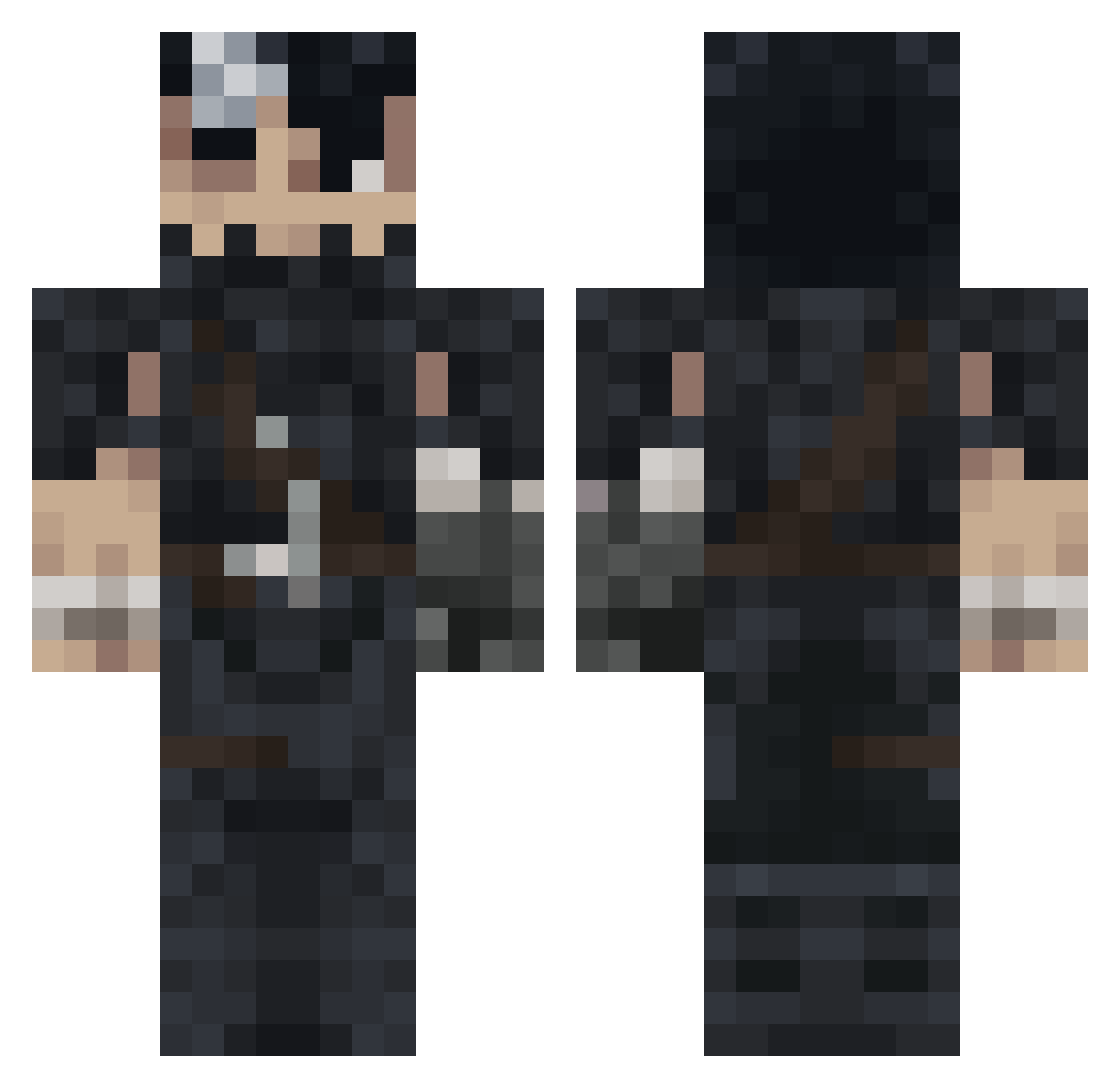
Current Minecraft skin of the player 99668, loaded from the official Mojang API. Rotate the 3D model with your mouse or finger, then download the skin as a PNG file and use it in Minecraft: Bedrock Edition or Java Edition for free. When 99668 changes their skin, this page updates automatically and the old skin stays in the history below.
Other players with this skin (993)
99668 was the 376th player we have seen with this skin, first spotted on 03.09.2026. The same skin was seen on these players. Open a nickname to see their current skin and skin history.
 qasop DanchoBerserk Chechomeister Adamexo fiM0 Bicoutrius LuhTwinkyBoy Leuuum HugoKaneki Darkal29 Dehram FinnTheHasty Wyald144hz TwiztedBeeznezz Vertuta Rois0209 narkim_ SpaceMiner555 JambonBeurre_1 Yera_20 Tapochki AngelWax zaladitaa Vegas1322 TetelinoBR HyDroy__ Dondoulol DaamAdam msttsI3 KimRoble Hxgas leodublaje KanocBerserk G0rilla02 FeelDiPump F0malhautt Yupipapo xpancake_ Marlques Fozzu BaysangurBorz Jijithosaure bavisbra Booker986 HurricanePollo TITI7267 Neithan_w Yimboking sarcqstick_69 sixtyblessings Amsizzle AP364 fcxd27 Pery18 NilsHolgg armyarmyarmy jusilver67 Hoklat01 ehabmuhammed airqqq
More Guts Minecraft skins
How to install the 99668 skin
- Press the Download button above to save the skin as a PNG file.
- Minecraft: Bedrock Edition (PE): open the Dressing Room from the main menu (or tap your character → Edit Character), go to Classic Skins → Owned, press the + (new skin) button, choose the downloaded PNG and pick the Classic (Steve) model. Works on PC and mobile; consoles cannot import custom skins.
- Minecraft: Java Edition: open the Minecraft Launcher, go to the Skins tab, click New Skin, load the PNG, pick the Classic (Steve) model and press Save & Use. You can also upload it at minecraft.net → Profile → Change Skin.
The skin does not show up after import - what should I do?
Restart Minecraft and open the Dressing Room again - imported skins sometimes appear only after a restart. Also make sure you selected the imported skin and picked the Classic (Steve) model.
Which model should I choose, Classic or Slim?
This skin is designed for the Classic (Steve) model. If you pick the wrong model, the arms of the skin will look stretched or squeezed.
Is the skin of 99668 free to download?
Yes. Press Download, save the PNG file and use it in Minecraft: Bedrock Edition or Java Edition - no payment or registration needed. The skin also works on multiplayer servers and Realms.
More skins
Looking for more? Go back to all Minecraft skins and check the top skins of the week, month and all time, or find any player's skin by nickname.